Your Local Services Ads account is about to move, and the email from Google reads like a lot changes at once. Most of it is plumbing behind the walls. A few pieces can cost you money or leads if you do nothing: your old reports, your bidding, your budget math and your callouts. Here is what changes, what stays, and what to do before and after your migration date.
The Short Answer
Google is moving Local Services Ads out of their own dashboard and into Google Ads, as a Performance Max campaign with pay-per-lead goals. You still pay per lead, not per click. Your ads still show only on Google Search and Google Maps, in the same spots. Your Google Verified badge carries over, and so does your lead history. What you lose: your old performance reports, manual bidding, separate cost-per-lead targets by trade, and BBB callouts. Your weekly budget turns into a daily average. You will not pay more just because of the move, but you can lose control of cost per lead if you never open the new settings. Save your reports before the move, check five settings after it, and judge the result on cost per booked job after 30 days.
Who Moves, and When
Google's transition page in Google Ads Help lays out three phases:
- August 2026: select US home service and storefront advertisers, including plumbing, HVAC, electrical, appliance repair, house cleaning, lawn care, roofing, pest control and moving.
- Late 2026: broader groups, including service-area businesses without a storefront and accounts with custom bidding or booking setups. Most contractors who work out of a truck and a home office fall here, so this is likely your window.
- 2027: accounts outside the US and the remaining categories.
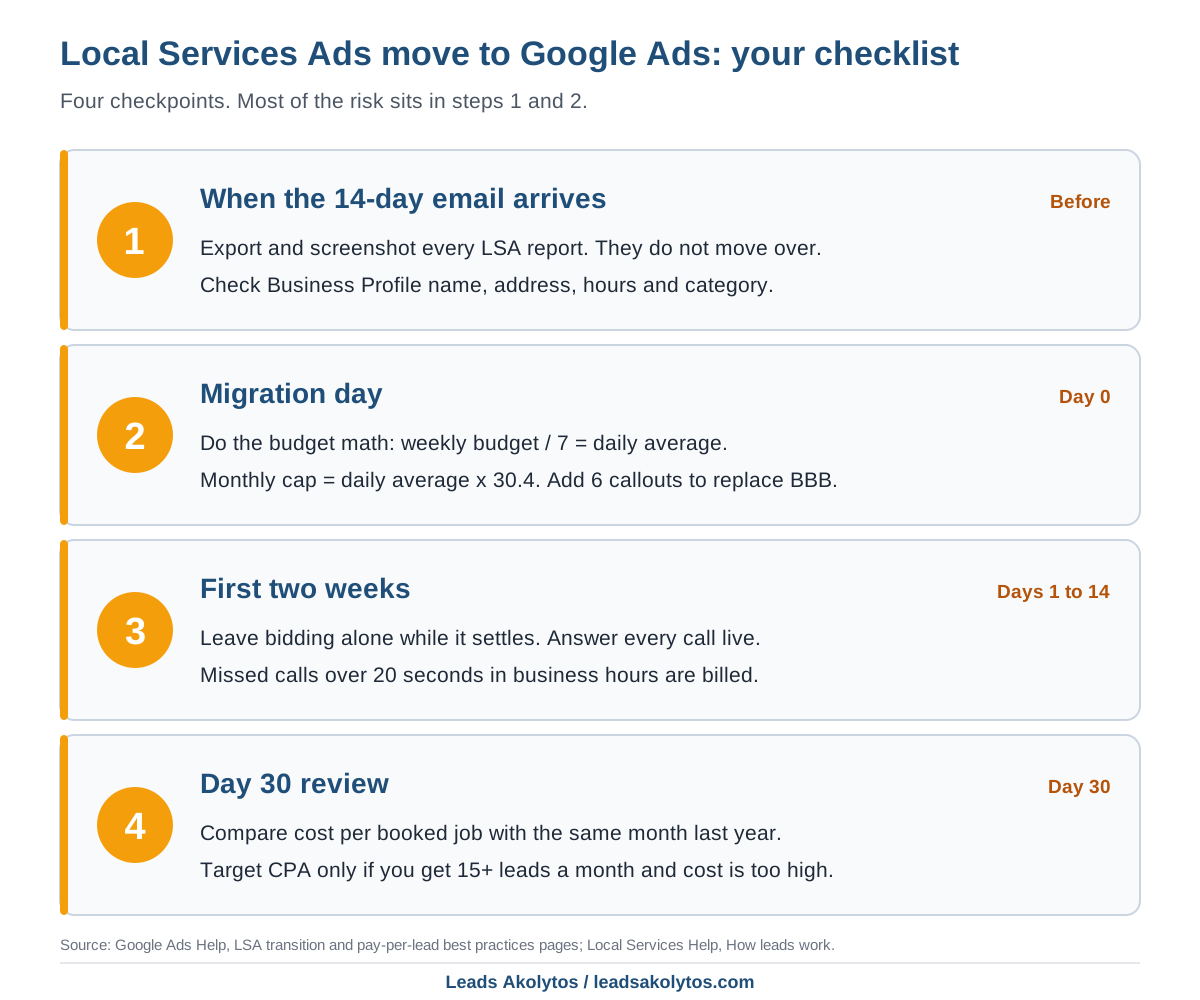
You will not be surprised by it. The account administrator gets an email 14 days before the migration date, a reminder 7 days later, banners in the dashboard, and a confirmation once it is done. If the administrator on the account is a former office manager or an old agency, fix that now. The person who gets the email is the person who gets the 14 days.
What Stays the Same
- Pay per lead. You are still charged for valid leads, such as calls, messages and booking requests, not clicks.
- Placement. Ads still run only on Search and Maps. Standard Performance Max runs across all of Google's networks; this version does not.
- No keywords. Targeting still comes from your service types and service areas.
- Your badge. Verified status and the Google Verified badge carry over. Google says insurance and license reverification are no longer required after the move, though business-level checks may still happen.
- Your lead history. Past leads, contact details, message threads and call recordings transfer.
- Your settings. Locations, service types, categories, budget limits, ad schedule and photos move over on their own.
What Changes, and What It Costs You If You Ignore It
Your old reports disappear
Google's page is blunt: your Local Services Ads performance reports will not transition to Google Ads. Impressions, clicks, spend and ad-level data from the old dashboard stay behind. That history is the only record of what a lead cost you in July versus January. Without it, you cannot tell in the spring whether the new campaign is cheaper or more expensive than last year.
- Export every report the dashboard offers, by month, as far back as it goes.
- Screenshot anything that will not export.
- Write down your cost per lead by month and by service type in one sheet.
Manual bidding and per-trade targets end
Manual bidding, such as a maximum cost per lead, goes away. So does the industry-level Target CPA, where a plumbing and HVAC shop could set one target for drain calls and another for AC repair. The new campaign uses one campaign-level Target CPA for every category.
That matters if your trades have very different job values. A $150 drain clear and a $9,000 system replacement do not deserve the same lead price. Google's transition page says you can keep separate bidding by setting up a campaign per vertical. Its developer documentation for these campaigns currently says only one Local Services Performance Max campaign is allowed per account. Those two pages do not match, so call Google's migration support line (+1-844-205-0011, weekdays 9 AM to 8 PM Eastern, per the transition page) before you plan around split campaigns.
Google's best practices for pay-per-lead goals say to keep the default Maximize Conversions bidding, and to set a Target CPA only after setup, only if the campaign gets more than 15 leads a month and your cost per lead is higher than you want. Below 15 leads a month, a target can choke delivery and lose you local auctions.
Weekly budgets become daily averages
Your weekly budget is divided by 7 to get a daily average. Monthly spend is capped at that daily average times 30.4. Some days will spend more than the average, but the month will not go over the cap. A $700 weekly budget becomes $100 a day and a monthly ceiling of $3,040. Do that math on your own budget before the move so the first invoice does not surprise you.
BBB callouts go away
BBB callouts are no longer supported. Google asks for at least six other structured callouts instead, and allows up to six per category. Pick the ones a homeowner cares about at 9 PM with water on the floor: same-day service, upfront pricing, licensed and insured, financing, warranty, family-owned. Only list what is true.
Everything lives in a new place
Budgets, bidding, locations and service types sit under Campaigns, then Settings. Photos and callouts sit under Campaigns, then Assets. Leads and call recordings sit under Goals, then Conversions, then Leads. Your business name, address and hours are edited in your Google Business Profile and sync one way into Google Ads. Big edits to the name, storefront address or primary category trigger verification and can pause the campaign for 24 to 48 hours, so do not change your primary category in the middle of the busy season.
The Billing Rule That Matters More Than the Move
The migration does not change what counts as a lead. A separate change did. Google's "How leads work" page now says an unanswered call during your business hours is charged when the caller stays on the line more than 20 seconds, voicemail or not. Business hours come from your Business Profile, and missed calls are charged only inside your active ad schedule.
- Set profile hours to the hours someone truly answers.
- Route LSA calls to a person, not a voicemail box, during those hours.
- Call back every missed lead the same day. You already paid for it.
The same page says Google reassesses charged leads over 30 days and may credit poor-quality, duplicate or invalid leads automatically, and you can still flag a bad lead through the feedback survey on that lead. Keep doing that after the move.
How to Judge Whether the New Campaign Works
Google asks you to allow up to two weeks for the migration to complete and performance to settle. Do not touch bidding in that window. After 30 days, compare against the reports you saved:
- Leads charged, cost, and cost per lead, from the Conversions, Cost and Cost/conv. columns.
- How many of those leads booked a job. Google Ads cannot see that; your FSM software or a simple lead log can.
- Cost per booked job, this month versus the same month last year.
The ceiling on what a lead is worth to you is simple: your average gross profit per job times the share of leads that book. Say a job leaves $450 after parts and labor and one lead in three books. You can pay up to $150 a lead before you lose money. Run it on your own numbers. If your cost per lead sits above that line after the two-week settling period, then a Target CPA (if you clear 15 leads a month), a tighter service area or a smaller ad schedule is the fix, not a bigger budget.
For context, LocaliQ's home services search advertising benchmarks put the average regular Google Ads cost per lead at $129.02 for plumbing and $127.74 for HVAC (April 2024 to March 2025 data). Those are click-based search ads, not Local Services Ads, but they tell you what the other option costs if you are weighing both. Our cost per lead comparison walks through the same math for SEO.
What to Do This Week
- Confirm who the account administrator is.
- Export and screenshot your Local Services Ads reports.
- Check your Business Profile name, address, hours and primary category.
- Write six honest callouts to replace the BBB one.
- Do the budget math: weekly divided by 7, times 30.4.
- Decide who on your team gets lead emails. Google turns them on for every user; at least one person must stay opted in.
- Set up call tracking or a lead log so you can count booked jobs, not just leads.
If you are still deciding whether Local Services Ads deserve your budget at all, start with Local Services Ads vs. SEO. If you have not been verified yet, what the screening checks covers the steps; new accounts still start at g.co/localservices, because Google says pay-per-lead campaigns cannot yet be created inside Google Ads. Ranking inside the ad unit still leans on reviews; Google's best practices ask for a rating above four stars and at least five reviews, and asking for reviews without breaking Google's rules covers how to get there.
Frequently Asked Questions
Will I pay more after Local Services Ads move to Google Ads?
Not because of the move itself. You still pay per valid lead. Your weekly budget becomes a daily average with a monthly cap of that average times 30.4. What can raise costs is losing manual bidding and per-trade targets, plus the separate rule that bills missed calls over 20 seconds during business hours.
Do I lose my Google Verified badge?
No. Google says verified status and the badge carry over, and insurance and license reverification are no longer required, though business-level checks may still happen.
Will my old leads and call recordings move over?
Yes. Past lead history, contact details, message threads and call recordings transfer. Performance reports with impressions, clicks, spend and ad-level data do not, so export them before your date.
Can I set a different cost per lead for each service?
Not inside one campaign. Vertical-level Target CPA is replaced by one campaign-level target. Google's transition page points to separate campaigns per vertical, while its developer docs allow one such campaign per account, so confirm with Google's migration support line what your account allows.
Should I set a Target CPA right away?
No. Google recommends Maximize Conversions by default and a Target CPA only once the campaign gets more than 15 leads a month and your cost per lead is too high. Wait out the two-week settling period first.
Do I need a Google Ads expert to run this now?
Not necessarily. The campaign is still keywordless, with no headlines, videos or sitelinks to write. An owner who checks budget, service area, callouts and cost per booked job every month can run it. Outside help pays when you also run regular search ads, or when the time is worth more on the job.
Want a Second Look?
Everything above is work you can do yourself before your migration email lands. If you would rather walk through your account and your numbers with someone, Leads Akolytos offers a free 30-minute strategy call; we work only with home service contractors, with no setup fees and no long-term contracts. See our Google Ads management page, or book a time here.
Want this handled for you?
We do this work for home service contractors every day, month-to-month, with no contracts. Book a free 30-minute call and we'll show you where you stand on Google.
Book my free call