Local Services Ads screening is the step that trips up more contractors than the ad platform itself. You can have a great Google Business Profile and glowing reviews, but if the Local Services Ads screening process finds a gap in your licensing, insurance, or background checks, your ads simply will not run until it is resolved.
This guide walks through what Local Services Ads screening actually verifies, how long it takes, what it costs, and the specific mistakes that stall contractors in the queue for weeks.
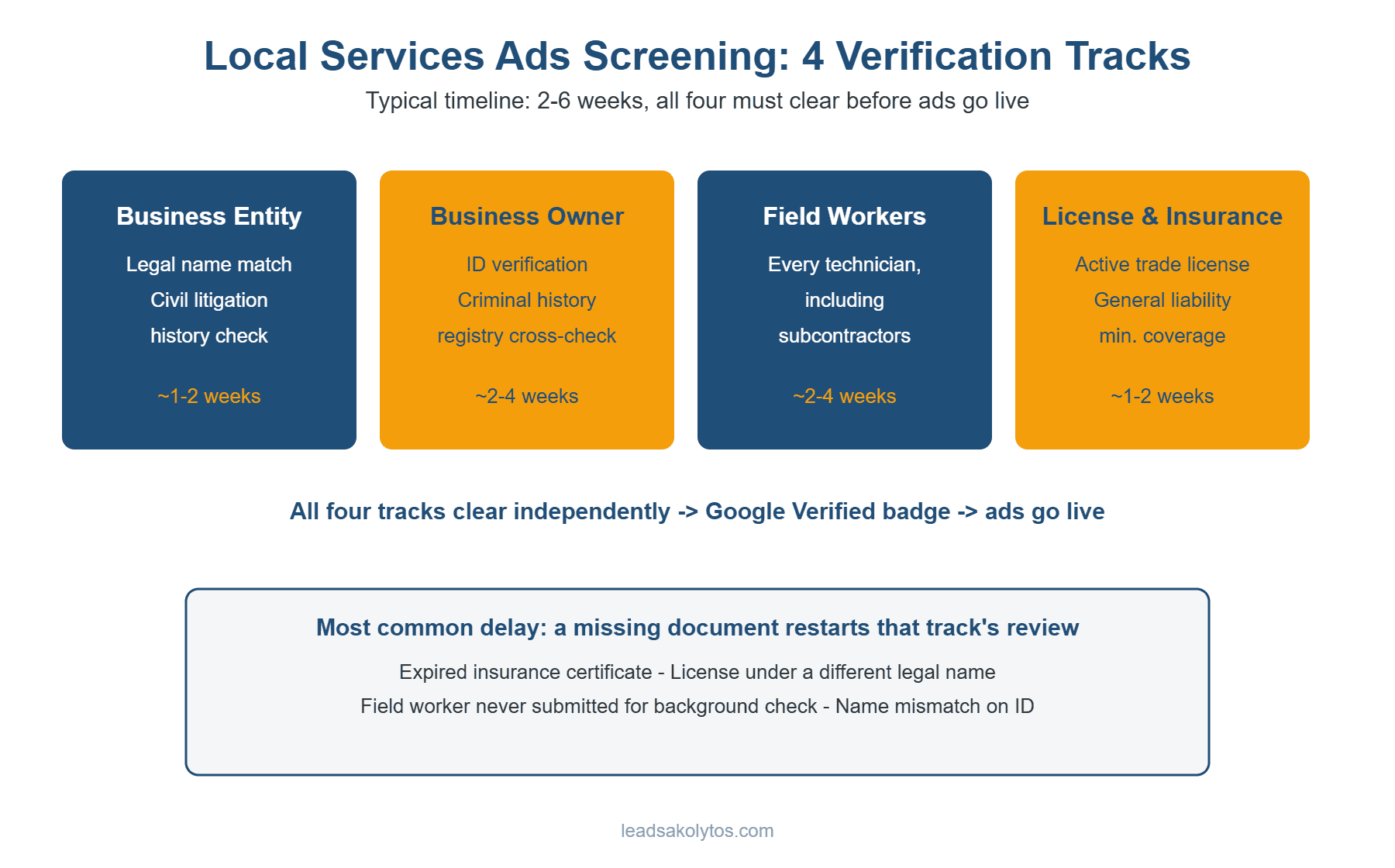
Feel free to use this graphic on your own site with credit and a link back to this article.
What Local Services Ads Screening Actually Checks
Local Services Ads screening covers four separate verification tracks: the business entity itself, the business owner, every field worker who enters a customer’s home or property, and the business’s license and insurance documents. Each track has to clear independently before your account is fully approved.
The background check portion is the part most contractors underestimate. It includes identity verification and criminal history research, including cross-checks against national sex offender, terrorist, and sanctions registries. For the business entity itself, Google also reviews civil litigation history. This applies to the owner and to every technician on the field worker roster, including subcontractors, not just whoever signs up for the account.
License and insurance verification runs in parallel. Google publishes the exact category-by-category requirements on its own Local Services help documentation, which is worth checking before you apply since requirements vary by trade and location. Google requires proof of an active, applicable business license where your trade requires one, plus general liability insurance that meets its minimum coverage thresholds (commonly cited around $1 million, though the exact figure can vary by category and location).
How Long Local Services Ads Screening Takes
Most contractors get through Local Services Ads screening in two to six weeks. The background check step is usually the longest single piece, often taking two to four weeks on its own, and it can stretch longer if a technician’s paperwork is incomplete or a name mismatch flags manual review.
The single most common cause of delay is not a failed check, it is a missing document. An outdated insurance certificate, a license listed under the wrong business name, or a field worker who was never submitted for background review can each restart the clock on that portion of Local Services Ads screening, even if everything else already passed.
What It Costs to Get Through Screening
Background checks run roughly $50 to $100 per person, billed per business owner and per field worker submitted. For a solo operator, that is a one-time cost. For a company with a five- or six-person crew, Local Services Ads screening costs can add up to a few hundred dollars before a single ad has run, on top of whatever your general liability policy already costs annually.
None of this is refunded if you decide not to proceed, which is worth factoring in before you commit a whole crew to the process at once. Some contractors screen the owner and one or two lead technicians first, then add the rest of the crew once the account is live and generating leads. Once leads start coming in, the next question is whether your team is actually converting them — our plumbing-focused lead-leak audit in how to get more plumbing leads without spending more on Google Ads walks through the response-time and follow-up factors that apply to almost any paid lead source, not just plumbers.
The Google Verified Badge
As of October 2025, Google consolidated its old trust badges, Google Guaranteed, Google Screened, and License Verified, into a single Google Verified badge. The badge means the business has passed all applicable background checks along with licensing and insurance verification for its category. If you researched Local Services Ads screening before that change, some of what you read about separate badge tiers is now outdated.
Practically, this means there is one bar to clear rather than several tiers to choose between, which simplifies the decision but does not reduce the actual screening requirements underneath it.
Common Reasons Contractors Get Stuck in Screening
The most frequent snags in Local Services Ads screening are avoidable with a bit of upfront preparation: a business license registered under a slightly different legal name than the one used on the Local Services Ads application, an insurance certificate that has since expired or lapsed, a field worker added to the roster without submitting them for their own background check, and Social Security or identification details that do not match public records exactly (a common issue after a legal name change).
Any one of these is fixable, but each one restarts part of the review, which is why contractors who gather every document before starting Local Services Ads screening tend to clear it noticeably faster than those who submit and fix issues as they come up.
How to Prepare Before You Apply
Before starting Local Services Ads screening, pull your current business license and confirm the legal name matches exactly what you will enter on the application. Confirm your general liability insurance is active, meets the posted minimum, and lists the correct legal business name as the insured party. Build your full field worker list in advance, including subcontractors, since anyone missing from that list cannot legally perform work booked through the platform once you go live.
Contractors who treat this as a document-gathering exercise before they ever open the application tend to move through Local Services Ads screening in closer to two weeks than six.
This process runs alongside your broader lead generation strategy rather than replacing it. If you are still deciding how Local Services Ads compares to organic SEO for your budget, or weighing it against a pay-per-lead provider, screening timelines and costs are worth factoring into that decision, since a six-week approval wait is a real delay if you are counting on leads starting immediately. For contractors who want leads flowing without owning any part of this verification process themselves, a designated lead generation program is worth comparing against the DIY LSA route.
One planning tip worth adding: line up your paperwork before you submit anything. Contractors who gather their license, insurance certificate, and full crew list first tend to move through this process in closer to two weeks than six.
If you would rather skip the screening timeline altogether and start getting exclusive, pre-qualified leads sooner, book a free strategy call to see whether a designated lead generation program is a faster fit for your business right now.
Should You Handle Local Services Ads Screening Yourself, or Get Help?
Screening is a one-time process, but it is also the single most common place contractors get stuck for weeks without knowing why. Before you apply, it is worth being honest about which situation you are actually in.
Handle it yourself if: your business license, insurance, and background-check paperwork are already current and easy to pull together, you have time to respond to Google’s requests within a few business days, and you are comfortable troubleshooting a stalled application by re-reading Google’s own guidelines and resubmitting documents.
Get help if: your licensing or insurance documentation is scattered across multiple providers or out of date, a prior application was rejected or has been stuck in review for more than two weeks, or you would rather spend that time on jobs and let someone who has run this process before handle the back-and-forth with Google’s screening team.
Paying for help here is not about the application itself — it is about not losing weeks of Local Services Ads visibility to a documentation problem you could have caught on day one. If you are not sure which situation applies to you, a quick 15-minute call can usually tell you within the first few minutes.
What to Do If Your Local Services Ads Screening Gets Rejected or Stalls
A rejection notice, or a screening status that has not moved in over a week, is not the end of the process — it almost always means one specific piece of documentation did not match what Google’s screening partner expected, not that your business does not qualify.
The short version: start by re-reading the rejection reason literally, not generally. Google’s screening emails typically name the exact issue — a business name that does not match your license exactly, an insurance certificate missing your named insured or coverage dates, or a background check that came back with a status Google could not automatically clear. Fix that one item before you touch anything else.
Steps to work through a rejection
- Match your business name everywhere. The name on your license, your insurance certificate, your background check, and your Google Business Profile need to be identical, including suffixes like “LLC” or “Inc.” A mismatch is one of the most common reasons a Local Services Ads screening stalls.
- Re-check expiration dates. An insurance certificate or license that expires within the review window gets flagged even if it was valid on the day you submitted it. Upload a version with several months of runway remaining where possible.
- Confirm the background check company’s report actually posted. Some third-party background check vendors take longer to transmit results to Google than they do to notify you the check is complete. If it has been more than a few business days since you were told the check cleared, ask the vendor to confirm submission, not just completion.
- Resubmit through the same dashboard, not a new application. Starting a second Local Services Ads profile from scratch usually resets your review timeline and can create duplicate-profile issues that take longer to untangle than the original rejection.
Once you resubmit a corrected document, screening updates typically move again within a few business days, though Google does not publish a guaranteed turnaround and busier seasons can push it longer. Watch your Local Services Ads dashboard directly rather than relying only on email, since the status there often changes before any notification arrives.
If two resubmissions in a row come back with the same generic rejection and no specific reason, that is the point where contacting Local Services support directly through the Ads Help Center makes more sense than guessing at a third fix. It is also the point where many contractors decide the hours spent going back and forth are worth handing to someone who runs this process daily.
Frequently Asked Questions
Does Local Services Ads screening cover employees or just the business owner?
It covers both. Every field worker who will perform work booked through the platform, including subcontractors, needs their own background check as part of Local Services Ads screening, not just the account owner.
Can I run ads while Local Services Ads screening is still in progress?
No. Your ads will not go live until the relevant verification tracks for your category clear, which is why starting the process well ahead of when you need leads matters.
What happens if a field worker fails the background check?
That individual cannot be listed as an active field worker on the account. It does not necessarily disqualify the whole business, but that person cannot perform Local Services Ads-booked jobs until the issue is resolved, if it can be resolved at all.
Do I need to redo Local Services Ads screening if I hire new employees later?
Yes. Any new field worker added after your initial approval needs to go through their own background check before they can be dispatched on jobs booked through the platform.
Is the Google Verified badge the same as being Google Guaranteed?
Functionally, yes. Google Verified replaced Google Guaranteed, Google Screened, and License Verified as a single unified badge starting in October 2025, and it reflects the same underlying screening standard.
Want this handled for you?
We do this work for home service contractors every day, month-to-month, with no contracts. Book a free 30-minute call and we'll show you where you stand on Google.
Book my free call