You need more Google reviews, and half the advice out there will get your profile flagged. The "$25 off your next service for a review" card. The text that sends happy customers to Google and unhappy ones to a private form. The tech who hands his phone to the homeowner in the driveway. All three are common in the trades. All three break Google's rules. Here is what you can do, what you cannot, and a simple system that keeps reviews coming in without putting your profile at risk.
The Short Answer
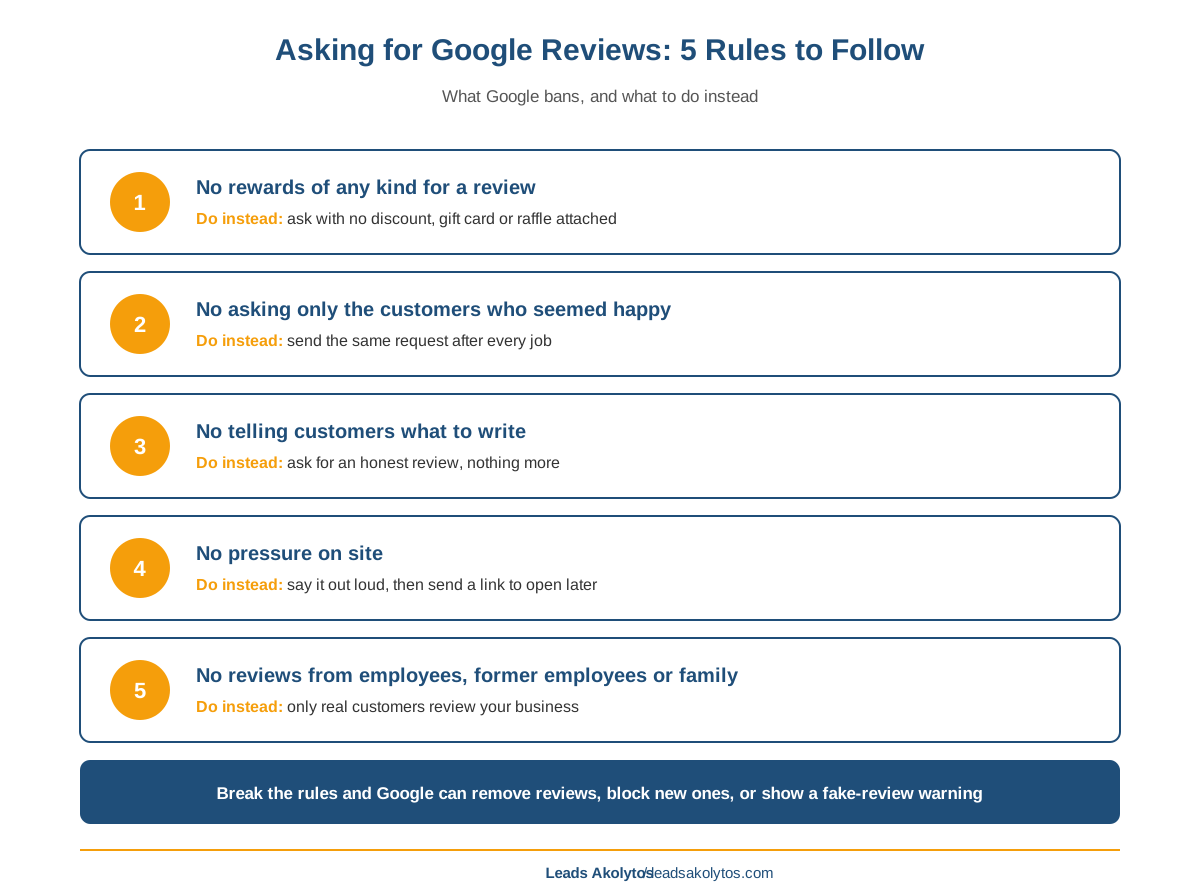
Ask every real customer, the same way, with a direct link, and let them write whatever they want. That is the whole rule. Google bans incentives of any kind for reviews, bans asking only the customers you expect to be happy, bans asking for specific content, bans reviews from employees and former employees, and bans pressuring customers to review while you are on site. Break those rules and Google can remove reviews, block new ones for a set period, hide the ones you have, or put a warning on your profile telling homeowners that fake reviews were removed. A steady, boring, ask-everyone process is both the compliant one and the one that builds the most reviews over time.
Why Reviews Are Worth Getting Right
Reviews do two jobs for a home service business. They help you show up, and they help you get picked once you do.
- Map rankings. Google's own local ranking page says "more reviews and positive ratings can help your business's local ranking."
- Local Services Ads. Google's Local Services Ads help says star ratings and number of reviews affect how your business is ranked in those ads. On a pay-per-lead channel, a better position means more of the leads you are already paying to compete for.
- The homeowner's choice. BrightLocal's Local Consumer Review Survey 2026 (published February 11, 2026, 1,002 US consumers) found 68% will only use businesses rated four stars or higher, up from 55% the year before, and 74% look for reviews from the last three months.
That last number matters most for the process below. A pile of reviews from 2022 does not help much. A steady flow every month does. If you want the numbers on how many reviews it takes to compete in your town, the contractor reviews scorecard covers it, and why contractors with worse reviews book more jobs explains why recency often beats a perfect average.
What Google Bans, Rule by Rule
These come from Google Maps' user-generated content policy and the Business Profile page on getting reviews. Each one has a common contractor version.
1. Incentives of any kind
Google calls incentives "such as free or discounted goods or services" in exchange for reviews "strictly prohibited." That covers posting a review, changing one, or removing one. In the trades it looks like:
- A discount on the next tune-up for leaving a review.
- A gift card raffle for everyone who reviews this month.
- A free filter, a free drain treatment, a free gutter flush.
- A partial refund if the customer takes down a bad review.
It does not matter that you would accept a three-star review too. Google does not care whether the incentive is tied to a positive review. Any reward is out. Local Services Ads has the same rule: its reviews page says providers are "prohibited from offering consumers compensation" for reviews.
2. Review gating
The policy says a business may not "discourage or prohibit negative reviews, or selectively solicit positive reviews from customers." The classic version is a text that asks "How did we do?" and sends four- and five-star answers to Google and everyone else to a private feedback form. Some review software still offers this as a feature. Turn it off.
The quieter version is the owner who only asks the customers who seemed pleased. Same problem. If you ask, ask everyone.
3. Asking for specific content
Google says you should not "request that specific content be included" in a review. That rules out a script like "please mention our water heater install and that we serve Plano." It also rules out asking customers to name the tech. Let them write what they want. Real customers mention the service and the tech on their own often enough.
4. Pressure on site
Google says you "should not require or pressure users to leave ratings or write reviews while on the premises." For a contractor, the premises is often the customer's own driveway. A tech who stands there holding out a tablet until the review is written is applying pressure. Asking out loud is fine. Sending a link they can open tonight is better.
5. Employees, family and anyone with a stake
Google bans content based on a conflict of interest, and its examples include "current or former employment" and other professional or personal ties. Your techs, your office manager, your spouse, your supplier and the sub you share jobs with do not review your business on Google. Do not ask other contractors to trade reviews either.
What Happens If Google Catches It
Google removes the reviews that break the rules. On top of that, its Business Profile restrictions page lists what else it can do to a profile:
- Block new reviews and ratings for a set period.
- Unpublish your existing reviews for a set period.
- Show homeowners a warning that fake reviews were removed.
Google says it emails the owner before applying a restriction and that you can appeal. The page gives no set length. Think about what the warning does to a roofer or a plumber competing in the map pack: the homeowner sees a red flag next to your name and calls the next company.
The Federal Rules Sit on Top of Google's
The FTC's Consumer Reviews and Testimonials Rule took effect on October 21, 2024. It applies to your business, not only to big online stores. The parts that matter for a contractor:
- No fake reviews. No reviews from people who were not customers, and no buying them.
- No rewards tied to sentiment. The rule bans incentives that require, openly or by implication, a positive or negative review.
- No suppression by threat. No unjustified legal threats, intimidation or false public accusations to stop a customer from posting a review.
- Insider reviews need disclosure. If an employee or relative reviews you anywhere, the relationship has to be disclosed clearly.
Courts can impose civil penalties for knowing violations. Two things trip owners up. First, the FTC rule allows a neutral incentive that does not depend on sentiment, but Google bans every incentive, so on Google the stricter rule wins. Second, the FTC's own Q&A says review gating is not banned by name in the rule but "could violate the FTC Act." Do not treat the gap as permission.
A Review System That Stays Inside the Rules
The compliant process is also the one that produces the most reviews, because it runs on every job instead of when someone remembers.
Step 1: Get your direct link
- On a computer, open your Business Profile, select Read Reviews, then the Get more reviews share icon. Google's help page says the review QR code can only be made from a computer browser for now.
- Copy the link and save the QR code image.
- If you run Local Services Ads directly with Google, you also have a review link under Business Verifications, on the Google Business Profile tab.
Step 2: Pick one trigger for every job
- Send the request when the job is marked complete or the invoice is paid. Not after you decide the customer was happy.
- If your FSM software can send an automatic message on job completion, use it. Automation is what keeps you from gating by accident.
- Send one reminder a few days later. Then stop.
Step 3: Use plain, neutral wording
Something like: "Thanks for choosing us for today's job. If you have a minute, we'd appreciate an honest review on Google: [link]. — [Your name], Owner." No reward, no hint about what to write, no star rating in the ask. Local Services Ads help notes customers are more likely to leave a review when the request comes from you directly, so sign it with a real name.
Step 4: Make the ask out loud too
- Train techs to say one line at the end of the call: "You'll get a text from us with a link for a review. We read every one."
- Put the QR code on the invoice or leave-behind.
- Do not hand over a device and wait.
Step 5: Handle the unhappy customer separately
A callback complaint is a service problem, not a review problem. Call the customer, fix the job, and do not hold back the review request because the job went sideways. If a bad review lands anyway, answer it well. The guide on responding to negative Google reviews walks through it. Never offer a refund in exchange for taking it down.
Step 6: Measure it monthly
- Count completed jobs and new Google reviews each month.
- Divide reviews by jobs. That is your review rate. Track it per tech if your software allows.
- Watch the date of your newest review. If it is older than a few weeks, the process broke somewhere.
A low rate usually means the request is not going out on every job, the link is buried, or the message arrives days after the work. Fix the trigger before you change the wording.
What About Paying Techs for Reviews?
Google's rules focus on rewarding the customer and on conflicts of interest, so a bonus to your own tech is not named as a violation. It still creates the wrong behavior. A tech chasing a bonus starts asking only the friendly customers, scripting what to write, or standing over the homeowner until it is done. That is gating, content requests and on-site pressure, all banned. If you reward techs, reward them for the request going out on every job, not for the count of five-star reviews.
If You Already Broke a Rule
- Stop the incentive or the gating flow today. Check your review software settings for a "happy customers only" or star-filter option and turn it off.
- Remove any offer of a reward for reviews from your website, invoices, emails and truck signs.
- Ask employees and relatives who reviewed your business on Google to delete their reviews.
- If Google restricts your profile, read its email, fix the cause, and use the appeal it describes.
- While you clean up, make sure the rest of your profile is solid. The Google Business Profile checklist covers the settings that matter.
Reviews are one part of map visibility, not all of it. If a competitor with fewer reviews still outranks you, this breakdown of why competitors outrank you covers the other factors, and our local SEO and map pack page explains how we approach it.
Frequently Asked Questions
Can I offer a discount for a Google review?
No. Google calls incentives such as free or discounted goods or services in exchange for reviews strictly prohibited, even if you would accept a negative review. The FTC rule allows some neutral incentives, but Google's policy is stricter, and Google is the platform that can remove your reviews or restrict your profile.
Is it OK to only ask customers I know were happy?
No. Google's policy bans selectively soliciting positive reviews, and the FTC says review gating could violate the FTC Act. Send the same request to every customer at the same point in the job, ideally automatically.
Can my employees or family leave reviews for my business?
Not on Google. Google's policy bans reviews based on a conflict of interest and names current and former employment as an example. Personal ties count too. Under the FTC rule, an insider review anywhere must clearly disclose the relationship.
Can I ask customers to mention the service or my tech's name?
No. Google says businesses should not request that specific content be included in a review. Ask for an honest review and leave the content to the customer.
Can my tech ask for a review on site with a tablet?
Asking out loud is fine. Google says businesses should not require or pressure customers to leave reviews while on the premises, and handing over a device and waiting crosses into pressure. Send a link the customer can open later instead.
What happens if Google finds fake or incentivized reviews?
Google removes them and can block new reviews, unpublish existing reviews for a set period, or show a warning that fake reviews were removed. Google says it emails the owner before a restriction and that you can appeal.
Want a Second Look?
You can set up the system above this week with your review link and the software you already use. If you would rather have someone go through your review process and profile with you, Leads Akolytos offers a free 30-minute strategy call. We work only with home service contractors, with no setup fees and no long-term contracts. You can book a time here.
Want this handled for you?
We do this work for home service contractors every day, month-to-month, with no contracts. Book a free 30-minute call and we'll show you where you stand on Google.
Book my free call