
Your HVAC company's Google Business Profile shows a list of searches that found you, and most owners glance at it, see "furnace repair near me" and their own company name, and close the tab. That list is the only place Google tells you, in your customers' own words, which jobs your profile is showing up for, and which ones it is missing. Read it right once a month and it tells you which service to add, which category to check and which page your website still needs.
Google Business Profile Searches for HVAC: The Short Answer
The Searches list in your Performance report shows the terms people typed when your profile appeared in Google Search or Maps. It counts appearances, not calls or clicks, and Google updates it once a month. Sort what you see into four piles: your own name (nothing to fix), services you do that are on the list (keep them), services you do that are missing (add them as services, check your categories, give each a real page on your site), and terms you do not want (ignore them). Then judge the result on calls you can trace, not on the searches number.
Where to Find the Searches List in Your Business Profile
The list sits in the Performance report, and you need to be signed in to the Google account that manages the profile. Google's performance help page gives the steps:
- Search for your business name on Google while signed in.
- Click Performance on your profile panel.
- Pick a time period at the top and click Apply.
- Scroll to the searches section and open the full list.
On a phone, open Google Maps, tap Business, then See more next to Performance. Data shows only for verified profiles. If your profile is not verified, start there; our guide to video verification covers the most common route today.
What the Searches Number Counts, and What It Does Not
A search term shows up when your profile appeared for that search. Google's help page says it plainly: "Search queries show up whenever your Business Profile appears for a certain search." It does not mean anyone saw you, clicked you or called you. Joy Hawkins of Sterling Sky, who studies local search for a living, makes the same point in her September 2026 guide to the report: a profile that appeared low in the results may never have been seen.
Four other facts change how you read it:
- Monthly, not daily. Google updates the searches metric at the start of each month, and it can take up to 5 days to show. Do not judge November until early December.
- About six months of history. Sterling Sky reports the date picker goes back up to six months. Save a copy each month if you want to compare this January with next January.
- Small terms are hidden. Google's Performance API documentation says low-volume terms come back as a threshold instead of a count, and reporting tools such as Databox say the dashboard shows them as "<15". A term with "<15" next to it is real but small.
- Ads are mixed in. Google says performance data "includes views, searches, and actions from both organic search results and Google Ads." If you turned on ads last month, a jump in searches may be the ads, not your profile work.
The Calls number has its own limit. Google counts taps on the call button on your profile, not answered calls, and Whitespark's January 2026 guide calls Google's call data "largely inaccurate" for that reason. A tracking number on the profile tells you what actually rang.
How to Sort Your HVAC Searches List in 15 Minutes
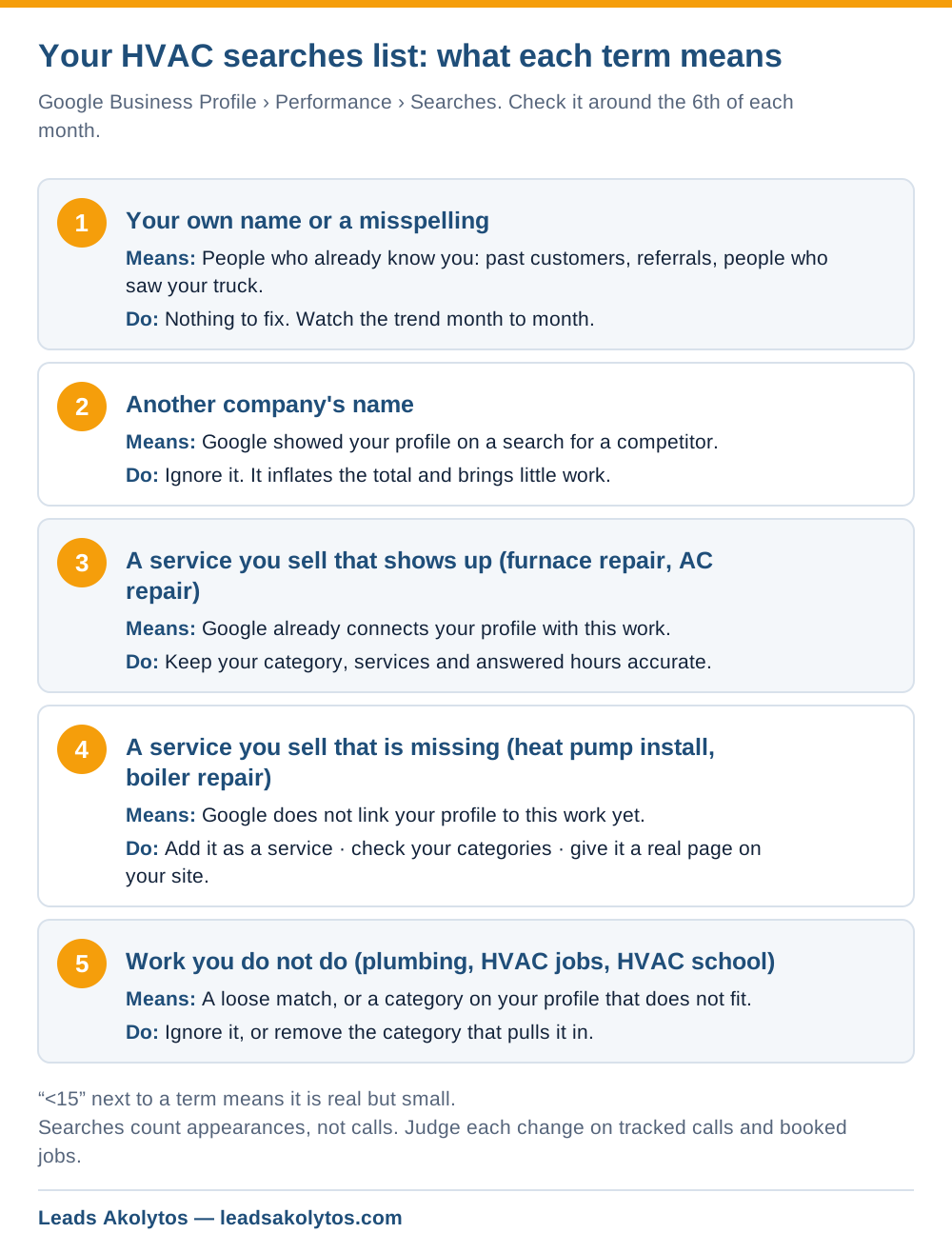
Sort every term on the list into one of five piles, then act on two of them. Copy the list into a spreadsheet with a column for the pile and a column for the action. For an HVAC company the piles look like this.
1. Your own name and its misspellings
These are people who already know you: past customers, referrals, people who saw your truck. Nothing to fix. A steady or growing count is a sign your name gets around. A falling count is a question for your marketing as a whole, not for the profile.
2. Another company's name
Google sometimes shows your profile when someone searches a competitor, often one nearby with a similar name. Ignore these. They inflate the total and bring you almost no work. When we looked at one of our own pages in Search Console, most of its impressions came from a branded search for a different company, and the low click rate meant nothing. Do not chase a number that comes from someone else's brand.
3. HVAC services you sell that already show up
"Furnace repair", "AC repair near me", "HVAC company" and similar terms are your core. Keep the profile accurate for them: correct primary category, services listed, hours a person actually answers. Watch them through the seasons. Heating terms should lead in winter and cooling terms in summer; if your heating terms stay flat through a cold January, look at your category, your reviews and your hours.
4. HVAC services you sell that are missing
This pile makes you money. Write down every job you want more of that never appears: heat pump installation, ductless mini-split, boiler repair, indoor air quality, maintenance agreements. A missing term usually means Google does not connect your profile with that work. Three things to check, in this order:
- Add it as a service. Google's services help page lets you pick suggested services or add custom ones, with a short description. Google says a service "may be highlighted on your profile" when someone searches for it.
- Check your categories. If you install boilers and only list "HVAC contractor", see whether a more specific additional category fits. Our post on changing your Business Profile category covers the risk: Google says a category edit can trigger re-verification.
- Give the service a real page on your website, with what you install, the brands you work on, rough timelines and the towns you cover. Google's local ranking page says relevance means how well a profile matches the search, and complete, detailed information helps Google make that match.
5. Terms you do not want
Plumbing, appliance repair, "HVAC jobs", "HVAC school". Ignore them unless one category on your profile is pulling in the wrong work. If you see a lot of plumbing terms and you do not do plumbing, check whether a plumbing category slipped onto the profile.
What Not to Change Because of the Searches List
The list tells you what Google thinks you do. It is not a list of words to stuff into the profile. Three moves look smart and cost you:
- Adding keywords to your business name. Google's profile guidelines say the name must match your real-world name, and adding keywords breaks that. Breaking the guidelines puts the profile at risk of suspension; see why Google suspends profiles.
- Building a page for every town on the list. If a town name shows up, that town finds you already. Thin pages with only the town name swapped help nobody. Write a town page only when you have something specific to say about work there.
- Chasing "near me" terms. Google says distance is one of the three local ranking factors. A town 40 minutes away will not show you for "furnace repair near me" no matter what you edit. That is a job for ads or Local Services Ads, not for the profile.
How to Tie the Searches List to Booked HVAC Jobs
Searches only matter if they turn into calls and booked jobs. Treat the report as the top of a funnel and check each step once a month:
- Searches for the services you want more of: going up?
- Calls from the profile: measured with a tracking number on the profile, not only the call-button count.
- Website clicks: tag the profile's website link with UTM parameters so GA4 shows profile visits as their own source.
- Booked jobs: in your FSM software, tag the lead source on every job so you can count jobs that came from the profile.
Make one change at a time and give it a full month before you judge it. If you add three services, a category and a new page in the same week, you will never know which one moved the calls. For the money side of the same funnel, our post on measuring ROI from HVAC lead generation walks through cost per booked job.
A 20-Minute Monthly Routine for HVAC Owners
Put it on the calendar for the 6th of each month, after Google's update has landed:
- Export or screenshot the searches list and save it with the month in the file name.
- Sort new terms into the five piles.
- Pick one missing service and fix it: service, category or page.
- Log the change and the date.
- Check last month's change against tracked calls and booked jobs.
Twelve months of that gives you something no agency report can: your own record of which changes brought calls in your market. For the bigger plan around it, see our HVAC SEO strategies guide and the HVAC marketing page.
Frequently Asked Questions
Why do the searches in my Business Profile not match Search Console?
They measure different things. The Business Profile list counts searches where your profile appeared in Search and Maps, including searches where ads ran. Search Console counts your website in Google's web results. Use the profile list for local visibility trends and Search Console for your website pages.
What does "<15" mean next to a search term?
The term found your profile fewer times than Google is willing to report. Google's Performance API returns a threshold instead of a count for low-volume terms, and dashboards show it as "<15". Treat those terms as real but small, and look for a pattern across several of them.
How often does the searches data update?
Once a month. Google updates the searches metric at the start of each month and says it can take up to 5 days to appear, so check around the 6th.
Can I add keywords so my HVAC profile shows for more searches?
Not to the business name; Google's guidelines say it must match your real name. You can add services with descriptions, choose accurate categories and build website pages for the work you do. Those are the legitimate ways to match more searches.
My searches went up but calls did not. What happened?
Check three things. Ads may have pushed up searches, since Google mixes ad data into the report. Your profile may be appearing low in the results, where people do not see it. Or calls are reaching you but not through the call button, which a tracking number would show. If your calls fell instead, see our five checks when Business Profile calls drop.
Facts in this article were checked on their sources on November 12, 2026: Google's Business Profile performance, services, local ranking and guidelines help pages, Google's Business Profile Performance API reference, Databox's metric library, Sterling Sky's guide to the Performance report (September 27, 2026) and Whitespark's GBP Performance guide (January 19, 2026).
Want a Second Look?
You can run this routine yourself starting next month. If you would rather go through your searches list with someone, Leads Akolytos offers a free 30-minute strategy call; we work only with home service contractors, with no setup fees and no long-term contracts. You can book a time here.
If you'd like one practical idea like this in your inbox each month, get The Leads Akolytos Monthly: one email a month, unsubscribe any time.
Want this handled for you?
We do this work for home service contractors every day, month-to-month, with no contracts. Book a free 30-minute call and we'll show you where you stand on Google.
Book my free call