Your map calls stopped overnight, and your Google Business Profile now says it is suspended, or it has simply vanished from Maps. For a service business that gets most of its first-time calls from the map, that is a revenue problem by Monday. The good news: most contractor suspensions come from a short list of rule breaks, and Google has a defined way back. The bad news: the most common panic move, making a fresh profile, makes it worse.
The Short Answer
Google suspends profiles that break its guidelines for representing your business. For contractors the usual triggers are a home address shown to the public, a virtual office or mailbox, a service area far wider than you really cover, extra keywords in the business name, a second profile for the same business, or a big edit such as a new address. To get it back: do not create a new profile, open Google's appeals tool to see the stated reason, fix the profile so it follows every rule, gather documents whose name and address match the profile exactly, and submit one appeal. You only get one appeal per decision, so make it complete the first time.
What "Suspended" Actually Means
Google's help page on suspended or disabled profiles describes a few different states. Know which one you are in before you do anything:
- Profile removed or disabled. The public cannot see the profile, and owners and managers cannot act on it. This is the one that kills map calls.
- Account restriction. Your Google Account itself is restricted. The profiles you manage get suspended, and you cannot create or claim new ones. You appeal the account restriction first, from your Google Account, and only then appeal the profile.
- Review restriction. If Google finds fake engagement, it can block new reviews for a set period, unpublish existing reviews, or show customers a warning that fake reviews were removed, per its profile restrictions page. The profile still shows, but the stars that win calls are gone.
The appeals tool shows the decision date, the reason, a link to the policy you broke, and whether the decision can be appealed. Start there. Guessing at the reason wastes your one appeal.
Why Contractors Get Suspended More Than Most
Google is fighting a lot of fake listings, and home services is where many of them live. In its April 16, 2026 Maps safety report, Google said it removed over 13 million fake Business Profiles and blocked 79 million inaccurate or unverified edits in 2025, and that it uses its Gemini models to catch bad edits before they go live. That checking is mostly automated. A real plumber whose profile looks like a fake one, with no storefront, a home address and a name full of keywords, can get caught in the same net.
Here are the rules contractors trip most, straight from Google's guidelines:
- Showing a home address. If customers do not come to you, Google says to hide your address. Its own example is a plumber running the business from home.
- Virtual offices and mailboxes. A rented mailing address you do not work from is not eligible. P.O. boxes and remote mailboxes are out. A coworking desk counts only with clear signage and your own staff there during business hours.
- An oversized service area. Google says the area should not reach farther than about 2 hours of driving time from your base. Listing every county in the state because you might take a job there looks like spam.
- Keywords in the name. The name must match the real-world name on your truck, sign and paperwork. Google's example: "Midas" is fine, "Midas Auto Service Experts" is not. "Smith Plumbing" is fine. "Smith Plumbing 24/7 Emergency Drain Cleaning Denver" is a suspension waiting to happen.
- Duplicate profiles. One profile per business. A second location only gets its own profile when it has its own service area and its own staff.
- A phone number you do not control. The number must be under your direct control. A lead seller's number or a premium-rate line does not qualify.
- Big edits. Google reviews changes before they go live. A move to a new address requires you to verify again, and a name change might, per its edit your profile page. Changing the address, name and category in one sitting is a common trigger.
- Fake engagement. Bought reviews, reviews from employees, or a review swap with another contractor can bring a review restriction or worse.
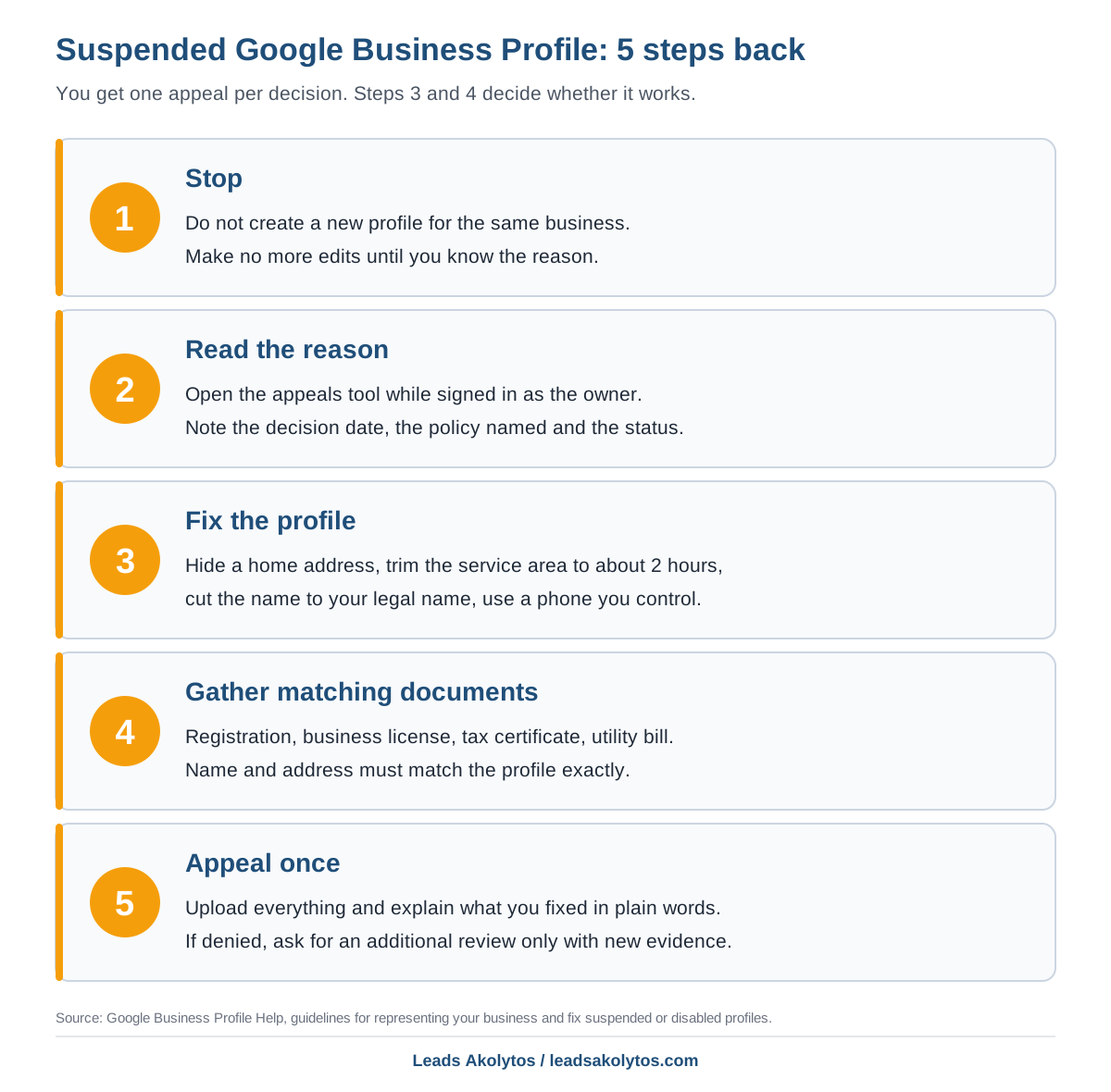
How to Get Your Profile Back, Step by Step
1. Stop, and do not make a new profile
Google's suspension page marks this as important: do not create a new Business Profile for the same business. A second profile is itself a duplicate, and it tells Google's systems the first suspension was right. Also stop making edits while you work out the reason.
2. Read the reason in the appeals tool
- Sign in with the Google Account that owns the profile.
- Open the Business Profile appeals tool from the suspension help page.
- Write down the decision date, the policy named and the status.
- If it says the decision cannot be appealed, read the linked policy closely before doing anything else.
3. Fix the profile before you appeal
Google says to make sure the profile follows every guideline before you appeal. Use the list above as a checklist:
- Hide the address if customers do not visit you.
- Trim the service area to where you really send trucks.
- Cut the name back to the name on your license and truck.
- Put a phone number you control in the phone field.
- Remove categories that describe what you have, not what you are.
4. Gather documents that match exactly
Google lists what it accepts: official business registration, a business license, tax certificates, and utility bills for the business such as electricity, phone, water or internet. The business name and address on each document should match the profile. This is where contractors lose appeals. If your license says "Smith Plumbing LLC" and your profile says "Smith Plumbing and Drain," fix one of them first. A trade license and a dated photo of a lettered truck or shop sign help show you are real.
5. Appeal once, with everything in it
- Upload the documents.
- Write three or four plain sentences: what you do, where you work from, what you fixed.
- Submit and watch the email on the owner account.
Google says appeals can be submitted only once. If it is denied, you can ask for an additional review with new evidence through Google's contact form. That second shot needs something new, so save nothing back for it. Put your best evidence in the first appeal.
Keep the Phone Ringing While You Wait
Google's appeals page gives no turnaround time. Plan as if the map calls are gone for weeks, not days, and lean on the channels you control:
- Check that your website's service and town pages still answer the searches the map used to catch. Our guide to service area pages covers what each page needs.
- Call recent customers who are due for maintenance. Route density from repeat work costs nothing in ads.
- If you run paid search, check whether it can carry more volume for a few weeks, and watch cost per booked job, not clicks.
- Use call tracking so you can see exactly what the suspension cost and when map calls come back. Our call tracking guide explains how to set it up without breaking your listing.
How to Avoid the Next One
- Keep the name on Google identical to the name on your license.
- Make one change at a time, then wait until it is live before the next.
- Give staff and agencies manager access, not ownership, and keep the owner login with you.
- Check the profile monthly for edits you did not make.
- Ask every customer for a review the same way, and never pay for one. Our post on asking for reviews without breaking Google's rules covers the line.
- Run through our Google Business Profile checklist once a quarter.
Competitors with keyword-stuffed names sometimes stay up while you get suspended. That is frustrating, but copying them is how you end up here again. Our post on why a competitor outranks you covers the right way to report them.
Frequently Asked Questions
How long does a Google Business Profile appeal take?
Google's suspension help page does not give a timeline. You get the decision by email. Plan for a wait of weeks, and keep your other lead sources running in the meantime.
Should I just create a new Google Business Profile?
No. Google tells suspended owners not to create a new profile for the same business. A second profile is a duplicate, which breaks the one-profile rule and can hurt your appeal.
Will I lose my reviews if my profile is suspended?
When a profile is removed, the public cannot see it, reviews included. Google says reinstatement restores the profile and its owners and managers. A separate fake-engagement restriction can unpublish reviews for a set period even when the profile stays up.
Can I list my home address if I work from home?
You can use it to verify, but if customers do not come to you, Google says to hide it and show a service area instead. Showing a home address as if it were a storefront is one of the most common contractor problems.
What if my appeal is denied?
You can request an additional review through Google's contact form, but it needs new evidence. Look again at whether your documents match the profile's name and address exactly, and whether anything on the profile still breaks a rule.
Should I pay someone to get my profile reinstated?
Most suspensions can be fixed by the owner with the steps above, since the work is fixing the profile and matching documents. Be careful with anyone who guarantees reinstatement. Google makes the decision, and nobody outside Google controls it.
Want a Second Look?
Everything above is work you can do yourself today. If you would rather have someone check your profile and your local SEO and map setup with you before you appeal, Leads Akolytos offers a free 30-minute strategy call. We work only with home service contractors, with no setup fees and no long-term contracts. You can book a time here.
Want this handled for you?
We do this work for home service contractors every day, month-to-month, with no contracts. Book a free 30-minute call and we'll show you where you stand on Google.
Book my free call