
You run your plumbing business from your house, you drive to every job, and Google is asking whether to show your street address to the public. Show it and strangers can park in your driveway, and your profile may break Google's rules. Hide it and you worry the calls dry up. The rule is clearer than most owners think, and the ranking fear is mostly about something else.
Should a Plumber Show a Home Address on Google? The Short Answer
No. If customers never come to your house, hide the address and list a service area instead. Google's Business Profile guidelines use this exact case as their example: a plumber who runs the business from a residential address should clear that address from the profile. Hiding the address changes what customers see, not whether you are on the map. Showing a home address with no signage and no customer hours is against the guidelines, and a suspended profile costs you every call, not just a few. Spend the effort on your reviews, your category and your website's town pages instead.
What Google's Rules Say About Home Addresses for Service Businesses
Google's rule turns on one question: do customers come to you, or do you go to them? The Business Profile guidelines say a service-area business "should hide your business address from customers." The same page sets the limits a home-based shop has to work inside:
- One profile per business. A service-area business gets one profile for its central base, with a service area attached.
- The service area should not reach farther than about 2 hours of driving from where the business is based.
- A business that shows its address should keep permanent signage with the business name at that address.
- A virtual office (a rented address you do not operate from) is not eligible, and neither is a P.O. box or a remote mailbox.
So a plumber, HVAC tech or electrician working from a home office with a van in the driveway is the textbook service-area business. You keep the profile. You just do not publish the street.
What Customers See When You Hide Your Address
A hidden-address profile shows your service area, not your street. Google's address help page says that once you hide the address, your profile "will only show your service area," and if you never entered one, Google picks a local area for you. Your phone, hours, reviews, photos and website link all stay visible, which is what a homeowner with a leaking water heater actually needs.
The service area itself has a few rules from Google's service area page:
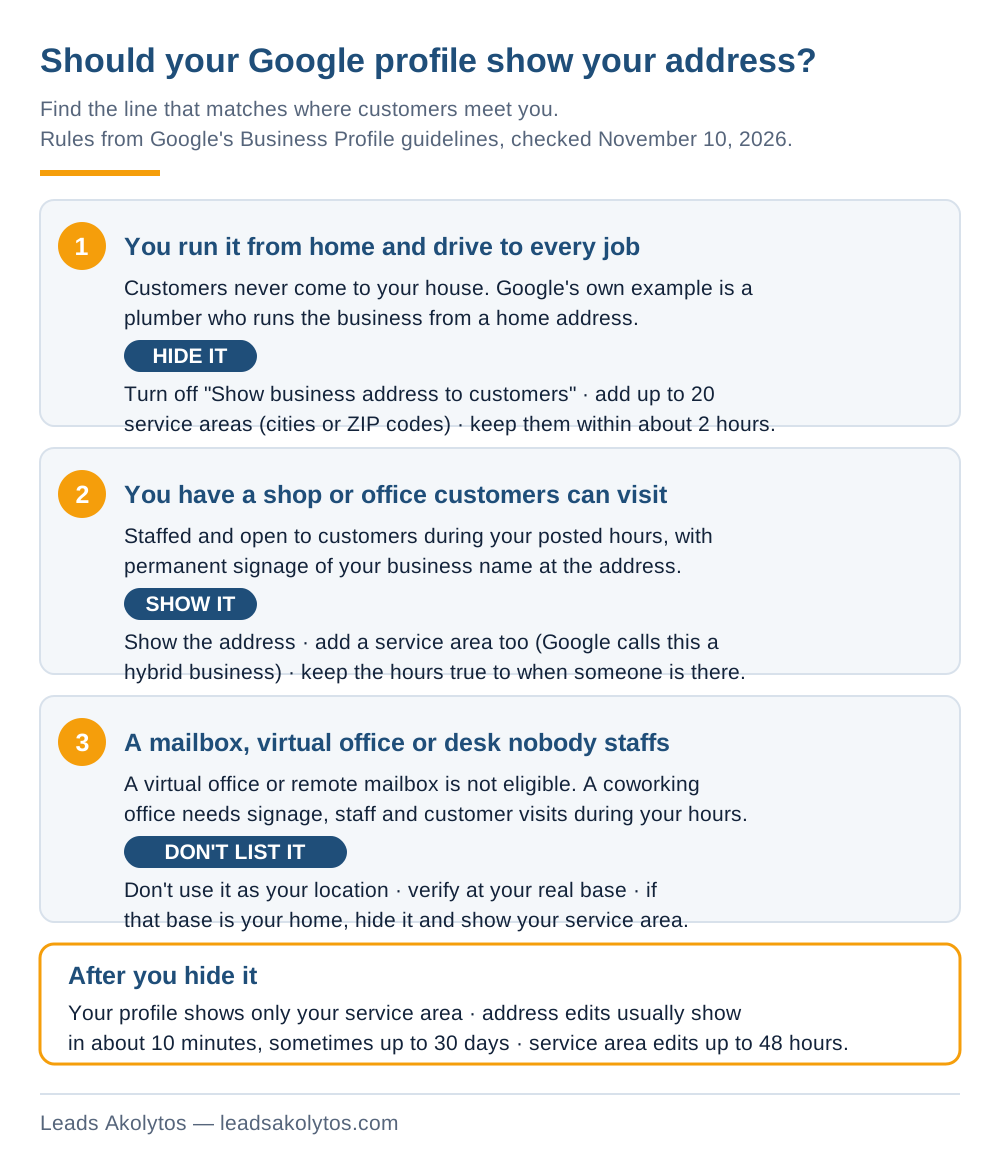
- Up to 20 service areas, entered as cities, ZIP codes or other named areas.
- No radius. You cannot draw "25 miles around my house."
- Edits can take up to 48 hours to show.
Will Hiding Your Address Cost You Calls?
Probably not, and the evidence that it does is thin. Google says local results weigh relevance, distance and prominence, with distance measured from the person searching (how Google ranks local results). It says nothing about hidden addresses ranking lower.
Two well-known local SEO firms have published tests, and they disagree:
- Sterling Sky hid the address on one home services client's listing (screenshots from June 2023) and reported a large drop in rankings and calls for that month, which came back when the address was shown again. It saw a similar bump on a second listing. That is two listings, and the author calls it a small sample.
- Whitespark's Darren Shaw (October 2024) says showing or hiding the address has no effect on rankings. In his view, the drops owners see after hiding usually come from a business that moved: with the address hidden, Google falls back to the address the profile was first verified at.
Read that second point carefully, because it is the useful one. If you verified the profile at your current home and you have not moved, hiding the address changes what the public sees and nothing else. If you moved since verifying, your map visibility may still be centered on the old place, and that is a support ticket to Google, not a reason to publish your new street.
Weigh the risks on your own numbers. A small ranking bump in one test is not worth a guideline violation that can get the whole profile suspended. A suspended profile stops every call from Google Maps until an appeal goes through, and Google gives no timeline for appeals.
How to Hide Your Address in Google Business Profile, Step by Step
It takes about two minutes. Follow Google's own steps:
- Open your Business Profile (search your business name on Google while signed in, or go to business.google.com).
- Select Edit profile, then Location.
- Next to Business location, select Edit.
- Turn off Show business address to customers.
- Select Save.
- Next to Service area, select Edit, add the towns or ZIP codes you serve, and save.
- Check your public profile from a phone that is not signed in.
Google says profile changes usually show in about 10 minutes and can take up to 30 days.
How to Set a Service Area That Brings Plumbing Calls You Want
List the towns where you want booked jobs, not every town you would drive to for the right price. Whitespark's 2024 tests found that adding or removing service areas did not move rankings, so a long list will not widen your reach on the map. It only tells customers where you go.
- Start with the towns where you already have route density and repeat customers.
- Add towns that pay for the windshield time: bigger tickets, newer housing, less competition.
- Leave out towns where every truck roll eats the margin on the job.
- Keep the whole area inside about 2 hours of driving, as the guidelines ask.
- Back each key town with real proof on your website: jobs done there, local permits or water issues, photos.
That last step does more for out-of-town calls than the profile setting. Our guide to service area pages for contractors covers when a town page helps and when Google treats it as a doorway page.
What Not to Do: Virtual Offices, Mailboxes and Coworking Desks
Do not rent an address to get a pin in a better town. Some marketers still sell this, and it is the fastest route to a suspension. Google's guidelines spell out the rules:
- A virtual office, meaning a rented address you do not operate from, is not eligible for a profile.
- P.O. boxes and mailboxes at remote locations are not acceptable.
- A coworking office counts only if it has clear signage, takes customers during business hours and is staffed by your own people during those hours.
- A second profile for the same business, in the same account or another, is not allowed.
If your profile has already been suspended over an address, read why Google suspends Business Profiles and how to appeal before you change anything. Google lets you submit an appeal only once, so get the evidence right the first time.
How to Verify a Profile When You Work From Home
You still verify at your real base, even with the address hidden. Many service-area businesses now get asked for a video. Google's video verification page asks service-area businesses to show where they operate, that the business exists and that they manage it. For home-based owners, Google suggests filming nearby street signs. A branded van, or a permit, invoice or utility bill in the business name, works as proof. Do not film faces or ID, tax or bank numbers. Our step-by-step guide to passing Google's video verification walks through a recording that passes.
When Showing Your Address Is the Right Call
Show the address when customers really do come to you. A plumbing supply counter, a showroom or a shop where homeowners drop off a water heater or pay a bill all qualify, as long as it is staffed and open during your posted hours and has permanent signage with your business name. Google calls this a hybrid business: you show the address and add a service area too. If you have that kind of location, use it. Do not hide a real storefront.
Your Address Checklist for This Week
- Decide which of the three cases in the chart you are.
- Working from home: hide the address and add up to 20 service areas.
- Moved since you first verified? Contact Google Business Profile support about the verification address.
- Drop any virtual office, remote mailbox or unstaffed desk from the profile.
- Check that your primary category says plumber (or your trade). See how to change your Google Business Profile category.
- Put your energy into reviews and town pages, the things that move map rankings. Our map pack fixes for contractors list where to start.
More on how plumbing companies get calls from Google is on our plumbing marketing page and our local SEO and map pack page.
Frequently Asked Questions
Do I have to show my home address on my Google Business Profile?
No. If customers do not come to your home, Google's guidelines say to hide the address and show a service area. Google's own example is a plumber running the business from a residential address.
Does hiding my address hurt my Google Maps ranking?
Google does not say it does. Local SEO firms disagree: Sterling Sky reported a drop on two listings in 2023, while Whitespark says showing or hiding makes no difference and that drops usually follow a move. If you have not moved since verifying, expect the change to affect what customers see, not where you rank.
Can I use my shop or storage unit address instead of my house?
Only if you really operate from it. A shop with signage, staff and customer visits during your hours can be shown. A storage unit or a rented mailbox you never work from is not eligible as a business location.
How many towns can I list in my service area?
Up to 20, as cities, ZIP codes or other named areas. Google asks you to keep the whole area within about 2 hours of driving from your base and does not allow a radius.
Will Google still know where my business is if I hide the address?
You still verify at your real base, and hiding only removes the street from public view. Whitespark's tests suggest Google keeps using the address the profile was verified at. The public profile shows your service area instead.
Can I show my address if I meet customers at home by appointment?
Google's rule for showing an address is that the location is staffed and can receive customers during its stated hours, with permanent signage. If customers only come now and then by appointment, hiding the address is the safer setup.
Facts in this article were checked on their sources on November 10, 2026: Google's Business Profile guidelines, address, service area, local ranking and video verification help pages; Sterling Sky's article on hiding an address (screenshots from June 2023); and Whitespark's articles by Darren Shaw on showing or hiding an address and on service areas (October 28, 2024).
Want a Second Look?
Everything above is something you can set up yourself in an afternoon. If you would rather go over your Business Profile with someone, Leads Akolytos offers a free 30-minute strategy call; we work only with home service contractors, with no setup fees and no long-term contracts. You can book a time here.
If you'd like one practical idea like this in your inbox each month, get The Leads Akolytos Monthly: one email a month, unsubscribe any time.
Want this handled for you?
We do this work for home service contractors every day, month-to-month, with no contracts. Book a free 30-minute call and we'll show you where you stand on Google.
Book my free call