Google wants a video before it will verify your Business Profile, and you have no storefront, no sign on a building and maybe no office at all. Until the profile is verified, you can't fully manage how your business shows up on Search and Maps, and that is where many first-time callers find a plumber, roofer or HVAC company. Most contractors who fail this step don't fail because they are fake. They fail because the video leaves out one of the three things Google's reviewer is looking for.
The Short Answer
Google video verification for a service-area contractor is one continuous, unedited recording of at least 30 seconds, filmed live through the Business Profile on your phone. Google's video verification help page asks a service-area business to show three things: where the business operates (street signs or landmarks at the business address), proof the business exists (tools, equipment, business cards, branded apparel) and proof you manage it (opening your locked, branded van with your key, doing the work, or a permit, invoice or utility bill in the profile's name). Plan the shots before you press record, keep faces and account numbers out of frame, and expect an answer within 5 business days. If it is rejected, open "Review issues", read the reason, and record a new video with everything from the first one plus what was missing.
Why Google Asks Contractors for a Video
Google picks the verification method, not you. Its verification help page says the options depend on your business type, public information, region and hours, that you can't change them, and that some businesses must verify with more than one method. If video is offered, Google recommends using it.
Service businesses get extra scrutiny because fake contractor listings are a known problem. In its April 2026 Maps update, Google said it removed more than 13 million fake Business Profiles in 2025. A real company with no storefront looks a lot like a fake one on paper. The video is how you prove the difference.
What the Video Must Show for a Service-Area Business
A service-area business, in Google's words, visits or delivers to customers but doesn't serve them at its address. For that setup the help page lists three required parts. Miss one and the video comes back.
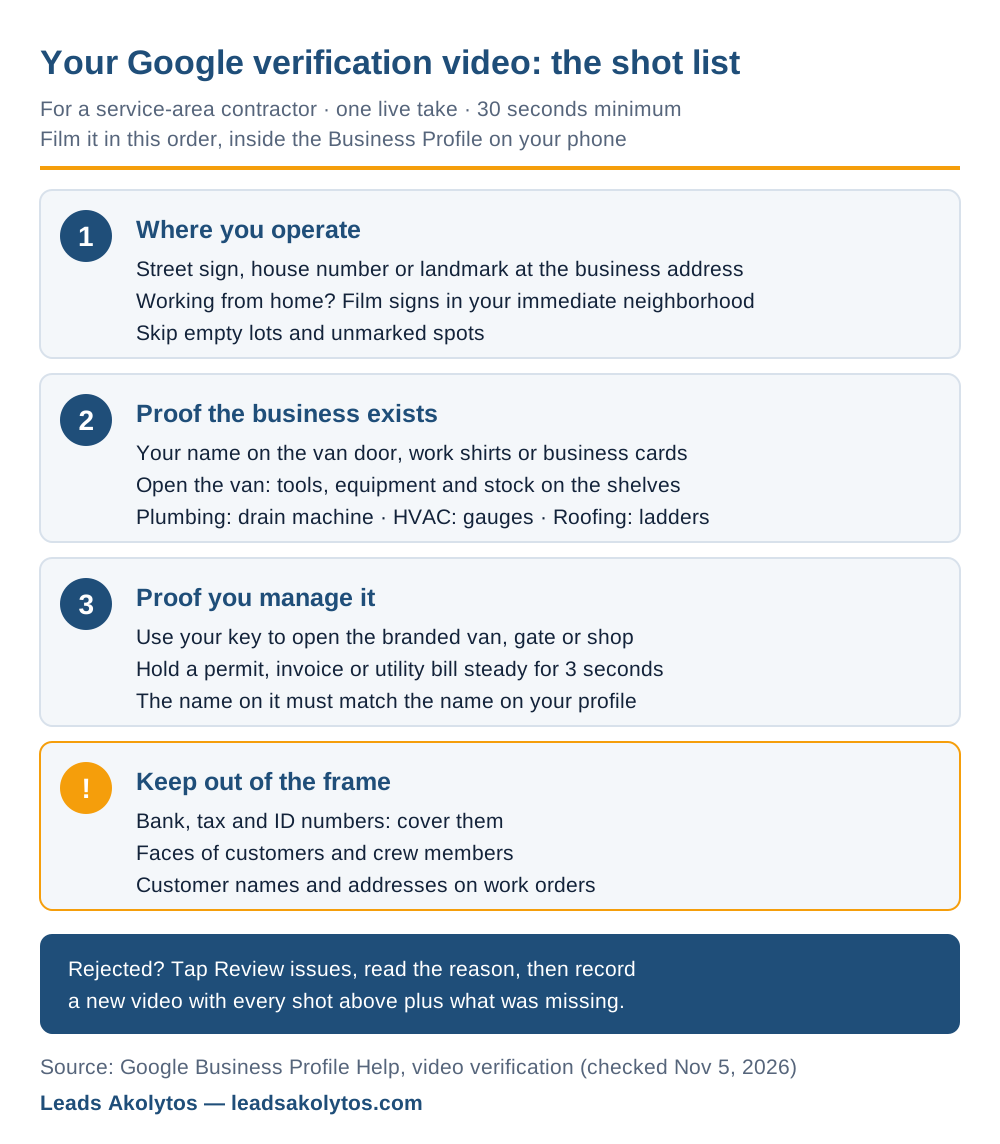
1. Where the business operates
Start at the business address. Film a street sign, a house or building number, or a landmark that a reviewer can match on Google Maps. Google says to avoid empty land or unmarked locations. If you run the business from home, Google's own tip is to film landmarks and signs in the immediate neighborhood. A 10-second walk from your driveway to the corner street sign does the job.
2. Proof the business exists
Show what a real company in your trade owns: professional tools, equipment, stock, your workspace, business cards or branded apparel. Open the van or trailer and pan across the shelves. A drain machine, a recovery machine and gauges, a ladder rack with your name on the door: that is what separates a working contractor from a lead-gen listing.
3. Proof you manage it
Google wants to see you doing something only the business can do. Its examples: performing a service, or accessing business-only assets, such as using your key to open a van with your business branding. You can also show a business permit, an invoice or a utility bill that matches the profile name. Hold the paper steady for a few seconds so the name is readable.
What to Keep Out of the Frame
Google's page bans three things in the video. Each one is easy to film by accident in a contractor's world.
- Cover bank account, tax and ID numbers on any document you show.
- Keep customers' and crew members' faces out of the shot. Film alone or point the camera away from people.
- Skip private information about you or anyone else, such as a customer's name and address on an open work order.
The recording rules matter as much as the content. The video must be live and recorded in the Business Profile on a phone. You can't upload a clip you shot earlier, and you can't edit or splice it. One take, start to finish.
What to Film, Trade by Trade
The three required parts stay the same. What proves them changes with the trade. Use these as starting points.
Plumbers
Street sign at the business address, then the van: name on the door, open it with your key, show the jetter, drain machine, fittings bins and pipe rack. Close on an invoice or your plumbing license with the business name. Our plumbing marketing page covers what the verified profile should then carry.
HVAC companies
Street sign, then the truck: branded doors, open it with your key, gauges, recovery machine, a refrigerant cylinder rack. A utility bill or invoice in the company name finishes it. See our HVAC marketing page for the profile setup after verification.
Roofers
Street sign, then the trailer or truck with ladders, harnesses, a nail gun and bundles. If you have a yard or shop, open the locked gate on camera. Show a building permit or invoice with your name. More on profile setup on our roofing marketing page.
Cleaning and lawn care companies
Smaller rigs need clearer branding. Film the branded shirts, the equipment trailer or supply caddies, then a business license or invoice. If nothing carries your name, the documents have to do more of the work, so hold them steady and close.
Before You Press Record
Most rejections trace back to a mismatch between the video and the profile. Fix the profile first, then film.
- Make the profile name match the name on the van, shirts and documents. No added keywords or city names.
- Hide the street address if customers don't come to you. Google says not to add it in that case.
- Keep the service area realistic. Google's guidelines say about 2 hours of driving from your base, and they ban virtual offices and mailbox addresses.
- Write the shot list on a card: street sign, van exterior, key in the lock, tools, document. Aim for 60 to 90 seconds.
- Film in daylight with a charged phone and a decent signal.
- Sign in with the Google account that owns or manages the profile.
If you recently changed the business name, address or category, sort that out before you verify. Our guide on changing your profile category explains why one change at a time is safer.
How to Record and Upload It
Google's steps, from the help page:
- Open your Business Profile on your phone and tap Get verified.
- Tap Business video, then Next.
- Read the requirements and allow camera, microphone and location access.
- Tap Start recording, film your shot list, then stop.
- Watch it back. Tap Try again if a shot is missing or blurry.
- Tap Upload video.
Google says review takes up to 5 business days. Sterling Sky, a local SEO agency, wrote in a March 2026 guide that uploads are often buggy, that a shorter 60 to 90 second video can help when one won't go through, and that you shouldn't upload a second video while the first is still in review. That is their field experience, not Google policy, but it matches what owners report.
If Google Rejects the Video
A rejection is a list of missing pieces, not a verdict on your business. Google shows the reasons under Review issues on your profile. Its examples include no nearby area shown and missing proof of authorization to operate the business.
- Tap Review issues and write down every reason listed.
- Record a new video that repeats everything from the first one and adds the missing shots. Google asks for exactly that.
- Check the profile in the Google Maps app every day while you wait. Sterling Sky notes that rejection notices don't always arrive by email.
- If a different method appears, such as a live video call, use it. Google says the live call happens during business hours with a representative.
- If you run out of options, Google's help page asks you to try every available method before contacting support.
Do not create a second profile to start over. That is a duplicate, and it is one of the fastest routes to a suspension. Our post on what to do when Google suspends your profile covers that side.
After You're Verified
Verification is the entry ticket, not the finish line. Once you have it, spend an hour on the parts that decide whether the profile rings your phone: categories, services, hours, photos and reviews. Our Google Business Profile checklist walks through each one.
Two more things to watch. Google may ask you to verify again after you change key details such as the name, address or category. BrightLocal also reported (article updated May 2026) that Google emailed owners in March 2026 saying it may contact the verified phone number by call, text or WhatsApp to confirm details. Keep that number one you actually answer.
Frequently Asked Questions
How long does the Google verification video need to be?
Google's minimum is 30 seconds, in one continuous take. Most contractors can cover the street sign, the van, the tools and a document in 60 to 90 seconds. Longer is fine as long as every shot has a purpose.
Can I record the video ahead of time and upload it later?
No. Google says the video must be recorded live through your Business Profile on a mobile device. A clip from your camera roll, an edited video or a pre-recorded walkthrough will not be accepted.
I work from home and have no signage. How do I pass?
Film the street signs and landmarks near your home, which is Google's own tip for home-based businesses. Then let the van, tools and a document in the business name prove the rest. Keep the home address hidden on the profile if customers don't come to you.
Can my office manager record it instead of me?
Google's page doesn't say the owner must film it. It says the video is recorded through the Business Profile, so whoever records it needs access to the profile on their phone and access to the van, tools and documents. Keep faces out of the shot either way.
How long does Google take to review the video?
Google says up to 5 business days. If nothing has changed after a week, check the Maps app for a Review issues notice or a new Get verified button.
Should I pay someone to verify my profile?
Usually not. Nobody can film your street, your van and your documents for you, and nobody outside Google controls the decision. Paying for help makes sense only if the profile itself has problems, such as a keyword-stuffed name or duplicate listings, that need fixing first.
Want a Second Look?
You can do every step above yourself this week. If you'd rather have someone go over your profile and your local SEO and map setup with you before you record, Leads Akolytos offers a free 30-minute strategy call. We work only with home service contractors, with no setup fees and no long-term contracts. You can book a time here.
Want this handled for you?
We do this work for home service contractors every day, month-to-month, with no contracts. Book a free 30-minute call and we'll show you where you stand on Google.
Book my free call