
Your HVAC office closes for Thanksgiving, your on-call tech is still taking no-heat calls, and your Google Business Profile says nothing about either. A homeowner sees your regular hours, calls, and gets voicemail. Or Google shows you as closed while your tech sits ready with an empty board. Holiday hours take 10 minutes to enter, and in heating season they decide whether the emergency call reaches you or the next company on the map.
The Short Answer: How to Set HVAC Holiday Hours on Google
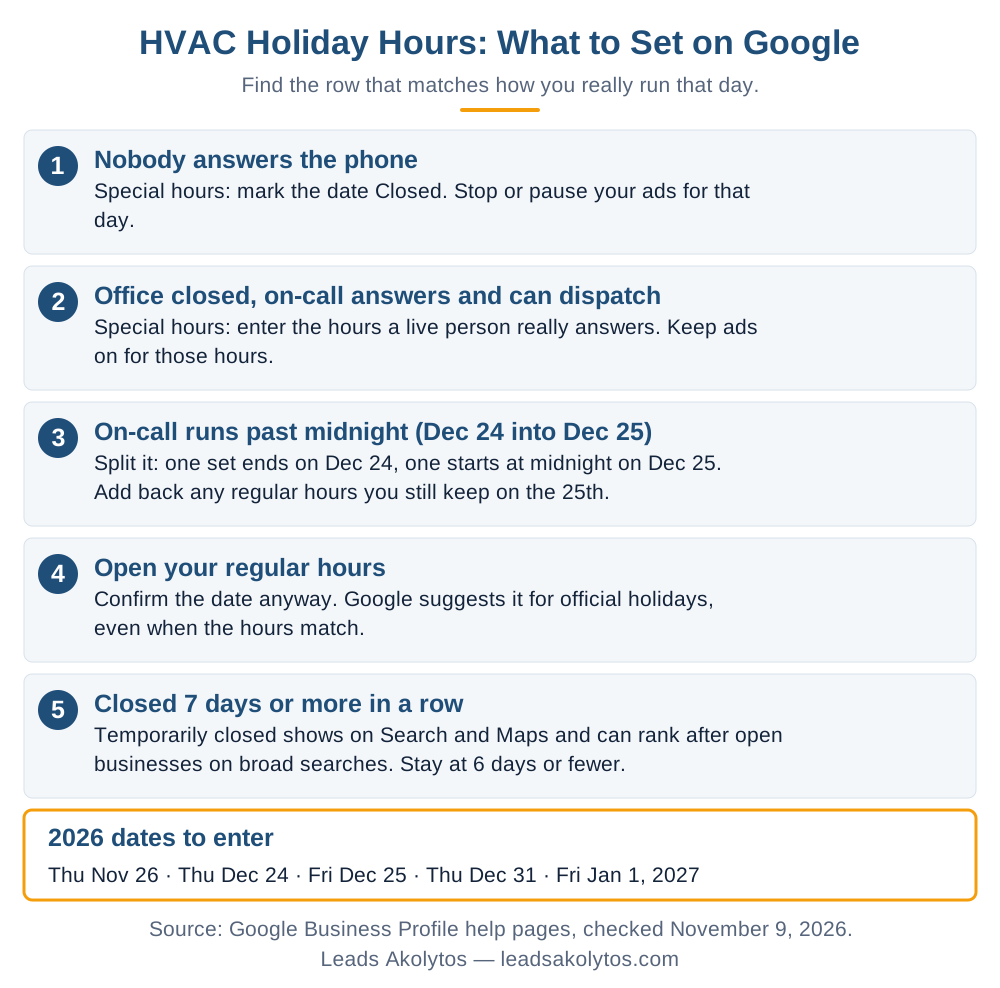
Enter each holiday as Special hours in your Google Business Profile, and enter the hours a live person really answers the phone, not the hours your office is open. If your on-call tech answers and can dispatch, show those hours as open. If nobody answers, mark the date Closed. Keep any closure to 6 days in a row or fewer, because a longer one means "Temporarily closed", which can push you below open competitors on broad searches. Then change your Local Services Ads schedule to match, since missed calls inside your hours and ad schedule can be billed. Do it this week: Thanksgiving is November 26, 2026.
Which Dates to Enter for the 2026 Holidays
Five dates cover most HVAC shops this season: Thursday, November 26 (Thanksgiving), Thursday, December 24, Friday, December 25, Thursday, December 31 and Friday, January 1, 2027. Add the Friday after Thanksgiving if you run a skeleton crew that day.
Enter a date even when your hours do not change. Google's special hours page says it is a good idea to confirm hours for official holidays even when they match your regular hours, because it shows customers the hours are accurate. For a homeowner with a dead furnace on Christmas Eve, that confirmation answers the question they are about to call and ask.
Google publishes no cutoff for how far ahead to enter them. BrightLocal's opening hours guide (updated October 2025) notes edits can take time to be checked and published, so do not leave it for the night before.
How to Enter Special Hours, Step by Step
Special hours live inside the Hours section of your profile and take a few minutes per date. Google's steps:
- Open your Business Profile and choose Edit profile, then Hours.
- In the Business hours section, click the edit icon next to Special hours.
- Pick a suggested date or add a custom one.
- Check Closed, or uncheck it and enter opening and closing times.
- Click Save.
Three rules catch HVAC owners out, all on the same Google page:
- Your profile must be set to "Open with main hours". Special hours do not show otherwise. A shop that chose "Open with no main hours" gets no holiday hours on its profile. Our post on whether an HVAC profile should say open 24 hours covers that setting.
- One set of hours cannot exceed 24 hours. On-call coverage from the evening of December 24 into the morning of December 25 needs 2 sets: one ending on the 24th and one starting at midnight on the 25th.
- That second set replaces your regular hours for the 25th. If you also work later that day, add those hours back as another set.
What to Show When the Office Is Closed but On-Call Is Running
Show the hours when a live person answers and can send a truck, whatever the office is doing. Google's Business Profile guidelines ask for customer-facing hours and say to use special hours for holidays. They have no rule for on-call or emergency-only hours, so the honest test is what happens when a homeowner calls. If your tech picks up at 9 p.m. on Thanksgiving and can dispatch, you are open at 9 p.m.
The ranking reason to get this right is real. Google's Search Liaison said in 2023 that openness had become a stronger local ranking signal for non-navigational searches, according to Search Engine Journal. A profile marked closed all day can lose ground on "furnace repair near me" that day, even when your on-call tech is free. Google also advised against listing false hours, and more calls to a voicemail box do you no good.
One shortcut does not work. BrightLocal reports that the "More hours" fields, such as a line for emergency service, do not change the open or closed status shown in search. Put holiday coverage in Special hours instead.
When the Whole Shop Shuts Down: The 6-Day Limit
Keep any closure to 6 days in a row or fewer so you can stay on Special hours. A longer closure means Temporarily closed, and Google's closure page says temporarily closed businesses can rank after open businesses on broad queries. Your profile also displays "Temporarily closed" on Search and Maps.
Google's two pages differ slightly: one says use temporarily closed for 7 or more days, the other for more than 7. Stay at 6 and the difference does not matter.
The 2026 calendar makes this easy to trip over. Closing from December 24 through January 1 is 9 days. An HVAC company that shuts for that stretch would show as temporarily closed through the coldest part of the season. Answer calls for one real day in the middle, such as Monday, December 28, and you split it into 2 short closures that both fit under Special hours. Only do that if someone truly answers that day.
What Holiday Hours Do to Your Local Services Ads Bill
Your hours and your ad schedule together decide which missed calls you can be charged for. Google's How leads work page, checked November 9, 2026, says a missed call during business hours is charged if the caller stays on the line more than 20 seconds, voicemail counts as connected, and unanswered calls are charged only inside both your active ad schedule and your business hours.
Google's page defines business hours as the hours on your Business Profile, but it does not say how special hours are treated. Do not assume a date marked Closed protects you. Change the ad side as well:
- Custom ad schedule: Local Services Ads scheduling offers All day, business hours only, or custom weekdays and times. Custom works by weekday, not by date, so set it for that week and change it back.
- Pause: Google's lead management page says to flip the status toggle under Profile & budget if you are away or too busy. It also says a free version of your listing may still appear.
- Check the Business hours card too: Google says that outside business hours, or when you are listed as not taking customers, your ad will not show with a badge.
- Already moved to Google Ads: Google's transition page says profile hours sync one way into Google Ads within 24 hours, the ad schedule is set separately under Settings, and you pause by setting the campaign status to Paused. Our guide to the Local Services Ads move covers the rest.
Watch your budget as well. Google says once you hit your monthly max, your ad stops for the rest of the month unless you raise it. A cold snap in the last week of December is a bad time to find that out.
What to Do With the Phones So Holiday Hours Hold Up
Your hours only work if the phone does what they promise. Run this the week before each holiday:
- Call your business line from another phone at the hours you listed.
- Forward the line to the on-call tech, and test the forward.
- Record a holiday greeting with your hours and your next open day.
- Tell CO alarm callers to get outside and call 911, the CPSC's instruction.
- Put the same hours on your website, your emergency page and your other directory listings.
- Give your answering service the on-call schedule and the holiday rate, if you charge one.
Our post on answering service or answering it yourself compares the options, and the cost breakdown has the published prices. BrightLocal also warns that Google can accept hours changes suggested by users or pulled from sites like Yelp and Facebook, so check your profile the morning of each holiday.
What It Costs to Cover a Holiday, and How to Check It Pays
Covering a holiday pays when one or two real emergency calls beat what you spend on coverage. Run it on your own numbers:
- Add up on-call pay, any holiday premium and any extra answering service minutes.
- Divide by your average gross profit on an emergency call.
- The answer is how many calls you need that day.
- Compare that to the calls in your log from last year's holidays.
On pay, the Department of Labor's Fact Sheet 22 says an employee required to stay on call at home is, in most cases, not working while on call, though added constraints on their freedom could make that time paid. Time on an actual call is work. The federal law does not require pay for holidays not worked, so holiday pay is a matter of agreement. State rules can differ, so check yours before you set the rotation. The BLS Occupational Outlook Handbook puts the median HVAC technician wage at $29.33 an hour (May 2025) and notes technicians may be on call for emergencies, so a good tech will expect a clear answer on this.
If the math does not work, closing is a fair call. Mark the date Closed, stop the ads and say so on your greeting. A clean closed day costs you less than a false open one. For the year-round plan around this, see our HVAC SEO strategies guide and the HVAC marketing page.
Frequently Asked Questions
Do holiday hours on Google hurt my HVAC company's ranking?
Entering them correctly is normal use of the profile. The effect comes from being shown as closed: Google uses openness as a local ranking signal, so a date marked closed can lose ground on searches made that day. That is a reason to show true on-call hours, not a reason to list hours nobody covers.
Should I use Special hours or Temporarily closed for Christmas week?
Use Special hours for 6 days in a row or fewer. Use Temporarily closed only for a longer closure, since Google says those businesses can rank after open ones on broad searches.
Will Google charge me for missed Local Services Ads calls on a holiday?
Unanswered calls are charged only inside both your business hours and your active ad schedule. Google's page does not say how special hours count, so change your ad schedule or pause the ad for any date nobody answers, then check your lead inbox afterwards.
Do I have to enter hours if I am open as usual on a holiday?
You do not have to, but Google suggests confirming official holidays even when the hours match, because it tells customers the hours are accurate.
Do special hours go back to normal by themselves?
Special hours are tied to the date you enter, so your regular hours apply on other dates. Check your profile after each holiday anyway, including the split set you made for any overnight on-call shift.
Facts in this article were checked on their sources on November 9, 2026: Google's Business Profile special hours, closure and guidelines pages, Google's Local Services Ads lead, scheduling and visibility pages, Google's Local Services Ads transition page, Search Engine Journal's December 15, 2023 report on openness, BrightLocal's opening hours guide (updated October 2025), the CPSC, the Department of Labor (Fact Sheet 22, revised July 2008) and the BLS Occupational Outlook Handbook.
Want a Second Look?
Everything above is something you can do yourself this week. If you would rather go over your holiday hours and call handling with someone, Leads Akolytos offers a free 30-minute strategy call; we work only with home service contractors, with no setup fees and no long-term contracts. You can book a time here.
If you'd like one practical idea like this in your inbox each month, get The Leads Akolytos Monthly: one email a month, unsubscribe any time.
Want this handled for you?
We do this work for home service contractors every day, month-to-month, with no contracts. Book a free 30-minute call and we'll show you where you stand on Google.
Book my free call