A text lands on your business line: "Google Maps" wants you to confirm your hours, or a recorded voice asks whether you still offer drain cleaning. Plenty of calls that claim to be Google are scams, so the natural move is to ignore it. But since March 2026 Google really does contact businesses this way, and whatever you answer can end up on your Business Profile, the listing that sends you calls from Maps. Ignore the wrong one and you lose nothing. Answer a real one carelessly, or let a scammer walk you through "verifying" your listing, and the profile your phone depends on takes the hit.
Google Texts to Confirm Business Details: The Short Answer
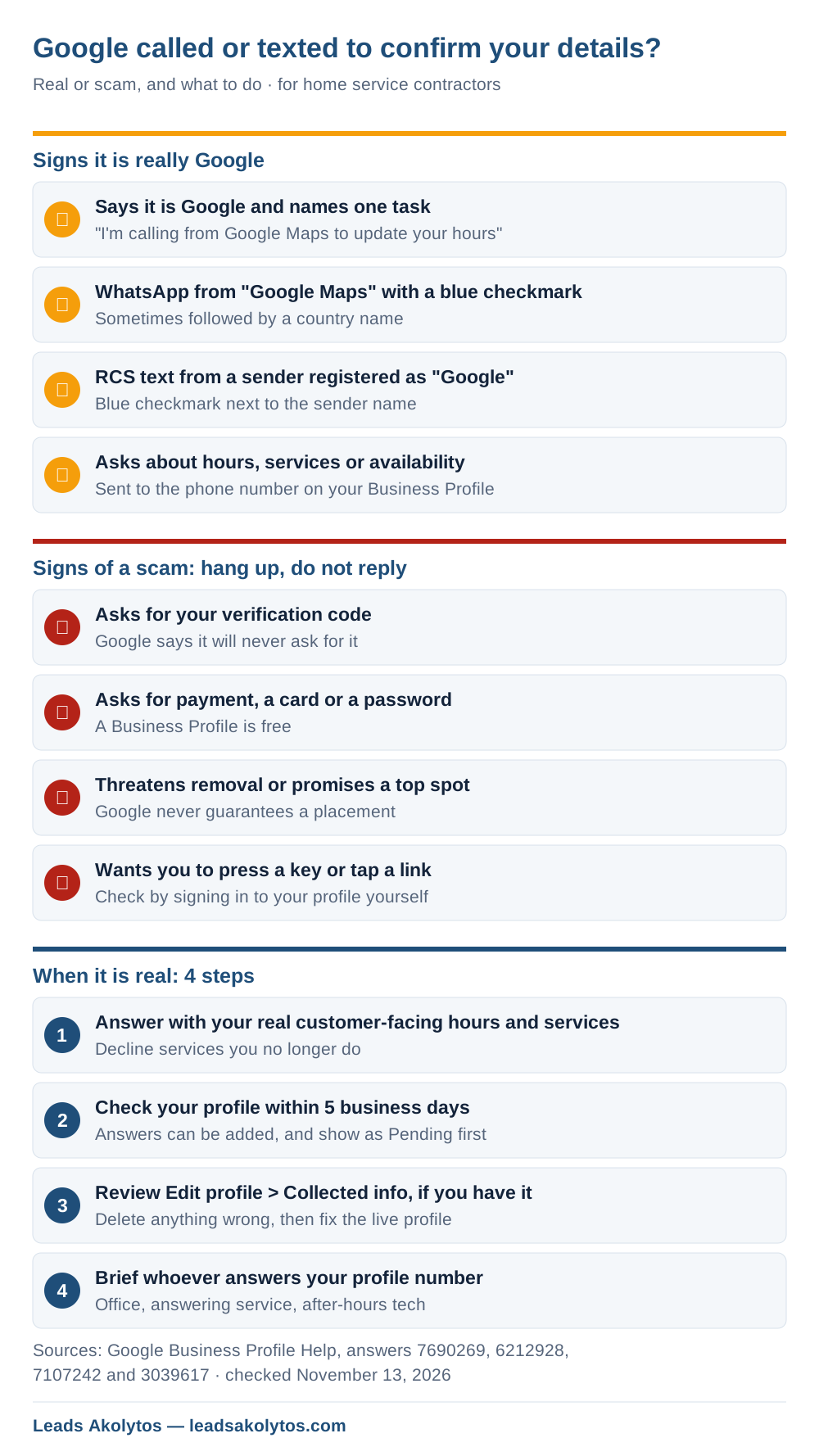
It can be real. Google says it may call, text or send a WhatsApp message to the phone number on your Business Profile to confirm details like your hours or the services you offer, and that the answers, photos and posts you send back may be added to your profile. A real Google contact says it is Google and why it is calling, never asks for payment, passwords, verification codes or sign-ups, and arrives on WhatsApp from a "Google Maps" account with a blue checkmark or on RCS from a sender registered as "Google". Anything else, hang up or don't reply. When it is real, answer only with facts that match your actual customer-facing hours and services, then check the edit on your profile within a week.
What Google Actually Sends, and to Which Number
Google contacts the phone number listed on your Business Profile, by automated call, text or WhatsApp. Its help page on automated calls and texts lists the reasons:
- Confirming business details such as hours or whether a service is available.
- Calling on behalf of customers, for example to book an appointment.
- Mapping your phone menu, if you use one.
Google announced the details-confirmation part in a March 2026 email to profile owners, reported by Search Engine Roundtable on March 31, 2026. The email said Google may reach out "via call, text, or WhatsApp to the verified phone number" on the profile.
Two limits matter. Google says these calls are recorded for quality, and the feature is not offered everywhere: in the US it is unavailable in Indiana, Louisiana, Minnesota, Montana and Nebraska. If your profile number is in one of those states, an automated "Google" call about your listing deserves extra suspicion.
Your Answer Can Change Your Listing
Treat a real Google message like an edit to your profile, because that is what it is. Google says information you provide during these calls or texts, including photos and posts, may be added to your Business Profile. Updates show as "Pending" and can take up to 5 business days to review. Google may also post on your behalf, and it emails you so you can review or remove what it added. This applies only to verified profiles.
The March email added a warning: what you share must follow Google's content policies, and violations can lead to a suspension that takes an appeal to reverse. For a contractor that means a careless answer is not harmless. Tell the bot you are "open 24/7" when nobody answers at 2 a.m., and you have published hours your phone does not keep. The first customer who calls at 2 a.m. finds out. Our post on why Business Profiles get suspended covers what that costs and how appeals work.
How to Tell Real Google From a Scam Caller
Real Google contact identifies itself and states one task. Google's page on fraudulent calls and texts gives the tests:
- Calls: the caller says it is Google and why, for example "I'm calling from Google Maps to update your business hours." Google says it never asks for payment information by phone and never guarantees a special placement.
- WhatsApp: the account is named "Google Maps", sometimes followed by a country name, with a blue verification checkmark.
- RCS texts: a blue checkmark next to the sender, and the registered business name shows as "Google".
- Never: Google says it will not ask you to sign up for a service, pay money or share private information.
Add one rule from Google's verification page: "Google will never ask for your verification code." A caller who says your listing is about to be suspended and needs the code Google just texted you is trying to take over your profile. If a call fails any test, hang up without pressing a button; Google warns that pressing keys can bring more scam calls. If a text fails, don't tap the link. To check something that might be real, sign in to your profile yourself rather than using anything in the message.
Who Picks Up Your Profile Number Matters
Google calls whatever number is on the profile, and for many contractors that is not the owner. It might be the office manager, an answering service, a tech's cell after hours or a call tracking number that forwards to any of them. Whoever picks up is now editing your Google listing.
- Tell everyone who answers that line that Google may call or text to confirm hours and services.
- Give them your exact public hours, your service list and your service area on one card.
- Tell them to say "please send that by text" or take a message if they are unsure, rather than guess.
- Give your answering service the same card and a rule: never read out any code.
This is also a reason to keep a number on the profile that a person you trust actually answers. Google's March email named the verified profile number, so a number that rings into a dead voicemail box means Google confirms your details with nobody.
What to Answer: Hours, Services and Service Area
Answer with what a customer will actually get, in plain words. Google is checking facts, not taking a sales pitch.
- Hours: give your regular customer-facing hours. If you take emergency calls at night, that is a separate question; our post on whether to list 24-hour hours walks through it for HVAC and plumbing shops.
- Services: confirm the ones you do and decline the ones you don't. A plumber who stopped doing well pumps should say no, or the profile keeps sending those calls.
- Photos: send only real photos of your work, trucks or team. Google says photos you send may be posted.
- Anything else: if the question is about something you would not put on your profile, don't answer it.
Then check the result. Within 5 business days, open your profile and look at the hours and services. If an answer went in wrong, edit it back from the profile.
Check What Google Collected About You
Google added a Collected info section in June 2026 that shows what it gathered from the web and from these calls and texts, with the source and date of each item. Google's edit your profile page gives the steps:
- Open your Business Profile and select Edit profile.
- Select Collected info.
- Check each item, with its source and date.
- Select Delete on anything wrong, then confirm.
Google says the section is only available in select regions, languages and business categories, so you may not see it yet. Deleting an item removes it from Google's records but does not change details already on your profile, so fix the live profile too.
How to Turn the Automated Messages Off, and Whether You Should
You can stop them in three ways, according to Google's help page:
- On a call, say so, for example "Please stop calling my business."
- On a text or WhatsApp, reply STOP.
- In the profile, go to More > Business Profile settings > Advanced settings, and under "Google automated calls and text messages" turn off bookings and inquiries, keeping your profile up to date, or posting on your behalf. This needs a verified profile.
Google says you may still get occasional manual calls to confirm your information after opting out. Whether to turn it off depends on who answers your line. If the number rings a person who knows your hours, leaving "keeping your profile up to date" on costs little. If it rings a busy answering service or a tech in the field, turning off the automated updates removes a way for someone else to change your listing, and you can keep the profile current yourself.
Report a Fake Google Caller
Pretending to be Google to sell a "listing service" is illegal, not just annoying. The FTC's Impersonation Rule (16 CFR Part 461, in effect since April 1, 2024) bans impersonating a business. Google's fraud page lists where to report:
- Google's webform for calls pretending to be Google, linked from its fraud page, with the caller's company, number and anything they sent you.
- Forward scam texts to 7726 (SPAM).
- File with the FTC at ReportFraud.ftc.gov.
Frequently Asked Questions
Does Google call businesses to confirm their hours?
Yes. Google says it may make automated calls, texts or WhatsApp messages to the phone number on your Business Profile to confirm details such as hours or available services. A real call says it is from Google and states the reason.
Will Google ever ask for my verification code on a call?
No. Google's verification page says Google will never ask for your verification code and tells owners not to share it with anyone, even people who manage the profile. Anyone asking for it is trying to take over the listing.
Can my answer to a Google text change my Business Profile?
Yes. Google says the information, photos and posts you provide may be added to your profile. Updates show as pending for up to 5 business days, and Google emails you so you can review or remove them.
Should I turn off Google's automated calls and texts?
Turn off "keeping your profile up to date" if your profile number rings someone who does not know your exact hours and services, such as an answering service. Leave it on if a person you trust answers and you check the profile afterwards.
What if the caller says my listing will be removed unless I pay?
Hang up. A Business Profile is free, and Google says it never asks for payment by phone or guarantees a placement. Report the call through Google's webform and to the FTC.
Facts in this article were checked on their sources on November 13, 2026: Google Business Profile help pages on automated calls and texts, fraudulent calls and texts, verification and editing your profile; Search Engine Roundtable's reports of March 31, June 22 and August 3, 2026; and the FTC's Impersonation Rule.
If you have not checked your profile in a while, the searches list in the Performance report is the next place to look, and our local SEO page explains how the profile fits with the rest of your Maps visibility.
Want a Second Look?
You can do every step here yourself in an afternoon. If you would rather go through your Business Profile with someone, Leads Akolytos offers a free 30-minute strategy call; we work only with home service contractors, with no setup fees and no long-term contracts. You can book a time here.
If you'd like one practical idea like this in your inbox each month, get The Leads Akolytos Monthly: one email a month, unsubscribe any time.
Want this handled for you?
We do this work for home service contractors every day, month-to-month, with no contracts. Book a free 30-minute call and we'll show you where you stand on Google.
Book my free call