You paid for a new website, it launched, and the phone got quieter. That is the worst way to find out that a redesign changed more than the look. Before you argue with your developer, find out which kind of drop you have, because the fixes are different and one of them fixes itself.
Why Contractor Website Traffic Drops After a Redesign: The Short Answer
Most post-redesign drops come from four faults: old page addresses that now return "not found" or point to the wrong page, a block left over from the build stage (noindex or robots.txt), service and city pages that were merged or deleted, and titles and page text that were rewritten without checking what ranked. A small dip for a few weeks is normal. Google says URL changes cause fluctuations while it recrawls, and that a medium-sized site can take a few weeks to settle. A sharp drop that lasts past that, or one that hits your service pages, means a fault you can find and fix.
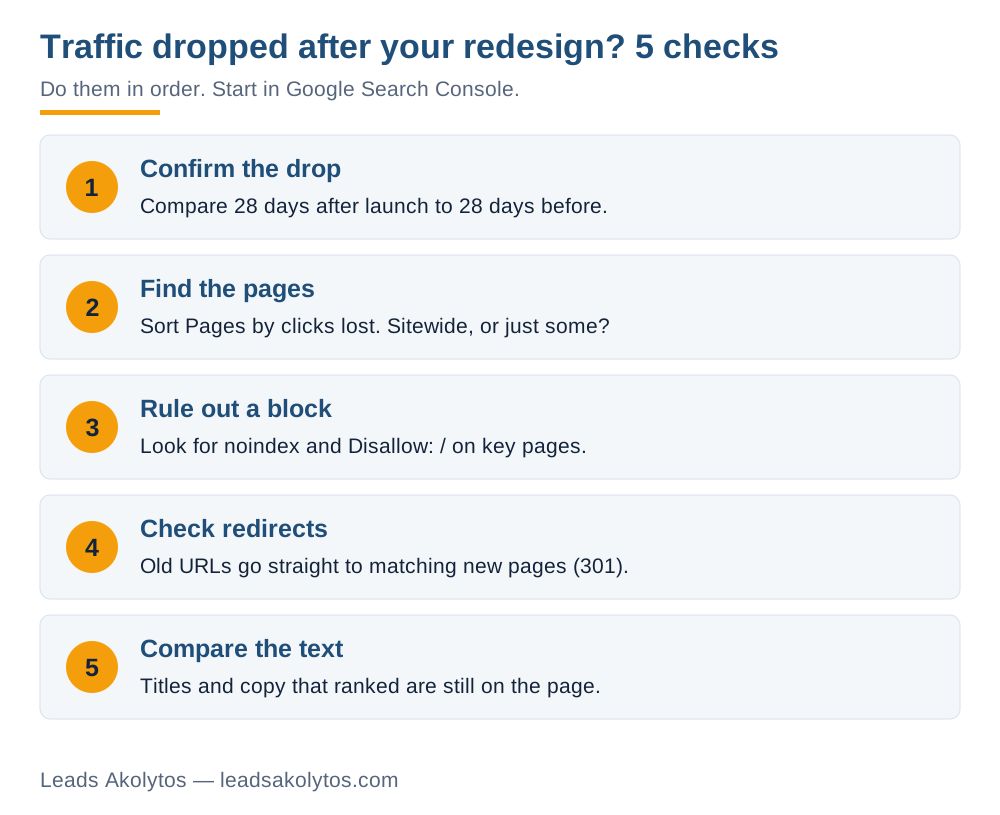
The order matters. Confirm the drop is real, see which pages lost traffic, then check blocks, redirects and content, in that order. Each step below takes minutes and needs only Google Search Console, which is free.
Step 1: Confirm the Drop Is Real
Do not trust one dashboard. A new build often loses the analytics snippet, so the chart falls while Google traffic did not.
- Open Search Console, then Performance. Set the date range to 16 months so seasonality shows. HVAC and roofing swing hard by month, and a December dip is not a redesign problem.
- Use the Compare tab: the 28 days after launch against the 28 days before.
- Read impressions and clicks together. If both fell, Google is showing you less. If impressions held and clicks fell, your titles and snippets are weaker than before.
- Check the Data Anomalies note on that page, since a logging error can fake a drop.
This is the sequence Google lays out in its guide to debugging search traffic drops. If Search Console is flat and only your analytics fell, you have a tracking problem, not a ranking one. Ask your developer to confirm the tracking code and your call-tracking number are on every page.
Step 2: Find Which Pages Lost the Traffic
In the same Performance report, open the Pages tab with the comparison on, and sort by the clicks difference. Two patterns tell you where to look next:
- Everything fell together. That points to something sitewide: a block, a broken redirect rule or a server problem. Go to Step 3.
- Specific pages fell hard. Your service pages, your city pages or your blog posts. That points to pages that were moved, merged or rewritten. Go to Steps 4 and 5.
Write down your top ten pages by clicks before the launch. You will use that list three times.
Step 3: Rule Out a Block
Developers keep a new site out of Google while they build it. If that setting ships to the live site, Google obeys it. Check robots.txt for "Disallow: /", view the page source of a service page for "noindex", and run URL Inspection in Search Console, which reports "Indexing allowed?" for any page you paste in. Our guide to whether your site is blocking Google walks through all five checks in about 15 minutes.
The Page indexing report matters most here. Google's help page lists the labels to look for: "URL marked 'noindex'", "URL blocked by robots.txt", "Not found (404)", "Redirect error" and "Soft 404". A long list under any one of them is your answer.
Step 4: Check the Redirects, the Most Common Cause
A redesign usually changes page addresses. "/services/water-heater-repair/" becomes "/water-heaters/". Google has the old address in its index, other sites link to it, and customers have it bookmarked. If nothing points the old address to the new one, it returns "not found", and the rankings built on that address go with it.
Google's guide to site moves with URL changes sets the standard. Hold your developer's work against it:
- Every old address gets a permanent redirect (301 or 308) to its matching new page.
- Each old address goes straight to its final destination. Keep any chain short, ideally no more than three hops.
- Do not send many unrelated old pages to the home page. A "water heater repair" page that lands on the home page is a mismatch, and Google treats it as one.
- Keep the redirects in place for at least a year.
- Test them with a crawler or the URL Inspection tool, not by clicking three links.
To find what you lost, take your top-ten list from Step 2 and paste each old address into a browser. Each one should land on the matching new page. A "page not found" or a jump to the home page is a missing or wrong redirect. For pages beyond the top ten, Google suggests building the old list from your old sitemap, server logs, analytics and the Search Console links report. The Page indexing report also shows "Not found (404)" with example addresses, capped at 1,000 rows.
Contractor sites have one repeat offender: city and service-area pages. A roofer with eight town pages gets a new site with one "service areas" page. Those eight addresses were what ranked for "roof repair + town". With no redirect and no replacement pages, the searches for each town now go to whoever else has a page for it.
Step 5: Compare What the Pages Say Now
A redesign often comes with new copy. Shorter pages look cleaner, and a designer may cut a 900-word service page to 150 words and a headline. If the old page ranked, you cut the reason it ranked.
- Open the old version of a top page. The Internet Archive's Wayback Machine often has a copy.
- Compare title tag, main heading, the first paragraph and the questions the page answered.
- Restore what was cut: the city name, the service name, the sections that answered customer questions.
Do not copy the old page back word for word if the design cannot hold it. Put the substance back. If the new pages are slower, look at site speed and Google's page experience metrics, since a heavy new design can cost you there too.
What the Drop Costs You
Put a number on it so you can decide how hard to push. Use your own figures:
- Clicks lost per month, from Search Console (before minus after).
- Share of visitors who call or fill out a form. Your call tracking or form count gives it.
- Share of those leads you book.
- Your average ticket.
Example with round numbers, not a benchmark: 300 clicks lost, 5 in 100 visitors call, 4 in 10 calls book, $400 average job. That is 300 x 0.05 x 0.4 x $400 = $2,400 a month of booked work. Put your own numbers in. If the result is a few hundred dollars, a slow, careful fix is fine. If it is thousands, fix redirects this week. Our missed-call calculator handles the other side of the same math.
The Fix Order and How Long Recovery Takes
Fix in this order, because each step makes the next one count:
- Remove any block (robots.txt, noindex, a WordPress search-visibility setting).
- Add the missing redirects for your top pages first, then the rest.
- Restore deleted city and service pages, or redirect each to the closest match.
- Restore titles, headings and the text that answered customer questions.
- Submit your updated sitemap and use "Validate fix" on the Page indexing issue.
Google says report validation typically takes up to about two weeks, and suggests waiting a few weeks after a change before you re-read Search Console. Rankings that moved because of URL changes return as Google recrawls; for a medium-sized site Google says that takes a few weeks or more. Our post on how long contractor SEO takes covers the longer clock. If traffic is back but calls are not, the problem moved: see ranking well but not getting calls.
What to Ask Your Developer
Keep it factual. You are asking for evidence, not an apology.
- Show me the redirect map from old addresses to new ones.
- Which old pages have no redirect, and why?
- Was the staging site password-protected, and was that removed at launch?
- Did the launch checklist include robots.txt, noindex and a sitemap?
- Are the analytics and call tracking firing on every page?
If these questions have no answers, the project probably never planned for them. Our website redesign contract checklist shows what to put in writing next time, and the redesign cost guide shows what you should expect to get for the money. Run the free website lead audit on your new home page for a quick read on what else may be leaking leads.
Frequently Asked Questions
Is a traffic drop after a website redesign normal?
A short dip can be. Google says URL changes cause ranking fluctuations while it recrawls the site, and a medium-sized site may take a few weeks or more. A drop that is sharp, sitewide or lasting past that window points to a fault such as missing redirects or a leftover block.
How long should I wait before I worry?
Start the checks in the first week, since they are free and fast. Wait for results after you fix something: Google suggests a few weeks before re-analyzing, and report validation takes up to about two weeks.
Do I need 301 redirects if I only changed my design?
Only if page addresses changed. If every address is identical, you do not need redirects. Compare your old and new addresses for your top pages to find out. Most redesigns change at least some.
Will redirecting every old page to my home page fix it?
No. Google advises against sending many unrelated old URLs to one page such as the home page. Send each old page to the closest matching new page.
How long should I keep redirects in place?
Google says to keep them as long as possible, and at least a year, so ranking signals can transfer to the new URLs.
Facts in this article were checked on their sources on November 19, 2026: Google's guide to debugging search traffic drops, its guide to site moves with URL changes, and the Search Console Page indexing help page.
Want a Second Look?
You can run these checks yourself in one sitting. If you would rather go through the results with someone, Leads Akolytos offers a free 30-minute strategy call; we work only with home service contractors, with no setup fees and no long-term contracts. You can book a time here.
If you'd like one practical idea like this in your inbox each month, get The Leads Akolytos Monthly: one email a month, unsubscribe any time.
Want this handled for you?
We do this work for home service contractors every day, month-to-month, with no contracts. Book a free 30-minute call and we'll show you where you stand on Google.
Book my free call