
The Short Answer
The website speed optimization cost for a contractor site typically runs $500 to $3,000, or $50 to $150 per hour if billed hourly, depending on how outdated the site is and how many pages need fixing.
That one-time fix does not stay fixed on its own — every new plugin, image, or page you add can slow the site back down, which is why most agencies now bundle ongoing speed and technical SEO monitoring into a monthly plan instead of selling it as a single project.

Why Site Speed Costs Money At All
Google evaluates every website against three Core Web Vitals metrics: Largest Contentful Paint (how fast the main content loads, target under 2.5 seconds), Interaction to Next Paint (how fast the page responds to a tap or click, target under 200 milliseconds), and Cumulative Layout Shift (how much the page jumps around while loading, target under 0.1).
Google measures these at the 75th percentile of real visitor sessions — not a single lucky test run — which is why a site can “pass” a quick PageSpeed check and still perform poorly for most actual visitors on a slow phone connection at a job site or in a driveway.
Fixing these numbers usually means compressing images, removing bloated page-builder code, deferring scripts that block rendering, fixing server response time, and cleaning up plugins — work that requires either developer time or specialized tools, which is why it isn’t free.
What Actually Drives the Website Speed Optimization Cost Up or Down
Two contractor sites can get wildly different quotes for what sounds like the same job, and the website speed optimization cost swings on a handful of concrete factors. The variables that actually move the number:
- Platform and theme. A modern, lightly-customized WordPress theme is a few hours of work. A heavily customized Divi or Elementor build with dozens of stacked page-builder modules takes longer to clean up, because every visual module adds its own code weight.
- Number of pages and photo galleries. A five-page site is a different job than a site with 40 project photos per city/service landing page — and photo-heavy sites (common for roofing, remodeling, landscaping) are almost always the slower ones.
- Hosting. No amount of image compression fixes a $4/month shared hosting plan that takes 2 seconds just to respond before the page even starts rendering. Sometimes the real fix is a hosting upgrade, not a code fix, and that changes the quote.
- How the quote is scoped. Some quotes cover only the homepage; others cover every indexed page. A quote that only touches the homepage will always look cheaper and accomplish less.
When you’re comparing quotes for the website speed optimization cost, ask specifically which of these four variables the price is based on — a vague flat number without that context is hard to evaluate against another vague flat number.
Why This Matters More for Contractor Websites Than Most
Most contractor websites were built once, years ago, by a local web designer, a template marketplace, or a family member who knew just enough to get something online. These sites are disproportionately likely to have unoptimized images straight from a phone camera, no caching, and page builders stacked with unused modules from a theme demo that was never cleaned up.
They also carry a specific kind of urgency mismatch: someone searching “emergency electrician near me” or “roof leak repair” at night is not a patient browser comparing five tabs. They’re trying to get a phone number as fast as possible and will bounce back to the map pack and call the next result if your site stalls.
A B2B software company’s slow site costs them a lead over days. A contractor’s slow site can cost the lead in seconds, because the searcher has an equally fast alternative one tap away.
Website Speed Optimization Cost: The Three Ways Contractors Actually Pay
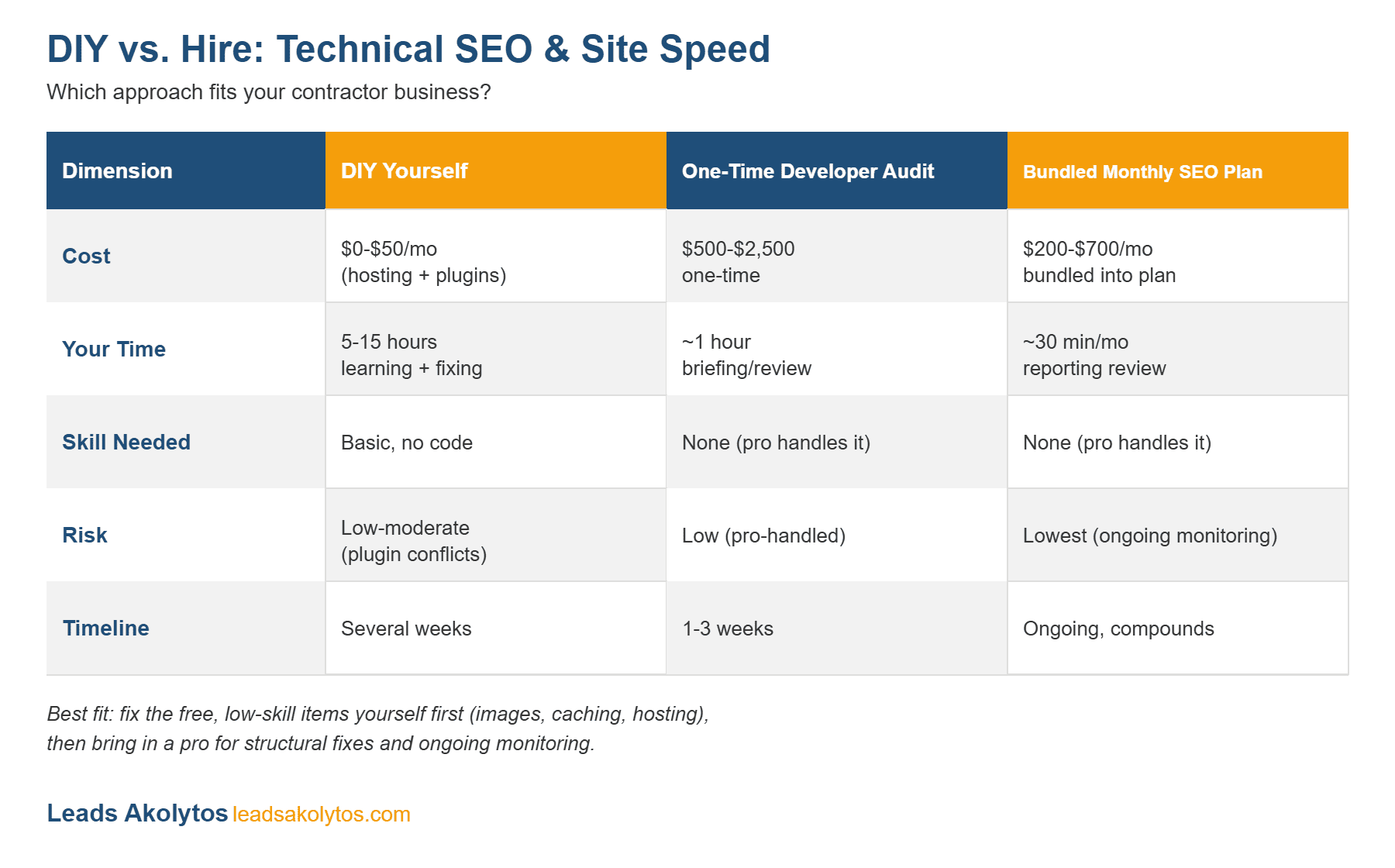
Every generic “site speed pricing” article online quotes a single number. In practice, contractors pay for speed optimization one of three genuinely different ways, and the right one depends on how bad the problem is and whether you want it to stay fixed.
| Option | Typical Cost | Time to See Results | Who It’s Actually For | The Catch |
|---|---|---|---|---|
| DIY with free tools (image compression plugin, caching plugin, PageSpeed Insights) | $0–$50 (plugin licenses) | A few hours of your own time | Owners with a newer site and one or two obvious issues (uncompressed images, no caching) | No one is watching for regressions; the next uncompressed photo you upload undoes the work |
| One-time freelance or agency speed audit and fix | $500–$3,000 project, or $50–$150/hour | 1–3 weeks | Sites with a genuinely broken technical foundation (old theme, no HTTPS, huge images, bad hosting) | A one-time fix has no ongoing monitoring — scores commonly drift back down within months as new content gets added |
| Bundled into an ongoing SEO/technical retainer | Often included at no extra line-item charge inside a monthly plan (e.g. plans starting around $1200/month) | Initial fixes in the first few weeks, then maintained continuously | Owners who also want rankings, content, and leads worked on, not just a speed score | You’re paying for the whole plan, not just speed — not the right fit if speed is your only problem |
The comparison most published pricing guides skip is the third column: a $1,500 one-time fix and a $1200/month bundled plan can produce the same initial PageSpeed score, but only one of them keeps checking your site every time you publish a new blog post or add a new project photo gallery.
What a One-Time Website Speed Optimization Cost Typically Includes
When you pay for a standalone speed project, whether from a freelancer or an agency, the scope usually covers:
- Image compression and resizing across the whole site
- Caching setup (page caching, browser caching, sometimes a CDN)
- Removing or deferring render-blocking scripts and unused plugins
- Server or hosting upgrade recommendations if the hosting itself is the bottleneck
- A before/after PageSpeed Insights or Core Web Vitals report
Sites with a heavily customized page builder, a lot of large project-photo galleries (common for roofing, remodeling, and landscaping sites), or outdated hosting tend to land at the higher end of that range, since more has to be manually rebuilt rather than just compressed.
Why “Cheap and Once” Often Doesn’t Stay Fixed
Speed optimization is not a one-time checkbox the way a logo redesign is. Every new blog post with an uncompressed photo, every new plugin, and every hosting change can quietly push Core Web Vitals scores back down.
A contractor who pays for a one-time fix and never checks the score again typically sees it drift for the same reason a car’s alignment drifts after enough potholes — nothing dramatic happens in one day, but six months later the difference is real.
This is the practical reason more agencies, including ours, fold speed monitoring into an ongoing plan instead of selling it as a single invoice: a static fix on a site that keeps changing has a shelf life, and the true website speed optimization cost includes that ongoing upkeep, not just the initial fix.
A 5-Point Speed Diagnostic Checklist You Can Run Before Paying Anyone
Before you pay a freelancer, an agency, or anyone else to cover the website speed optimization cost of “fixing your site speed,” run this check yourself — it takes about 10 minutes and tells you whether you actually have a speed problem or something else entirely:
- Run your homepage and your top service page through Google PageSpeed Insights. Note the Mobile score specifically — most contractor leads happen on a phone, and mobile scores are almost always worse than desktop.
- Check the LCP, INP, and CLS numbers, not just the overall 0–100 score. A site can score 60 overall but fail on just one metric, which changes what actually needs fixing.
- Look at the “Diagnostics” section for “Properly size images” and “Reduce unused JavaScript” — these two account for the majority of contractor-site slowness we see, especially on sites with big project photo galleries.
- Check Search Console’s Core Web Vitals report (if you have Search Console set up) to see real visitor data over time, not just a single test snapshot.
- Ask what happens after the fix. If a quote doesn’t include any mention of re-checking the score after your next site update, you’re buying a snapshot, not a fix that holds.
If your mobile score is already in the 80s or 90s, the website speed optimization cost you’d pay for a full project likely isn’t justified yet — a couple of image compressions may close the gap. If it’s in the 30s or 40s, that’s a real, fundable problem worth paying to fix properly.
Does Site Speed Actually Affect Contractor Leads?
Yes, and the effect is documented outside of any agency’s own marketing claims. Google’s own research (cited in its Core Web Vitals business impact case studies) found that as page load time goes from 1 second to 5 seconds, bounce probability increases by roughly 90%.
In real company case studies documented by Google: Vodafone improved LCP by 31% and saw an 8% increase in sales; Tokopedia improved LCP by 55% and saw a 23% improvement in average session duration.
Those are large e-commerce and telecom sites, not contractor sites specifically. But the underlying mechanism is the same one that applies to a homeowner searching for an emergency plumber at 8 PM on their phone: a slow site loses the visitor before they ever see your phone number, regardless of how well you rank.
How Leads Akolytos Prices Technical & Speed Optimization
We don’t sell technical SEO and speed optimization as a standalone line item, and understanding the real website speed optimization cost is part of that conversation. We’re upfront about why: a one-time fix on a site that keeps getting new content doesn’t stay fixed.
Instead, our Technical & Speed Optimization service is included in every plan, starting at $1200/month, alongside local SEO, content, and link-building work — so your site’s speed is checked and maintained continuously, not audited once and forgotten. If you specifically want a one-time audit before committing to anything, we’ll do a free speed and mobile-performance check live on a strategy call, no obligation.
If you’re not sure whether your current slowdown is a $500 fix or a symptom of a bigger technical problem, our related guide on diagnosing whether your contractor website is too slow walks through the full Core Web Vitals breakdown in plain language.
Frequently Asked Questions
Is website speed optimization a one-time cost or ongoing?
It can be either. A standalone project (typically $500–$3,000) is one-time, but the results commonly drift as new content is added, which is why many agencies bundle ongoing speed monitoring into a monthly SEO plan instead.
How much does it cost to fix Core Web Vitals specifically?
The website speed optimization cost of fixing all three Core Web Vitals metrics (LCP, INP, CLS) on a typical small-business site generally falls in the same $500–$3,000 range as broader speed optimization, since the same root causes — large images, blocking scripts, layout instability — usually affect all three metrics at once.
Can I improve my contractor website’s speed myself for free?
Partially. Compressing images and installing a caching plugin can meaningfully help and cost nothing but time. What free tools generally can’t fix is a fundamentally slow host, a bloated page-builder theme, or ongoing monitoring after you publish new content.
Does a faster website actually help me rank higher on Google?
Core Web Vitals are a confirmed Google ranking factor, but a modest one relative to content relevance and links. Speed matters more for keeping the visitors you already earned (fewer bounces, more calls) than for winning rankings on its own.
How do I know if my website is slow enough to be losing me leads?
Run it through Google PageSpeed Insights and check the Mobile score. A mobile score in the 30s or 40s, or an LCP over 4 seconds, is generally worth fixing. Above 80 on mobile, speed is unlikely to be your biggest lead-generation problem.
Is speed optimization included in Leads Akolytos’s SEO plans?
Yes. Technical SEO and speed optimization are included in every Leads Akolytos plan, starting at $1200/month, with no separate line-item charge.
Book a free strategy call and we’ll check your site’s speed and mobile performance live, no obligation, and tell you plainly whether it’s a real problem or not.
Quick gut check on website speed optimization cost before you sign anything: ask any vendor to tie website speed optimization cost to a measurable Core Web Vitals target, not vague “we’ll make it faster” language. A fair website speed optimization cost should come with a before-and-after PageSpeed score, not just an invoice.
Bottom line on website speed optimization cost: track it against real load-time gains, not just the line item on a bill. Contractors who verify website speed optimization cost this way keep the vendors who actually move the needle and drop the ones who don’t.
One more thing that changes website speed optimization cost: image-heavy portfolio and gallery pages. Contractors with dozens of unoptimized project photos should expect website speed optimization cost to land at the higher end of the range, since compressing and lazy-loading that many images takes real developer time.
A Quick Example: What Drives the Number Up or Down
A contractor site running on a shared hosting plan with a dozen uncompressed gallery photos and no caching plugin is a textbook case for the higher end of the website speed optimization cost range — there’s real diagnostic and cleanup work involved. A newer site on managed WordPress hosting with a handful of properly-sized images usually needs far less, since the website speed optimization cost there is mostly a caching and code-cleanup pass rather than a full rebuild.
Want this handled for you?
We do this work for home service contractors every day, month-to-month, with no contracts. Book a free 30-minute call and we'll show you where you stand on Google.
Book my free call