
Short Answer: Can You Fix Technical SEO and Site Speed Yourself?
Yes, for a handful of common issues. Image compression, browser caching, and moving to a faster hosting plan can be fixed by a contractor business owner for free or under $50/month using free tools like Google PageSpeed Insights and Google Search Console. But structural problems — slow server response time, render-blocking code, mobile usability bugs, or broken schema markup — usually need a developer or an SEO provider. A one-time professional audit-and-fix typically runs $500–$2,500, or it’s bundled into an ongoing SEO plan in the $1200–$3500/month range.
Why Site Speed and Technical SEO Matter More for Contractors Than Most Businesses
A slow website is a lead-loss problem before it’s ever an SEO problem. Most contractor searches — “emergency plumber near me,” “AC not cooling,” “roof leak repair” — happen on a phone, often from someone standing in their driveway or kitchen with a real problem right now. If your site takes six seconds to show a phone number, that homeowner is already dialing the next result.
Google also uses Core Web Vitals as a page-experience ranking input, evaluated at the 75th percentile of real visitor data. The three metrics and their “good” thresholds are:
- Largest Contentful Paint (LCP) — how fast your main content loads. Good: under 2.5 seconds.
- Interaction to Next Paint (INP) — how quickly the page responds to a tap or click. Good: under 200 milliseconds.
- Cumulative Layout Shift (CLS) — how much the page jumps around while loading. Good: under 0.1.
These thresholds are documented by Google’s own web.dev Core Web Vitals research, not a third-party estimate. For a deeper walkthrough of what each metric means for a contractor site specifically, see Is Your Contractor Website Too Slow? Core Web Vitals Explained.
What “Technical SEO” Actually Covers
Most owners hear “technical SEO” and think only of page speed. It’s broader than that. The full list of what’s typically included:
- Site speed and Core Web Vitals (LCP, INP, CLS)
- Mobile usability (tap targets, viewport, text size)
- HTTPS and basic site security
- Crawl errors and indexing issues (Search Console coverage report)
- Schema markup (structured data for services, FAQs, reviews)
- Duplicate or thin content cleanup
- Image optimization and compression
The DIY Path: What You Can Realistically Fix Yourself
Step 1: Run the two free diagnostic tools
Start with Google PageSpeed Insights on your homepage and your top 2-3 service pages — it gives you an LCP/INP/CLS reading plus a specific list of flagged issues. Then check the Core Web Vitals report inside Google Search Console, which shows site-wide, real-visitor data instead of a single-page snapshot.
Step 2: Fix the low-skill, high-impact items yourself
- Compress and resize images before uploading, or install a reputable image-optimization/caching plugin
- Turn on browser caching (often a one-click plugin setting)
- Upgrade to a faster hosting plan — better hosting typically runs $20–$50/month and often pays for itself in retained leads
- Remove unused plugins, themes, and tracking scripts that are slowing every page down
Step 3: Know when you’ve hit the ceiling
Render-blocking JavaScript and CSS, slow server-side response time, structural mobile-usability bugs, and broken or missing schema markup usually require actual code changes. If you’re not comfortable editing theme files, this is the point to bring in a developer rather than risk breaking the site.
Common Mistakes Contractors Make With Technical SEO
Before deciding who does the work, it helps to know where most contractor sites actually go wrong. A few patterns show up over and over:
Treating “site speed” and “technical SEO” as the same thing
Speed is the most visible symptom, but a fast-loading page can still fail on mobile usability, have broken schema, or sit uncrawled in Search Console because of a stray “noindex” tag left over from a redesign. Fixing speed alone without checking the rest of the list above leaves real ranking opportunity on the table.
Installing “speed” plugins without measuring before and after
It’s common to install two or three caching or “optimization” plugins at once, see the homepage feel a little snappier, and assume the problem is solved. Without a PageSpeed Insights or Search Console reading before and after, there’s no way to know whether the change actually moved LCP, INP, or CLS, or whether one plugin is quietly conflicting with another and slowing things back down.
Paying for “SEO” that never touches the technical side
Some cheaper SEO packages are really just content or social posting with no actual technical work included. If you’re paying monthly for SEO and have never seen a PageSpeed score, a Core Web Vitals report, or a schema markup audit from your provider, that’s worth asking about directly — not assuming it’s happening in the background.
Ignoring mobile entirely
Desktop testing tools can show a perfectly fine score while the mobile experience — where most contractor searches actually happen — is failing badly. Always check the mobile tab in PageSpeed Insights specifically, not just the default desktop view. It’s a two-minute check with an outsized payoff: switching tabs from desktop to mobile in PageSpeed Insights costs nothing, and it’s often the single fastest way to spot a gap between how a site “feels” on a laptop and how it actually performs for the homeowner searching from their phone, which is where most contractor leads originate.
What a Typical DIY Fix Session Looks Like
To make the “5-15 hours” estimate concrete, here’s roughly what that time gets spent on for a typical small contractor site with a handful of service pages:
- 1-2 hours: running PageSpeed Insights and Search Console reports across the homepage and top service pages, and reading through the flagged issues
- 2-4 hours: compressing and re-uploading images, and installing/configuring a caching plugin
- 1-2 hours: researching and switching to a faster hosting plan if the current one is the bottleneck
- 1-3 hours: removing unused plugins and scripts, then re-testing to confirm the changes actually helped
- 1-3 hours: troubleshooting anything that didn’t move the needle, before deciding whether to bring in outside help for what’s left
If, after that time investment, the PageSpeed score is still in the red or Search Console is still flagging mobile usability or indexing errors, that’s the practical signal you’ve hit the DIY ceiling described above.
DIY vs. Hire: A Decision Framework
Here’s how the three realistic paths compare across the factors that actually matter to a contractor business owner:
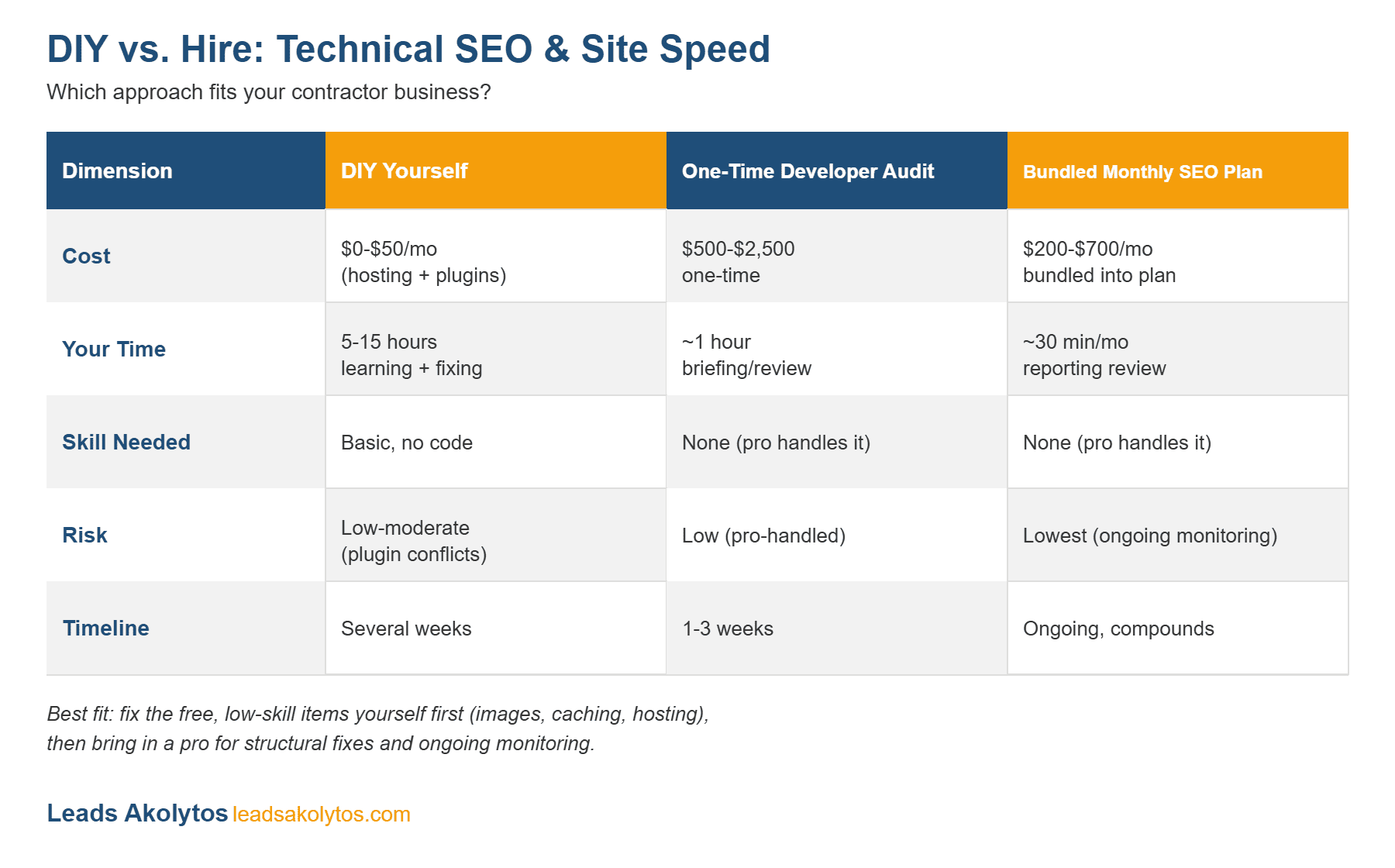
DIY vs. hire decision matrix for technical SEO and site speed work.
Use this graphic: feel free to embed this comparison matrix on your own site or share it with attribution and a link back to this article.
| Dimension | DIY Yourself | One-Time Developer Audit | Bundled Monthly SEO Plan |
|---|---|---|---|
| Cost | $0–$50/month (hosting + plugins) | $500–$2,500 one-time | $1200–$3500/month, bundled in |
| Your time | 5–15 hours, learning + fixing | ~1 hour, briefing/review | ~30 minutes/month, reporting review |
| Skill needed | Basic, no code required | None — the pro handles it | None — the pro handles it |
| Risk | Low-to-moderate (plugin conflicts) | Low (professionally handled) | Lowest (ongoing monitoring catches regressions) |
| Timeline | Several weeks | 1–3 weeks | Ongoing, compounds over time |
A Realistic Cost Comparison
DIY costs $0–$50/month in tools and hosting, but the real cost is your own time — 5 to 15 hours learning and fixing things has a genuine opportunity cost as a business owner. A one-time freelance or developer audit-and-fix typically runs $500–$2,500 depending on how many issues the site has. Ongoing technical SEO bundled into a monthly plan — the approach Leads Akolytos uses in its own Designated Lead Generation tiers — runs $1200–$3500/month and folds speed, mobile usability, HTTPS, schema, crawl-error fixes, and image optimization into the plan rather than billing them separately.
What to Look For If You Do Hire Someone
If the DIY ceiling has been reached and you’re evaluating a developer or an SEO provider for the technical side, a few questions separate a genuine fix from a vague promise:
- Can they show real before/after PageSpeed Insights numbers from past work, tied to a date you could independently verify, rather than a general “we optimize for speed” claim?
- Do they check Search Console, not just PageSpeed? A single-page speed test misses site-wide indexing errors and real-visitor Core Web Vitals data that only Search Console shows.
- Is technical work itemized or just implied? If a monthly SEO plan never once mentions Core Web Vitals, schema, or crawl errors, ask directly whether technical SEO is actually included or if it’s assumed to be someone else’s job.
- Will they explain what they changed, in plain language? You don’t need to become a developer, but a provider who can’t explain what a fix did and why is harder to hold accountable if scores don’t move.
- Is there ongoing monitoring, or just a one-time fix? Sites regress — a new plugin, a theme update, or a batch of unoptimized images can undo months of work. Ongoing monitoring catches that before it costs you rankings.
5 Questions to Ask Before You Decide
- Do I have 5–15 hours to spend learning and fixing this myself?
- Is my current PageSpeed/Core Web Vitals score “Poor” (red) or just “Needs Improvement” (yellow)?
- Am I comfortable editing theme files or plugin settings without risking the site breaking?
- Is technical SEO already bundled into a service I’m paying for, or considering?
- How fast do I need this fixed — is a slow site actively costing me calls right now?
Bottom Line
Most contractors should start with the free 15-minute diagnostic, fix the obvious low-skill wins themselves, and then get a professional opinion on whatever’s left. If your PageSpeed score is solidly red or your site has never had a technical audit, that’s usually the sign it’s time to bring in help rather than keep guessing. If you want a second opinion on where your site actually stands, Leads Akolytos’ Technical & Speed Optimization service is a good place to start, or you can grab a free 30-minute strategy call to talk through what your specific site needs before spending anything.
If you decide to hire this out, our 7 questions to ask a technical SEO or speed company before you hire them will help you tell a real audit from a sales pitch.
Frequently Asked Questions
How do I check my website’s Core Web Vitals for free?
Google PageSpeed Insights (page-level) and the Core Web Vitals report in Google Search Console (site-wide, using real visitor data) are both free.
What is a good Core Web Vitals score?
LCP under 2.5 seconds, INP under 200 milliseconds, and CLS under 0.1 are all considered “good” by Google.
How much does a technical SEO audit cost?
Independent audits for small-business sites typically run $500–$2,500 depending on site size and how many issues are found; ongoing technical SEO is often bundled into monthly SEO plans instead of billed separately.
Can a slow website really hurt my Google ranking?
Yes — Core Web Vitals are a confirmed ranking input, and mobile users, who make up a large share of emergency-service searches, are especially likely to leave a slow page before it finishes loading.
Should I fix technical SEO myself or hire someone?
Fix the free, low-skill items yourself first — images, caching, hosting. If issues remain after that, especially render-blocking code, server response time, or schema errors, hire a developer or an SEO provider that bundles technical work into its plan.
Want this handled for you?
We do this work for home service contractors every day, month-to-month, with no contracts. Book a free 30-minute call and we'll show you where you stand on Google.
Book my free call