If your Google Ads are getting clicks but no calls, the ad platform is usually doing exactly what it was told to do -- the problem is what it was told. Google Ads clicks but no calls is one of the most common complaints we hear from contractors, and it almost always traces back to a short list of fixable leaks between the search and the ringing phone. This guide walks through each one, shows you how to check it yourself in about fifteen minutes, and helps you decide whether the fix belongs to you or to whoever is managing your account.
Why Google Ads Get Clicks but No Calls: The Short Answer
Google Ads clicks but no calls almost always comes from one of six leaks: the wrong searches triggering your ads, ads showing outside your service area, ads running when nobody can answer, a landing page that makes calling hard, calls that happen but are never tracked, or calls that ring and get missed. Check the search terms report, location settings, ad schedule, landing page, call tracking, and your own call log, in that order.
Most of those checks take a few minutes each. The first three are almost always your PPC manager's responsibility. The last three are usually shared between you and them.
Why Clicks Without Calls Is Usually a Setup Problem, Not a Google Problem
A click means someone saw your ad and was interested enough to tap it. That part of the system is working. When those clicks don't turn into calls, something between the tap and the conversation is broken -- and in a contractor account, that "something" is rarely the ad copy itself.
It is tempting to conclude that Google Ads "doesn't work" for your trade, or that the leads in your area are just low quality. Sometimes that's true. But before you cut the budget or fire your agency, it is worth knowing which part of the chain is actually failing, because the fix -- and who should pay for it -- depends entirely on where the leak is.
Think of it like a water line with no pressure at the tap. You don't replace the whole system. You walk the line from the meter to the faucet and find where it's leaking.
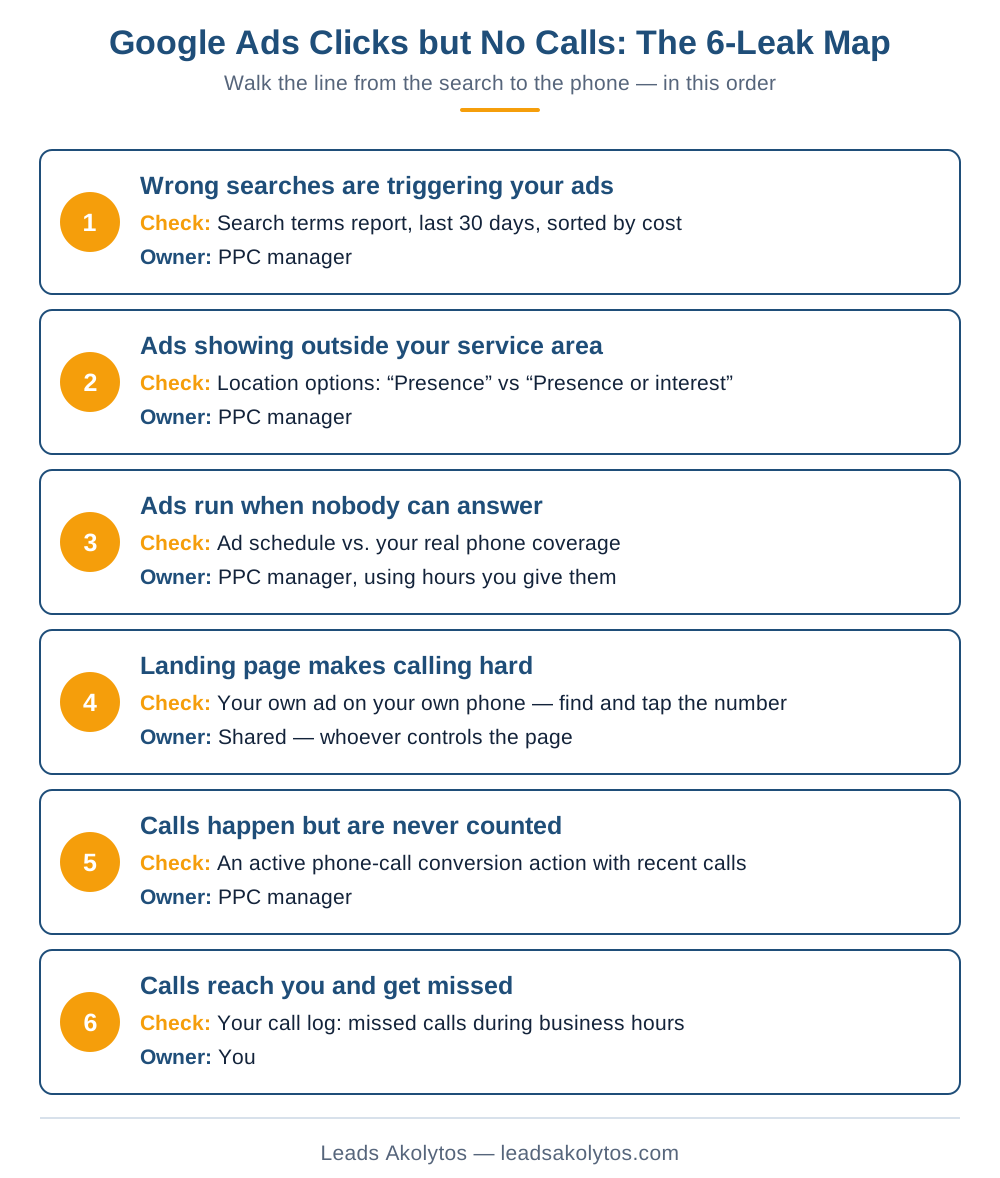
Google Ads Clicks but No Calls: The 6-Leak Map
Here is the line, from the moment someone searches to the moment your phone either gets answered or doesn't. Work through it in order -- the early leaks make the later ones look worse than they are, and most cases of Google Ads clicks but no calls are solved somewhere in the first five.
Use this graphic
You're welcome to republish this graphic on your own site, as long as you credit Leads Akolytos with a link back to this article. Copy the code below:
<a href="https://leadsakolytos.com/blog/google-ads-clicks-but-no-calls/"><img src="https://leadsakolytos.com/blog/google-ads-clicks-but-no-calls-6-leak-map.png" alt="Google Ads clicks but no calls: the 6-leak map" width="1200" /></a><br>Source: <a href="https://leadsakolytos.com/blog/google-ads-clicks-but-no-calls/">Leads Akolytos</a>Leak 1: The Wrong Searches Are Triggering Your Ads
You bid on keywords, but Google shows your ads for search terms -- the actual words people type. Those can drift a long way from what you intended. A "water heater installation" keyword can end up showing your ad to someone searching "water heater installation cost DIY," "water heater installer jobs," or the name of a big-box store's install service.
Every one of those clicks costs you money and none of them were ever going to call a local plumber. Google's own explanation of the search terms report describes it as the place to see exactly which searches triggered your ads and how they performed -- which makes it the first place to look when Google Ads clicks but no calls is the symptom.
What to check: open the search terms report for the last 30 days, sort by cost, and read the top 30 rows out loud. If you see job seekers, DIY researchers, competitor names, or services you don't offer, you've found a leak. The fix is negative keywords and tighter match types -- routine maintenance any PPC manager should be doing weekly.
Leak 2: Your Ads Are Showing Outside Your Service Area
Google Ads has a location setting most owners never see. According to Google's guide to advanced location options, the default "Presence or interest" setting reaches people in your target area plus people who are simply interested in it. The stricter "Presence" option reaches only people likely to be physically in or regularly in your area.
For a national e-commerce brand, "interest" targeting can make sense. For a roofer who serves three counties, someone in another state researching your town is not a lead. They click, they read, they leave -- and they look exactly like a "click with no call" in your reports, which is why location settings are a classic cause of Google Ads clicks but no calls for local trades.
What to check: in campaign settings, open the location options and confirm which one is selected. Then look at the user-location report to see where clicks are actually coming from.
Leak 3: Your Ads Run When Nobody Can Answer
If your ads run around the clock but your office phone goes to voicemail after 5 PM and all weekend, a large share of your paid clicks may be landing on a business that can't take the call. Many homeowners won't leave a voicemail -- they hit back and call the next company in the results.
This is one of the cheapest leaks to fix. Either run ads only during hours someone can answer, or set up after-hours call handling (an answering service or an on-call tech) so the ad spend at night actually has a chance to convert.
What to check: compare the campaign's ad schedule against your real phone coverage, and look at the hour-of-day report to see how much you spend after hours.
Leak 4: The Landing Page Makes Calling Hard
Most contractor ad traffic is on a phone. If the page your ad sends people to buries the phone number, opens with a slider of stock photos, loads slowly on cellular data, or sends them to your generic homepage instead of the specific service they searched for, a lot of interested people will leave before they ever find a way to call.
The page should match the search ("emergency AC repair" lands on an emergency AC repair page), show a tap-to-call number above the fold, and make the next step obvious within a few seconds. We cover the specific warning signs in our guide to how to know if your landing pages are actually converting.
What to check: click your own ad on your phone (use the ad preview tool so you don't pay for the click) and time how long it takes to find and tap the number.
Leak 5: Calls Are Happening -- They're Just Not Being Counted
Sometimes the calls are coming in, but the account has no way of knowing which ones came from ads. If your PPC reports show clicks and spend but zero or almost zero "conversions," check whether call tracking was ever set up. Our guide to call tracking for contractors covers what to set up first.
Google supports tracking calls from your ads and calls from your website. Its setup guide for tracking calls to a phone number on your website explains how a Google forwarding number replaces your business number on the page so calls can be tied back to the keyword and campaign that produced them.
Without that, Google's bidding is flying blind, your manager can't optimize toward calls, and you can't tell a broken campaign from a working one. This is not optional for a contractor account.
What to check: in the conversions section, look for an active phone-call conversion action that has recorded calls recently. If there isn't one, that's the first thing to fix.
Leak 6: Calls Reach You and Get Missed
The last leak lives inside your own business. If the office is short-staffed, the techs are on job sites, or calls roll to a voicemail box nobody checks until evening, paid leads can be calling and simply not getting through.
This one is uncomfortable because it isn't the agency's fault, but it's also the one most likely to be invisible. If call tracking shows calls and your crew insists the phone "never rings," pull the call log for a week and count the missed calls during business hours.
What to check: the call details in your call-tracking report (duration, answered vs. missed) compared with your own phone system's log for the same week.
The 15-Minute Self-Check You Can Run Before Your Next Invoice
You don't need to be a Google Ads expert to run this. Log in with view access (you should always have your own login to your own ad account) and work through the list:
- Search terms report, last 30 days, sorted by cost: are the top searches people who want to hire you?
- Location options: is the campaign set to "Presence," and do the clicks come from your actual service area?
- Ad schedule vs. phone coverage: are you paying for clicks when nobody can answer?
- Your own ad on your own phone: can you find and tap the number in under five seconds?
- Conversions: is there an active call conversion action with recent calls recorded?
- Your call log: how many calls were missed last week during business hours?
If items 1-3 fail, your account isn't being managed closely. If item 5 fails, nobody -- including your manager -- actually knows whether the ads work. If items 4 or 6 fail, the ads may be fine and the leak is on the landing page or in the office. Either way, you now know where your Google Ads clicks but no calls problem actually lives.
Is It Your PPC Manager's Fault? Who Owns Each Leak
This is the question most owners are really asking. Here's an honest split:
| Leak | Who usually owns the fix | Red flag if it's been ignored |
|---|---|---|
| 1. Wrong search terms | PPC manager | No negative keywords added in months |
| 2. Location settings | PPC manager | Default "Presence or interest" left on a local service account |
| 3. Ad schedule | PPC manager, using hours you give them | Nobody ever asked you when your phones are covered |
| 4. Landing page | Shared -- whoever controls the page | Ads still send all traffic to your homepage |
| 5. Call tracking | PPC manager | Reports show clicks and spend but never calls |
| 6. Missed calls | You | Tracking shows calls your team says never came in |
If the leaks are concentrated in rows 1, 2, 3, and 5, that's a management problem, not a channel problem. Those are basic settings any competent PPC manager checks in the first week, and our list of questions to ask a PPC agency before you hire them is designed to catch exactly this before you sign.
Should You Fix This Yourself or Hire a PPC Manager?
Some of these fixes are genuinely DIY-friendly. Changing the location option, adjusting the ad schedule, and moving the phone number to the top of a landing page are settings changes an organized owner can make in an afternoon. Answering the phone more reliably is a staffing decision only you can make.
The harder part is the ongoing work. Search terms drift every week as Google expands where your keywords match. Negative keyword lists need constant maintenance. Call tracking has to be set up correctly the first time, and bidding needs to be pointed at calls rather than clicks. That's where paying for management usually earns its fee -- not in the one-time fixes, but in the weekly attention.
A reasonable rule of thumb: if you have a few hours a week, are comfortable inside the Google Ads interface, and your account is small, you can manage the basics yourself once these leaks are closed. If you don't have that time, or you're spending enough that a few weeks of drift costs real money, a manager who does this weekly is usually the cheaper option. For what that typically costs, see our breakdown of PPC management costs for contractors.
And if you already pay someone and the self-check above turned up problems in rows 1, 2, 3, or 5, it may be time to read our guide on switching PPC agencies without losing your account history.
5 Questions to Ask Your Current PPC Manager This Week
If you'd rather not dig through the account yourself, send these to whoever manages it. A good manager will answer all five quickly and specifically:
- When did you last add negative keywords, and what were the top wasted search terms you found?
- Is our location targeting set to "Presence" or "Presence or interest," and why?
- How many calls did the ads produce last month, and how are those calls being tracked?
- Which landing page does each campaign send traffic to?
- Are we bidding toward calls or toward clicks?
Vague answers -- "the algorithm is still learning," "clicks are what we can measure" -- are themselves an answer.
Frequently Asked Questions
Why are my Google Ads getting clicks but no calls?
Usually because of one of six leaks: irrelevant search terms, ads showing outside your service area, ads running when nobody answers, a landing page that hides the phone number, calls that aren't being tracked, or calls that ring and get missed. Checking each one takes only a few minutes.
Is it normal to get clicks without calls at first?
Some unconverted clicks are normal in any account -- not everyone who clicks is ready to hire. But consistently getting clicks with almost no calls for weeks is not something to wait out. It usually points to a setup problem in targeting, tracking, or the landing page.
How do I know if my PPC manager is doing a good job?
Ask how many calls the ads produced last month and how they're tracked, when negative keywords were last added, and which location option the campaigns use. A good manager answers all three specifically. If calls aren't being tracked at all, nobody can say whether the account is working.
Should I pause my Google Ads if they aren't producing calls?
Not before you've checked the six leaks. Pausing stops the spend, but it also stops you from learning anything. If the leaks are in settings and tracking, fixing them is usually faster than starting over. If the account has been neglected for months, that's a management decision, not a channel decision.
Get a Second Set of Eyes on Your Account
If you've run the self-check and you're not sure what you're looking at -- or you found problems and want to know what fixing them would actually involve -- we're happy to walk through your account with you. On a free strategy call we'll look at your search terms, location settings, tracking, and landing pages, tell you plainly which leaks we see, and whether they're something you can fix yourself. No pressure and no long contract pitch.
Book your free strategy call, or learn more about how we handle PPC management for contractors.
If you'd like one practical idea like this in your inbox each month, get The Leads Akolytos Monthly: one email a month, unsubscribe any time.
Want this handled for you?
We do this work for home service contractors every day, month-to-month, with no contracts. Book a free 30-minute call and we'll show you where you stand on Google.
Book my free call