The Short Answer
Switching PPC agencies without wasting your budget or losing your ad account history comes down to protecting what already works while you make the change. Before you give notice, confirm you personally own admin-level access to your Google Ads account, GA4 property, Google Business Profile, and Tag Manager container — not the agency.
Export at least 12-24 months of campaign performance data, get a written handover of bid strategy and conversion tracking setup, and overlap the new agency’s start date with the old one’s remaining notice period so campaigns are never left unmanaged. Most contractors who lose ad performance during a switch lose it to a gap in account management, not to the new agency’s strategy being worse.
Signs It Is Time to Switch PPC Agencies
A few patterns show up repeatedly among contractors who are switching PPC agencies:
- Cost per lead has climbed for several months in a row with no clear explanation in reporting.
- Monthly reports show the same generic template with little specific commentary on your account.
- You cannot get a straight answer about which keywords, campaigns, or changes are driving results.
- The agency resists giving you admin-level access to your own Google Ads account.
- Account structure has not changed in six months or more despite shifting seasonality in your trade — a sign of vendor lock-in rather than active management.
If two or more of these apply consistently, it is worth having the ownership and access conversation described in Step 1 below, even before you talk to a new agency. Our PPC management cost and vetting guide is a useful reference point for what a well-run account should actually look like.
Step 1: Verify You Own Every Account the Agency Manages
This is the step most contractors skip when switching PPC agencies, and it is the one that determines whether the transition is smooth or messy.
This is the single most important step, and the one most contractors skip until it is too late. Confirm you — not the agency — are the admin on your Google Ads account (or at minimum listed as an account-level admin), your GA4 property, your Google Business Profile, your Google Tag Manager container, and your domain and website login. If any of these were set up under the agency’s own login rather than yours, request they be transferred to an account you control before you give notice. An agency that resists this request, or stalls on it, is telling you something important about how the relationship will end.
Step 2: Export 12-24 Months of Historical Performance Data
Ad platforms use historical performance to inform automated bidding, and losing that history — by starting a brand-new account instead of keeping your existing one — sets your bidding strategy back to zero. Before the transition, export campaign, ad group, and keyword-level performance covering at least the past 12 to 24 months, and store it somewhere outside the account itself. Also document your conversion tracking setup: which actions are marked as conversions, any offline conversion imports from your CRM, and any custom audiences or remarketing lists you have built. These configurations are easy to lose and slow to rebuild from scratch.
Step 3: Request a Full Handover Document From the Outgoing Agency
Ask your current agency for a change log: bid strategy adjustments, major campaign restructures, negative keyword lists, and any scripts or automated rules running in the account. Even an agency you are leaving on good terms may not volunteer this unless asked directly and in writing. This document is what lets a new agency start from an informed position instead of guessing at why the account is structured the way it is, which reduces the temptation to rebuild everything from scratch in week one.
Step 4: Overlap the New Agency’s Access Instead of a Same-Day Handoff
Add the new agency to your account and let them observe live performance for one to two weeks before the outgoing agency’s access is removed. Appoint one agency as the sole party making changes during this overlap — two agencies editing the same campaigns simultaneously will produce conflicting changes that are hard to untangle afterward. The new agency’s first job is not to restructure your account; it is to preserve what is already working while they build the commercial context needed to improve it responsibly.
Step 5: Wait Before Restructuring the Account
Contractors who are switching PPC agencies for the first time often underestimate this step.
The most common mistake a new agency makes — and one you should ask about directly before signing — is rebuilding campaigns from scratch in the first week to make an early impression. This resets the learning phase for automated bidding and often causes a temporary spike in cost per lead right when you are watching most closely. Ask the new agency to commit, in writing, to a stabilization period of at least 30 days before any major restructuring, unless something in the account is actively losing money.
What to Do With Leads and Calls Already in the Pipeline
Ads running during the transition week will still generate calls and form fills. Confirm who is responsible for monitoring and responding to these during the handover — an account with no one clearly assigned to check form submissions for a few days is where leads quietly go cold. If your outgoing agency also managed a call-tracking number, confirm before the switch whether that number transfers with the account or reverts to the agency, since losing it can break attribution on your reporting for the following months.
Should You Pause Ad Spend During the Transition?
Pausing campaigns entirely during a PPC agency switch feels like the safe option, but it usually costs more than it saves. A paused campaign loses its accumulated bidding signal, and Google’s automated bidding strategies need time to relearn performance once spend resumes — often another one to two weeks of elevated cost per lead on top of whatever gap the pause created. Unless the outgoing agency’s access genuinely cannot be trusted during the notice period, it is usually better to keep campaigns running at a steady, modest budget through the handover and let the overlap period in Step 4 carry the account through, rather than stopping and restarting.
Common Mistakes That Waste Budget During a PPC Agency Switch
Removing the outgoing agency’s access before the new agency has fully set up tracking and campaigns.
Starting a brand-new Google Ads account instead of keeping the existing one, which erases bidding history.
Letting the new agency rebuild every campaign in week one before they understand what was already working.
Not documenting conversion tracking, so attribution breaks and neither agency can prove what is driving results.
Signing a long-term contract with the new agency before a 30-day trial confirms performance holds steady.
A Simple 5-Stage Timeline for Switching PPC Agencies
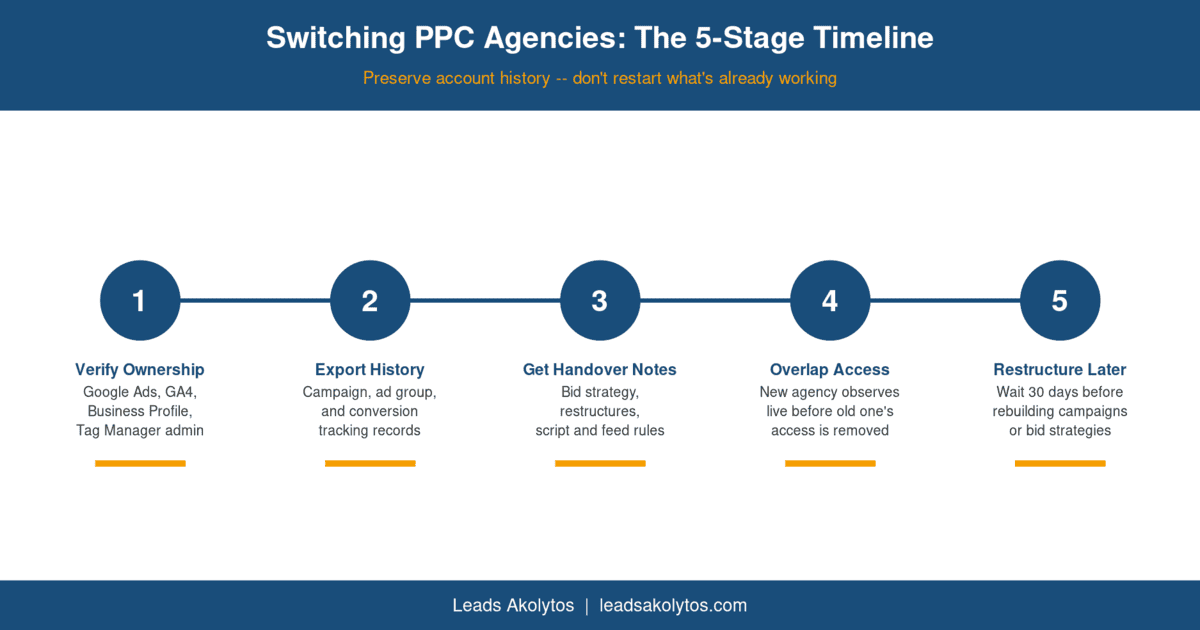
Use this graphic: feel free to republish this timeline on your own site with attribution and a link back to this article. Embed code: <img src="https://leadsakolytos.com/blog/switch-ppc-agencies-timeline.png" alt="Switching PPC agencies 5-stage timeline"></code>
What to Ask a New PPC Agency Before You Sign
Will we keep our existing Google Ads account, or would you set up a new one and why?
How long is your standard stabilization period before you restructure an existing account?
Who is my day-to-day point of contact, and how often will I see a report with specific commentary, not just numbers?
What access will your agency require, and will it be added as a user on my account rather than the reverse?
Can you show an example of a handover document you would expect from an outgoing agency in my situation?
Frequently Asked Questions About Switching PPC Agencies
Will switching PPC agencies reset my Google Ads performance history?
Only if you close the existing account and start a new one. Keeping your current account and simply changing who manages it preserves your bidding and conversion history.
How long should I expect a dip in performance after switching agencies?
If account access and tracking transfer cleanly and no major restructuring happens immediately, most accounts see little to no dip. A dip that lasts more than a few weeks usually points to a tracking or bidding strategy problem, not just the change of agency.
Should the new agency restructure my campaigns right away?
No. Ask for a stabilization period of at least 30 days so automated bidding does not reset its learning phase right as you are evaluating the new agency’s performance.
What access does a new PPC agency actually need?
Account-level access as a user added to your existing Google Ads account, plus access to GA4, Tag Manager, and your Google Business Profile if they will manage local campaigns. You should remain the owner throughout.
Is it worth switching PPC agencies and redesigning my website at the same time?
Generally no, for the same reason it is not worth doing with lead generation providers: changing two variables at once makes it far harder to tell which change affected your results.
Ready to Compare Your Options?
If cost per lead has been climbing and your current agency cannot explain why in specific terms, the ownership audit in Step 1 above takes less than an hour and puts you in a stronger position before that conversation happens. If you would like a second opinion on your account structure, tracking setup, or whether your current spend is being managed efficiently, book a free strategy call and we will review it with you at no obligation. You can also read more about how we structure and manage PPC management for contractors who want an account built for their own service area instead of a generic template. Before you switch, it is worth running our 15-minute check for Google Ads clicks but no calls so you know whether the problem is the agency or something on your side.
Want this handled for you?
We do this work for home service contractors every day, month-to-month, with no contracts. Book a free 30-minute call and we'll show you where you stand on Google.
Book my free call