
You paid for 30 leads from Angi or Thumbtack last month, called every one of them, and booked a handful of jobs. The app tells you how many leads it sent. It does not tell you whether that spend made you money, and neither does the sales rep on the phone.
Are Angi Leads Worth It? The Short Answer
Angi and Thumbtack leads are worth it only if one number works on your own books: what you spent on the source in a month divided by the jobs it booked, compared with the gross profit on those jobs. The platforms are built to share. Angi matches each homeowner request with up to five pros and charges for a lead whether or not you open it. Thumbtack charges automatically at the lead price you set. Credits and refunds cover bad data (wrong number, wrong ZIP code, wrong service, a duplicate) or a customer who answered nobody, never the normal case of a homeowner who hired someone else. So the platform's lead count says nothing about whether it pays. Track five numbers per source for 90 days, fix your own response speed first, then keep, cut back or drop each source on its cost per booked job.
How Angi and Thumbtack Leads Work, and What You Pay For
Both platforms charge for a chance at the job, not for the job. That is the core of the math, so it pays to know exactly when the meter runs.
Angi. Angi's pro help center says each homeowner request is matched with no more than five pros, and that you are charged for leads whether or not you open or respond to them. Lead fees change with the task, the homeowner's location and demand for the work. Angi also sends Opportunities: a name, a general location and the task. You pay only if you and the homeowner both show interest, and Opportunities are charged on top of your monthly budget, not inside it. Opportunities can keep coming while your leads are paused.
Thumbtack. Thumbtack's help page on lead types describes three kinds of work. Leads come from customers who saw your profile in their search results and contacted you; you pay automatically at your lead prices, and your weekly spend can run above or below the budget you set. Opportunities are customers who already reached out to other pros; sending a quote is free and you pay only if the customer responds. Preset jobs carry no upfront cost; Thumbtack keeps a percentage of the job price.
What this means for your shop: every one of those charges belongs in the "spend" column for that source, including subscriptions and any Opportunities you accepted. Leaving them out makes a source look cheaper than it is.
What You Can Get Credited, and What You Can't
Credits fix bad data, not lost jobs. Read the rules once and you will stop counting on them.
Angi's lead credit page (dated August 14, 2026) lists the reasons it may credit after a review:
- Invalid contact info: disconnected, not in service, or not the homeowner listed.
- Wrong location: outside the ZIP codes on your profile.
- Service mismatch: a job you do not list.
- Duplicate: charged twice for the same homeowner within 45 days.
- Charged while your leads were paused.
The same page sets conditions. The lead must be under 45 days old, you should have tried to call within 24 hours, your account must be in good standing, and leads on an annual subscription get no credits. Angi does not credit a homeowner who never answers, hired another pro first, decided to wait, is still gathering quotes, or took someone else's quote over yours. Credits are not cash: they apply to future lead charges, expire after six months, and reviews take up to 5 business days.
Thumbtack's Fair Shot Refund policy refunds a lead automatically when the customer replied to no pro within 72 hours. You qualify only if you accepted and answered within four business hours (8 a.m. to 8 p.m. local time), made first contact through Thumbtack messages or a Thumbtack number, and did not share your own phone or email before the customer replied. The refund goes to your Thumbtack balance, not your card.
- Request every eligible Angi credit the same week. A 45-day window closes fast.
- On Thumbtack, reply inside the app first so a dead lead is refunded.
- Log credits and refunds as negative spend for that source, in the month they land.
The Number That Decides It: Cost per Booked Job, by Source
Cost per lead is the platform's number. Cost per booked job is yours. A $40 lead that books 1 job in 10 costs you $400 a job; an $80 lead that books 1 in 3 costs about $240. Those are round example numbers, not benchmarks. Run your own.
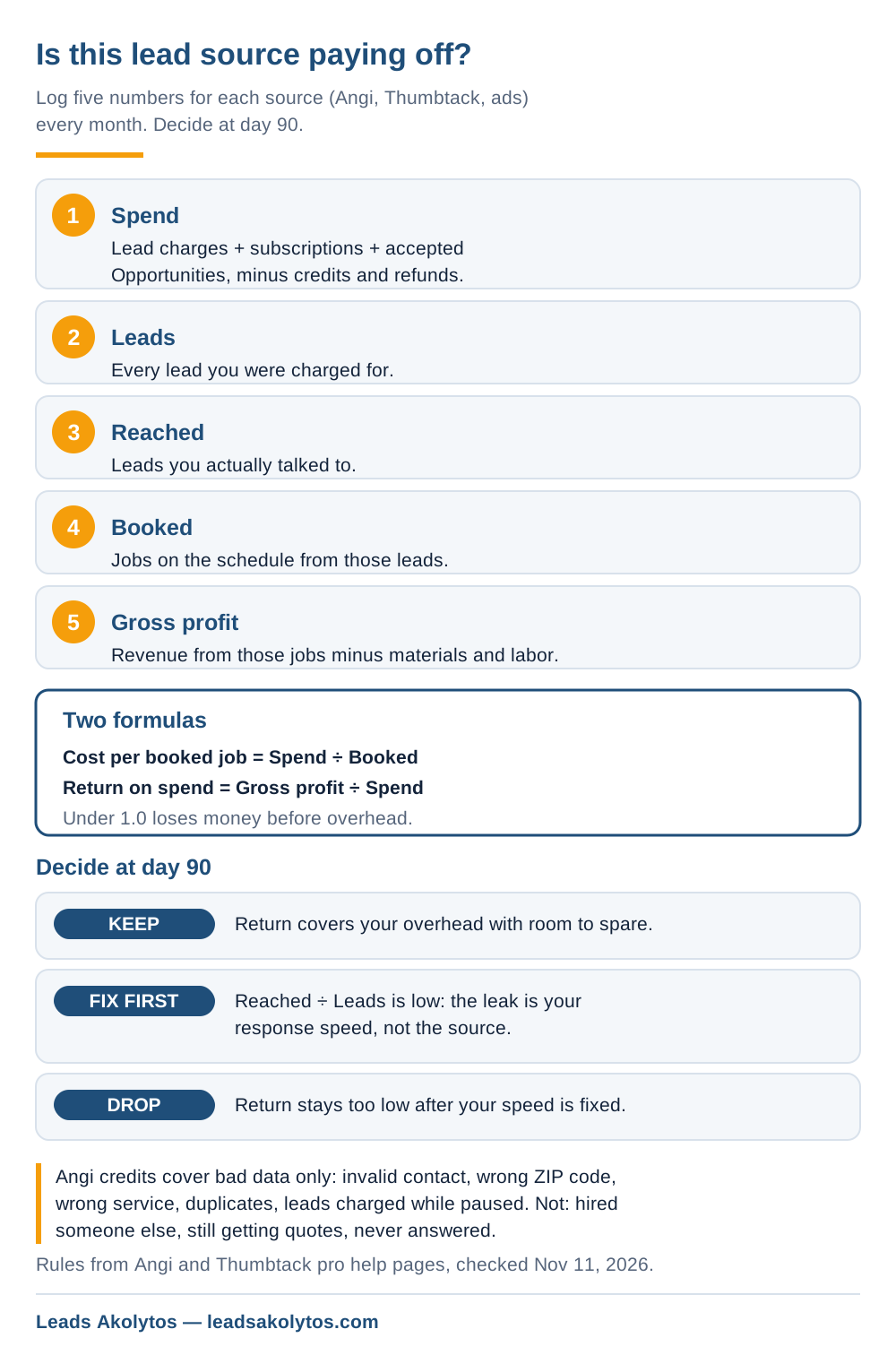
Log five numbers per source, every month:
- Spend: lead charges, subscriptions and accepted Opportunities, minus credits and refunds.
- Leads: every lead you were charged for.
- Reached: leads you actually talked to.
- Booked: jobs on the schedule from those leads.
- Gross profit: job revenue minus materials and labor on those jobs.
Then two formulas. Cost per booked job = spend ÷ jobs booked. Return on spend = gross profit ÷ spend. A source returning less than 1.0 loses money before overhead. The ratio you need above that depends on your overhead and how many of those customers come back, which is why repeat-service trades like HVAC maintenance, pest control and cleaning can live with a thinner first-job return than a one-time repair.
Your FSM software can carry most of this. Jobber, Housecall Pro and ServiceTitan all let you tag a lead source on the customer or job; set the tag to the platform's name every time, so the booked and revenue columns fill themselves. If calls arrive through a platform number, call tracking for contractors shows which source each call came from.
How to Run a 90-Day Lead Source Test
Ninety days gives you enough leads to judge a source and enough time to fix your own side first. One bad month on 12 leads is noise.
- Week 1: set a monthly cap on each platform you can afford to lose.
- Week 1: tag every lead with its source in your FSM software.
- Every day: answer or call within minutes; shared leads go to whoever gets there first.
- Every week: request credits on invalid, out-of-area, wrong-service and duplicate leads.
- Every month: fill in the five numbers per source.
- Day 90: keep, fix or drop each source on its cost per booked job.
Look at the reached-to-leads ratio before blaming the platform. If you reach only half the leads you pay for, the leak is speed on your end, and how fast to call back a lead covers ring groups and auto-texts that fix it without a new hire. If you reach most of them and still book few, the leads are the problem. Check one thing first: if your estimates go out late or follow-up stops after one message, see why leads go cold between the call and the estimate.
Which Trades Shared Leads Tend to Fit
Shared leads fit work where speed wins and the job is decided in one conversation. They fit worst where the homeowner collects several bids over weeks.
- Better fit: small repairs, handyman tasks, house cleaning, a quick drain or fixture call. Speed closes these, and an office that answers in minutes has the edge.
- Harder fit: roof replacements, remodels, new HVAC systems. A homeowner gathering quotes is excluded from Angi's credit list, and you pay to be one of up to five estimates.
- Check the margin: a lead price that is a small share of gross profit on a big job can still pay if your close rate holds.
That is a planning pattern, not a rule. Your 90-day sheet settles it for your trade and your market.
What the FTC's HomeAdvisor Order Tells You
Judge a lead source on your own numbers, never on the close rates a sales rep quotes. That is the practical lesson of the Federal Trade Commission's case against HomeAdvisor, a company affiliated with Angi.
On April 21, 2023 the FTC approved a final order requiring HomeAdvisor to pay up to $7.2 million in redress. The FTC's complaint alleged that since at least mid-2014 the company made false, misleading or unsubstantiated claims about the quality and source of its leads, and often told service providers its leads turned into jobs at rates much higher than it could back up. The order bars misleading claims about leads, including claims that leads come from people ready to hire. HomeAdvisor settled; a settlement is not a finding of wrongdoing. Either way, a close rate you did not measure is a claim, not a number.
When to Drop a Lead Source, and What Replaces It
Drop a source after 90 days when its return on spend stays below what your overhead needs, and your reach rate shows the problem is not your response speed. Cut it back, rather than drop it, when it pays in some services or ZIP codes and not others: both platforms let you narrow your job preferences and service area.
Before you move that budget, compare options on the same sheet. Exclusive versus shared leads explains what changes when no one else gets the call, and a 5-step audit of "exclusive" leads checks whether a vendor's leads really are. For leads you own outright, pay-per-lead versus SEO compares the cost per booked job over time, and the SEO break-even calculator runs the math on your numbers. For how an owned, single-buyer lead flow is built, see our SEO plans.
Running a handyman business? Small jobs change the math: see is Thumbtack worth it for a handyman for the lead price ceiling.
Frequently Asked Questions
How many contractors get the same Angi lead?
Up to five. Angi's pro help center says each homeowner request is matched with no more than five pros, with the exact number depending on the lead type and your service area.
Do I pay for an Angi lead if I never respond to it?
Yes. Angi says you are charged for leads whether or not you open or respond to them. Opportunities are the exception: you pay only when you and the homeowner both show interest.
Can I get a credit if the homeowner hired someone else?
No. Angi lists hired another pro, still gathering quotes, decided not to proceed, never answered, and you quoted and lost as reasons that do not qualify. Credits cover invalid contact info, wrong location, service mismatch, duplicates and leads charged while paused.
Does Thumbtack refund leads that go nowhere?
Only when the customer replied to no pro at all within 72 hours, and you answered within four business hours through Thumbtack without sharing your own number first. The refund goes to your Thumbtack balance. A customer who replied to another pro does not qualify.
How long should I test a lead source before deciding?
About 90 days, with a spending cap, every lead tagged in your FSM software and fast follow-up. That gives enough leads to judge, and time to rule out slow response on your side before you blame the source.
What is a good cost per booked job?
There is no universal number. A good cost per booked job is one your gross profit on that job covers with room for overhead. Divide spend by booked jobs per source, compare it with the gross profit on those jobs, and compare sources against each other.
Facts in this article were checked on their sources on November 11, 2026: Angi's pro help center (Opportunities and Leads FAQ; lead credit page dated August 14, 2026), Thumbtack's help center (lead types; Fair Shot Refund policy) and the FTC's April 21, 2023 press release on the HomeAdvisor final order.
Want a Second Look at Your Lead Sources?
Everything above is something you can set up yourself this week, and the 90-day sheet will tell you more than any sales rep. If you'd rather go over your lead sources with someone, Leads Akolytos offers a free 30-minute strategy call; we work only with home service contractors, with no setup fees and no long-term contracts. You can book a time here.
If you'd like one practical idea like this in your inbox each month, get The Leads Akolytos Monthly: one email a month, unsubscribe any time.
Want this handled for you?
We do this work for home service contractors every day, month-to-month, with no contracts. Book a free 30-minute call and we'll show you where you stand on Google.
Book my free call