
Guest post by Ryan Hovis, founder of MainStreetAI.
An AI receptionist can sound great on a sales demo. The real test is how it sounds at 2 a.m. when a homeowner has water coming through the ceiling, and what the bill looks like after your busiest week.
Most of these tools offer a free trial or free plan. Use it. If you're shopping for an AI receptionist for contractors, this guide gives you a 10-minute test-call script, a simple way to check the price for a busy month, a way to tell if a tool really books jobs into your software, and the red flags to watch for.
Prices and features below come from each vendor's own website, checked on November 2, 2026. Prices change often, so check them again before you sign up.
Before you start: set up the trial the right way
Don't test with default settings. Give the tool what a new office hire would need:
- Your business hours and what counts as after hours
- Your service area (towns or ZIP codes)
- Your dispatch or trip fee, if you charge one, and whether the AI may say it
- Who gets emergency calls, and how (a transfer, a text, or both)
Then forward only after-hours calls or a second line to it until it passes your tests.
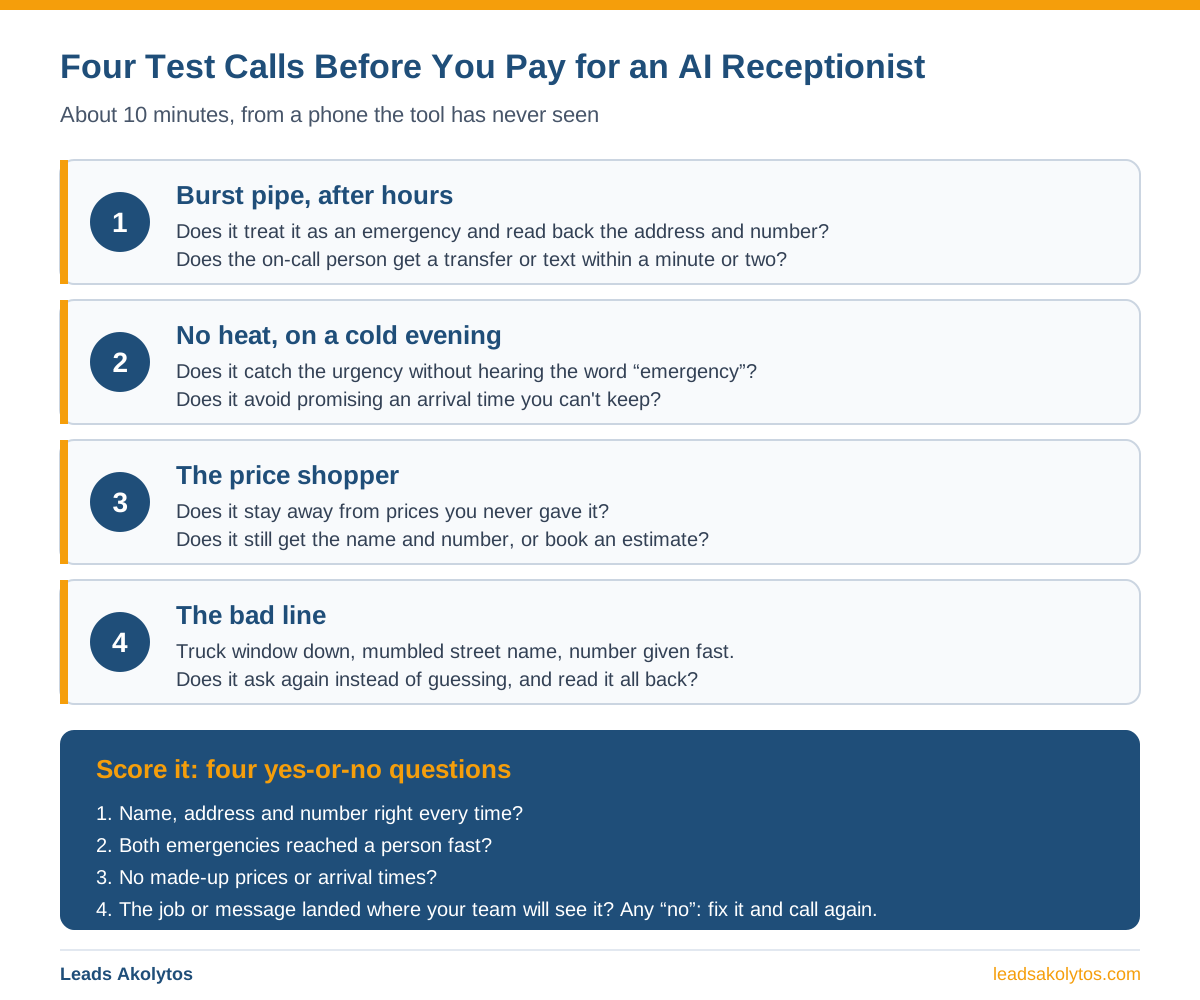
The 10-minute test-call script
Make four calls from a phone the tool has never seen. Have a friend make at least one, since they won't know what the AI is "supposed" to hear. Write down what happens on each.
Call 1: The burst pipe (about 3 minutes)
Call after hours. Sound a little rushed. Say something like: "Water is coming through my kitchen ceiling. I think a pipe burst upstairs. Can someone come tonight?"
Watch for:
- Does it treat this as an emergency, or does it offer you a slot next Tuesday?
- Does it ask for the service address and a callback number?
- Does it read the address and number back to you?
- Does the on-call person actually get a transfer or a text within a minute or two?
That last point is the big one. If the alert shows up 20 minutes later, or only in an email, a real customer is already calling the next plumber. If you run Google Local Services Ads, a missed call can also cost you money; our guide to answering services for contractors covers how Google bills those calls.
Some tools let you choose trigger words for this. For example, Jobber's Receptionist page says you can pick keywords like "burst pipe" or "no heat" that make it transfer the call or text you. ServiceTitan's help page says its AI Voice Agent can escalate on keywords you set. Test those words, and test a caller who describes the problem without using them: "There's water all over the floor and it won't stop."
Call 2: No heat (about 2 minutes)
Call on a cold evening if you can. Say: "My furnace stopped working and the house is getting cold. I have a baby at home."
Watch for:
- Does it pick up that this is urgent even though you never said "emergency"?
- If you charge more for after-hours calls, does it say so clearly and correctly?
- Does it make a promise you can't keep, like "A tech will be there in 30 minutes"?
A tool that promises an arrival time it can't know leaves you explaining it to an upset customer.
Call 3: The price shopper (about 2 minutes)
Call during the day. Say: "How much do you charge to replace a water heater?" Then push a little: "Just a ballpark. The other guy said $900."
Watch for:
- Does it give out prices you never gave it?
- Does it handle the pushback politely, then try to book an estimate or take the lead?
- Does it get the caller's name and number before the call ends?
Decide ahead of time what it should say about price, and check that it sticks to it.
Call 4: The bad line (about 2 minutes)
Call from your truck with the window down, or stand next to a running shop vac. Mumble your street name once. Give your phone number fast.
Watch for:
- Does it ask you to repeat yourself, or does it guess?
- Does it read back the address and number so you can catch a mistake?
Afterward, compare the call log and summary with what you actually said. One wrong digit in a callback number is a lost job.
Score it
After the four calls, answer four yes-or-no questions:
- Did it get the name, address and number right every time?
- Did both emergencies reach a person fast?
- Did it avoid making up prices or arrival times?
- Did the job, request or message land where your team will see it?
If any answer is no, fix the setting and call again. If you can't fix it, that's your answer about the tool.
How the pricing plays out in a busy season
AI receptionists usually charge in one of three ways:
- Per minute: you get a set number of minutes, then pay for each extra minute.
- Per call: you get a set number of calls, then pay for each extra call.
- Unlimited: one flat monthly price.
The cheapest plan in a slow month is often not the cheapest plan in a storm month. Here is a worked example. The call volumes are made up to show the math. Use your own numbers from your phone records.
Example shop (hypothetical numbers):
- Normal month: 120 answered calls, averaging 2 minutes each = 240 minutes
- Storm or freeze month: 400 answered calls, averaging 2 minutes each = 800 minutes
Per minute (hypothetical plans, to show the math). Say a small plan costs $49 a month with 150 minutes, then $0.49 per extra minute, and a bigger plan costs $149 with 200 minutes, then $0.99 per extra minute.
- Normal month on the small plan: $49 + (90 extra minutes × $0.49) = $93.10
- Storm month on the small plan: $49 + (650 × $0.49) = $367.50
- Storm month on the bigger plan: $149 + (600 × $0.99) = $743.00
Here the bigger plan costs more in the storm month, because its overage rate is twice as high. Bigger isn't always safer. Read the overage rate on every tier, not only the included minutes.
Per call (Upfirst, from its pricing page). Starter is $24.95 for 30 calls ($1.50 per extra call). Premium is $59.95 for 90 calls ($1 per extra call). Pro is $159.95 for 300 calls ($0.75 per extra call).
- Normal month on Premium: $59.95 + (30 × $1) = $89.95
- Storm month, still on Premium: $59.95 + (310 × $1) = $369.95
- Storm month after moving up to Pro: $159.95 + (100 × $0.75) = $234.95
So the right plan in the storm month saves $135 in this example. That only helps if you can change plans fast. Upfirst's page says you can upgrade or downgrade anytime. Ask every vendor this before a busy season, not during one.
Unlimited (NextPhone, from its pricing page). Pro is $199 a month with unlimited calls and no overage.
- Normal month: $199
- Storm month: $199
Here unlimited costs about twice as much in a normal month and is the cheapest in the storm month. Which wins depends on how many storm months you get a year.
Three things change the math
Call length. On a per-minute plan, a six-minute call costs three times a two-minute call. Per-call plans don't care.
What counts as a call. Vendors count calls differently. Upfirst says it doesn't bill for spam it blocks, calls under 15 seconds, or calls where no one speaks. Smith.ai says every call its AI answers counts by default, but you can remove up to 10% of calls each billing cycle as spam. ServiceTitan's help page says its AI Voice Agent bills on usage and all calls are included, whatever the outcome.
Prices move. When MainStreetAI re-checked vendor pricing pages on November 2, 2026, one vendor had switched from per-call pricing to per-minute pricing since its mid-October check. Screenshot the pricing page on the day you sign up.
To compare any of these against a live answering service or an office hire, our missed-call calculator shows what unanswered calls are costing you now.
Does it book into Jobber, Housecall Pro or ServiceTitan, or just take a message?
"Integrates with your CRM" can mean two very different things:
- It books the job. The AI checks your real schedule, picks an open slot and puts the job on your calendar during the call.
- It passes along a lead. The AI takes the caller's details and sends them somewhere (an email, a text, a Zapier step). Someone in your office still has to call back and book it.
Both can be useful, but they aren't the same.
Built into the software you may already use:
- Jobber Receptionist. Jobber's page says it can book visits during the call using the online booking settings you already set up in Jobber. When a job can't be booked, it creates a work request or a task in Jobber.
- Housecall Pro CSR AI. Housecall Pro's page says CSR AI is built into Housecall Pro and books jobs based on your schedule and service settings, so jobs show up on your calendar.
- ServiceTitan AI Voice Agent. ServiceTitan's help page says it books new jobs using Adaptive Capacity, and can confirm and reschedule appointments. Two limits from that page: it is for residential home service companies on The Essentials + The Works packages with Basic Phones or Phones Pro, and at launch it can't add call notes, summaries or transcripts to booked job records.
Ask each for pricing on your account, since it's added to your current plan.
Standalone tools (what their own pages list):
- NextPhone lists booking into Google and Outlook calendars, plus Calendly, Acuity, Cal.com and OnceHub. Its named CRM list does not include Jobber, Housecall Pro or ServiceTitan. Its higher plans also list Zapier, Make, webhooks and an API.
- Upfirst lists booking into Google, Outlook, Clio, Acuity, Calendly and Square, and sending caller details to a CRM through Zapier or its Custom Actions feature.
- Smith.ai lists AI scheduling through Calendly and more, plus integrations like Clio and Zapier.
As of November 2, 2026, none of these pages say they book straight into Jobber, Housecall Pro or ServiceTitan schedules. That doesn't mean they can't; check with the vendor. If direct booking matters, ask them to show it working in your own account during the trial.
Red flags during a trial
- It makes up prices or arrival times. If it says something you never gave it, stop and fix it before going live.
- Emergency alerts are slow or go only to email. A burst pipe at night needs a call or a text, not an inbox.
- You can't see transcripts and recordings. You need them to check what was promised.
- The trial misses your busy days. If you can, start it before a forecast cold snap or storm.
- The plan page doesn't say what happens when you go over. "Contact us" is not an answer. Get the overage rate in writing.
- Spam counts as billable. Check how much of your trial log was junk and whether you'd have paid for it.
- Cancelling takes a phone call or a long notice period. Smith.ai, for example, says it needs 30 days' notice. Read the terms before you enter a card.
- You can't keep your number. Most of the tools above work by forwarding your existing line. If one needs your main number moved to it, ask how you get it back.
- "Integrates with your CRM" turns out to mean an email. Ask for a live demo inside your own Jobber, Housecall Pro or ServiceTitan account.
A receptionist only helps if the phone rings in the first place. If calls from Google have dried up, start with why you show up on Google but the phone doesn't ring.
FAQ
How long should I test an AI receptionist before paying?
Use the whole trial, and run the four test calls in the first two days so you have time to fix settings.
Should I forward all my calls or just after-hours calls?
Start with after-hours and overflow calls. Add more after it passes a week of real calls.
Will customers know they are talking to AI?
Some tools let you choose. Housecall Pro, for example, says you can decide whether CSR AI tells callers it is AI. Pick what fits your customers, and make sure a caller who asks for a person can reach one. Some states have their own disclosure and call-recording consent rules; Fleurant AI's guide to AI receptionists for small business walks through the US rules and how to word the greeting.
Is per-call or per-minute pricing better for an AI receptionist for contractors?
It depends on your call length and your busiest month. Pull last year's call counts for your slowest and busiest months, then run the math above with your own numbers.
What if the AI gets a call it can't handle?
Set a rule for it. Most tools can transfer the call, text you, or take a message. Test each path during the trial so you know which one actually works.
Prices and features in this article were checked on each vendor's own website on November 2, 2026, and re-checked by Leads Akolytos on November 3, 2026: getjobber.com (Receptionist), housecallpro.com (CSR AI), help.servicetitan.com (AI Voice Agent FAQ), upfirst.ai/pricing, getnextphone.com/pricing and smith.ai/pricing/ai-receptionist. Check current pricing before you buy.
Want a Second Opinion?
If you would rather look at your missed calls and call handling with someone, Leads Akolytos offers a free 30-minute strategy call. We work only with home service contractors across 14 trades, with no setup fees and no long-term contracts. See our plumbing and HVAC pages or book a time here.
About the Author
Ryan Hovis is the founder of MainStreetAI, a free directory of AI tools for local service businesses that tracks published pricing and setup details for AI receptionists, scheduling and invoicing software.
Want this handled for you?
We do this work for home service contractors every day, month-to-month, with no contracts. Book a free 30-minute call and we'll show you where you stand on Google.
Book my free call