Guest post by Umair Ejaz, founder of Bildrix.
Most contractors shop for software by comparing feature lists. The better way is to start from how you win work, then test the tool on a job you have already bid.
Choosing takeoff and estimating software is one of the bigger tool decisions a trade contractor makes. It decides how fast you can price a job, how often your numbers hold up after you win it, and how much of your week disappears into counting and retyping. It is also easy to get wrong, because every demo looks good on the vendor's own drawings.
The Short Answer
Pick software based on how you win work.
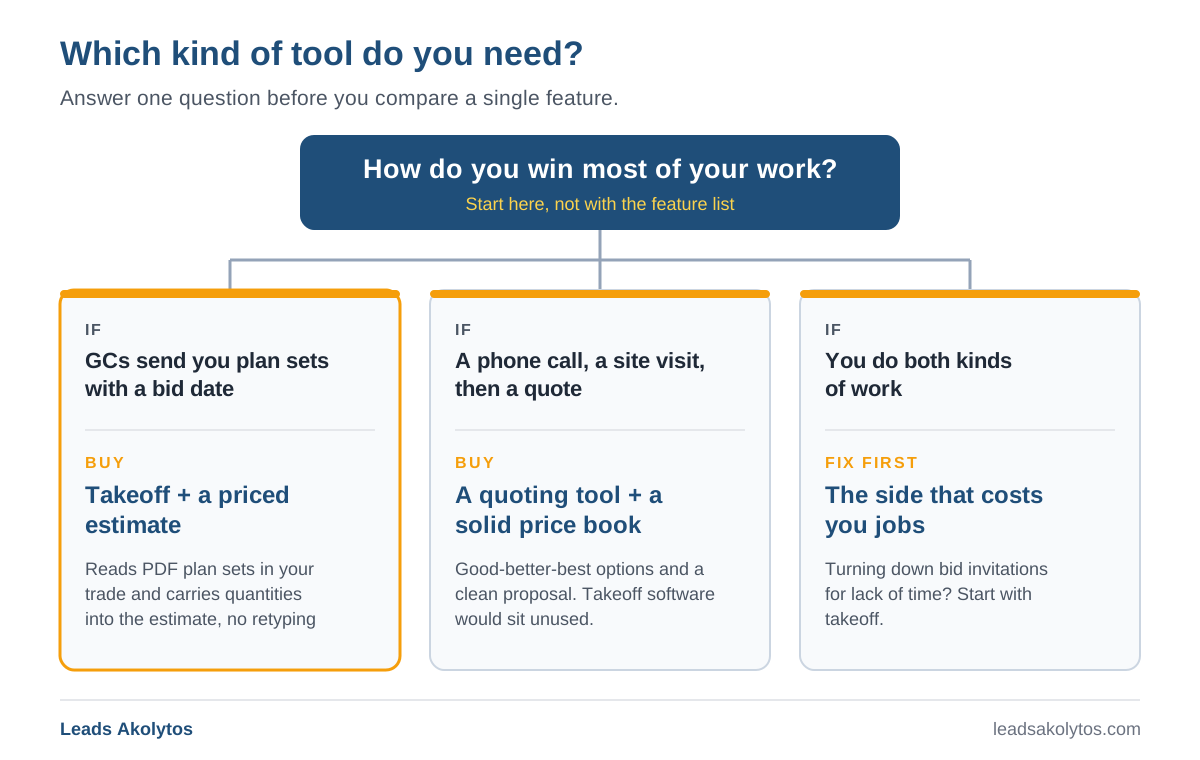
If you bid from plan sets, such as commercial, tenant improvement or multi-unit work, you need takeoff that reads PDF plan sets in your trade and an estimate that carries those quantities forward without retyping. If you mostly price service calls and small residential jobs from a site visit, you need a quoting tool with a good price book, and takeoff software will mostly sit unused.
Then test every tool on your shortlist on a job you have already bid. Time the review as well as the processing, follow the numbers past the estimate, and find out what it costs before you commit hours to a sales process.
First, Decide Which Problem You Are Buying For
"Estimating software" covers several different jobs, and contractors often buy the wrong one.
Plan-set bidders
If general contractors send you plan sets and ask for a number by a deadline, takeoff is your bottleneck. Someone has to read the drawings, count devices or fixtures, measure lengths and areas, and turn all of it into a price. This is where takeoff and estimating software earns its keep.
Service and small residential work
If most of your work comes from a phone call, a site visit and a quote, you rarely have a plan set to take off from. You need fast, consistent quoting: a price book, good-better-best options and a clean proposal.
A mix of both
Many shops do both. Decide which side limits your growth. If you are turning down bid invitations because nobody has time to price them, solve the takeoff problem first.
Takeoff and Estimating Are Two Halves of One Job
- Takeoff produces quantities: how many, how long, how big.
- Estimating turns quantities into a price: material, labor, equipment, markup and a proposal.
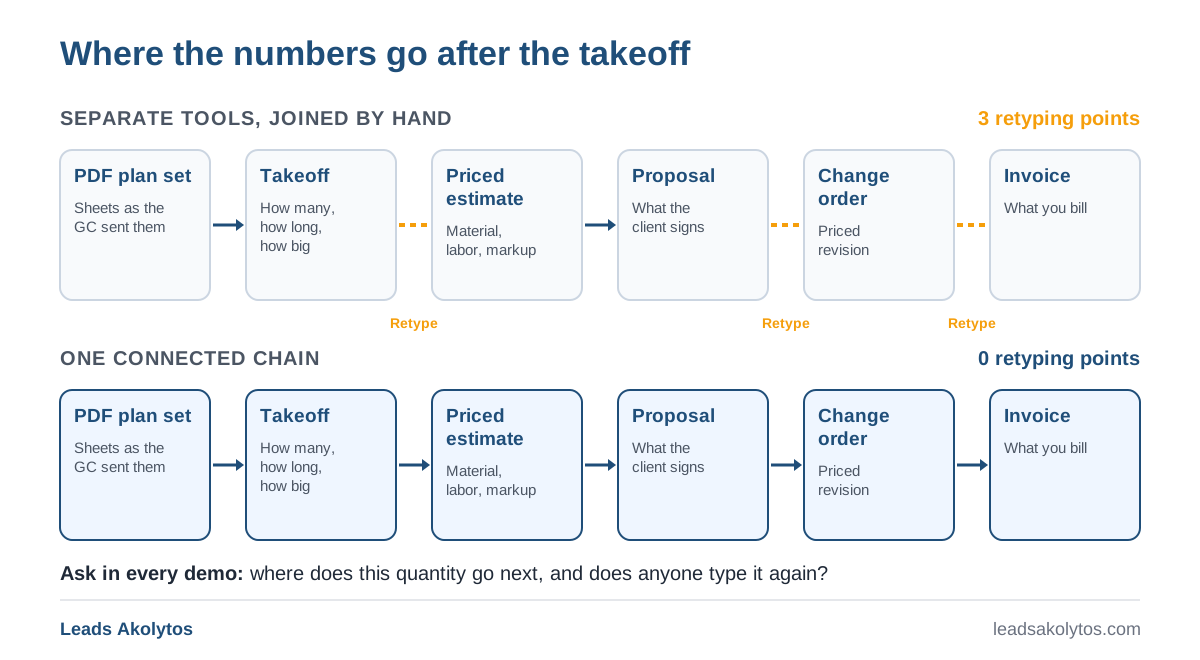
Some tools only do takeoff and export a spreadsheet. Some only do estimating and expect you to type quantities in. Some do both, and a few keep going into change orders and invoices. Every handoff between steps is a place where a number gets typed a second time, and every retyped number is a chance for a transposed digit.
The cost of poor data exchange is an old industry problem. A study for the National Institute of Standards and Technology estimated that inadequate interoperability cost the US capital facilities industry $15.8 billion in 2002. Your shop's version of that cost is smaller, and it shows up every time a quantity is typed twice.
Seven Criteria for Choosing Takeoff and Estimating Software
1. Does it read your drawings?
Plan sets usually arrive as PDFs. Ask whether the tool works from PDF plan sets as they arrive, including scanned sheets, and whether it covers your trade. An electrical contractor needs device symbols and lighting fixtures read against the electrical legend. A plumber needs fixtures counted against the plumbing schedule. A drywall or finish contractor needs walls, rooms and areas.
Ask whether it reads the project's own legend or assumes standard symbols. Every design firm draws a little differently.
2. How does it handle doubt?
No software reads every symbol correctly on every drawing. What matters is whether it tells you which items it is unsure about. If every number arrives with the same apparent confidence, you have to check every number, and most of the time you saved is gone.
Check traceability too. You should be able to click any count and see where it sits on the sheet.
3. How long does the review take?
Vendors talk about processing speed. Your real cost is processing plus review plus fixing. A tool that finishes in minutes but needs a full recount has saved you nothing. Time the whole loop on your own drawings.
4. Where do the numbers go next?
A takeoff that ends in a spreadsheet export still has to be retyped somewhere. Check whether quantities flow into a priced estimate built on your own material prices and labor units, and whether that estimate can become a proposal, a change order and an invoice. If you use accounting software, check how data gets there, whether by integration or by a file you import.
5. What happens when the drawings change?
Addenda and revisions arrive late. Ask how the tool handles a reissued sheet. Does it show what changed between versions? Can you price the difference as a change order without starting over?
6. Can you see the price, and how do you pay?
Pricing models vary widely: annual subscriptions, per-seat pricing, usage-based credits, and quotes that only arrive after a demo. None is wrong in itself, but you should know which one you are walking into, and a demo-gated price means budgeting time for a sales process. Some newer tools, including Bildrix, which I founded, publish their prices on their websites. Whatever you look at, check what is billed annually or monthly, what counts as a seat, and what happens to your projects if you stop paying.
7. Where do your plans go?
Plan sets belong to your clients. Ask where files are stored, who can see them, how to remove a project, and whether the vendor uses your documents to train its models. Get the answers in writing.
Buy, Outsource or Keep Doing It by Hand?
Software is not the only option.
- Keep doing it by hand. PDF markup and a spreadsheet cost little and they work. The cost is time: evenings and weekends at bid deadlines, and errors that surface after you win.
- Outsource takeoff. Takeoff services return quantities for a fee per job. This works well for occasional overflow. You still need to check the result, and turnaround depends on their queue, not your deadline.
- Buy software. There is a learning curve and a recurring cost. In return, the time per bid falls and the same quantities can feed your estimate and paperwork.
A quick way to decide: estimate the hours per bid your team spends on takeoff, multiply by bids per month, and put a value on those hours. Say takeoff takes six hours per bid and you price eight bids a month. That is 48 hours, more than a full work week every month spent counting. Compare that time, and the jobs you decline for lack of it, with the cost of each option.
What Switching Really Costs
The subscription or usage bill is the visible cost. The hidden costs come in the first few weeks, and they decide whether the tool sticks.
- Setting up your prices. An estimate is only as good as the material prices, labor units and assemblies behind it. Expect to spend time loading or checking your price book, or deciding how far to trust the defaults a tool ships with.
- Learning the review. Every tool has its own way of showing what it found and what it is unsure about. The first few bids will be slower while your estimator learns where to look.
- Running two systems for a while. Price the first few jobs both ways, the old way and the new way, and compare. It costs time up front, and it is the most honest way to build trust in the new numbers.
- Your old estimates. Past jobs in spreadsheets or another tool rarely move over cleanly. Decide early whether you need them inside the new tool or only as a reference.
- Changing habits. If the estimator still recounts everything by hand after the software has run, you are paying for both. Agree up front what gets reviewed and what gets trusted.
Plan the switch for a quieter month rather than your busiest bid season, and these costs stay manageable.
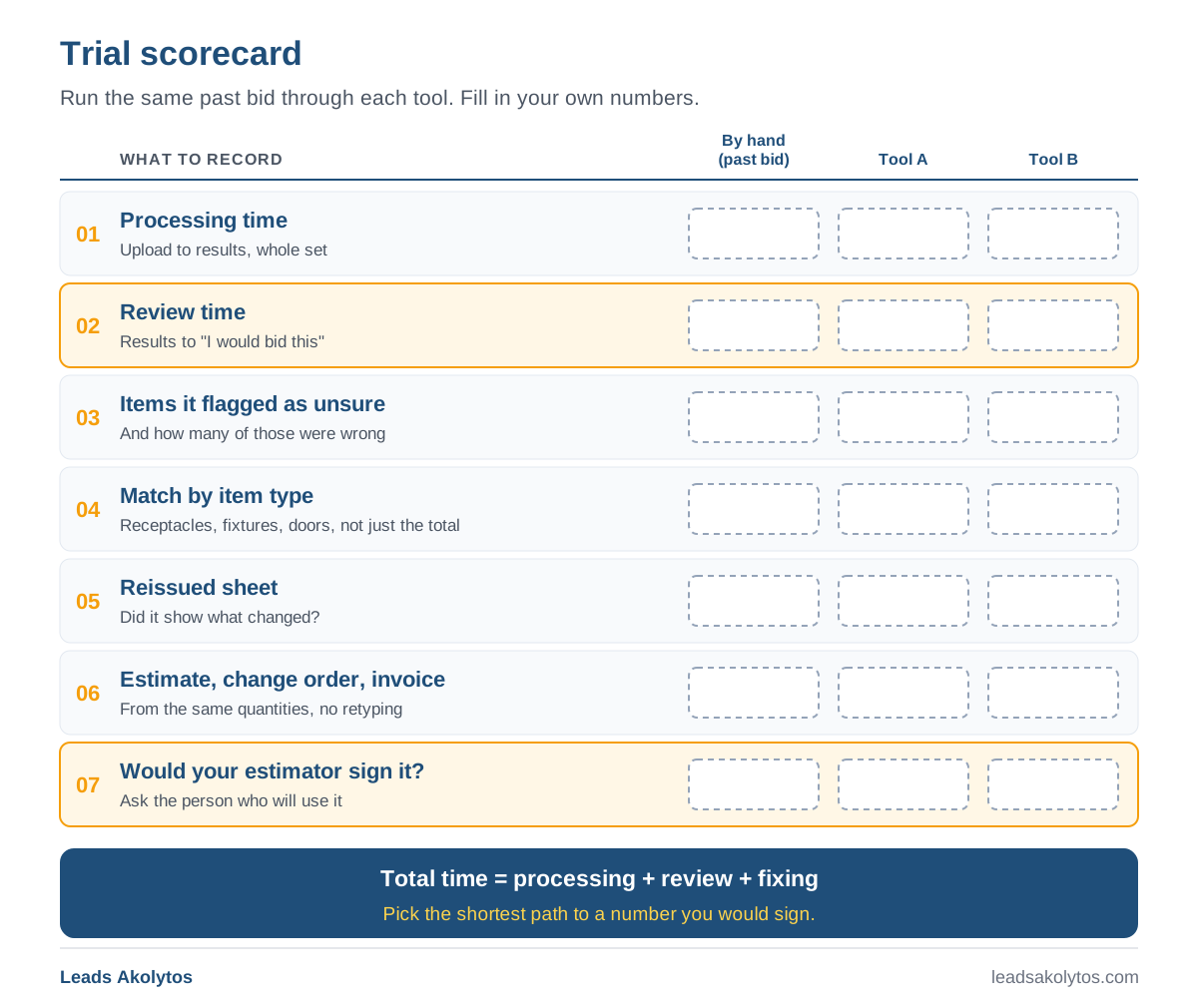
How to Run a Trial That Tells You Something
Vendors run demos on drawings they know well. Run your trial on yours.
- Pick a job you have already bid. You know the quantities, so you can judge the output.
- Run the whole set. Every sheet, including the messy scanned ones, not one clean sample page.
- Compare by item type. A right total can hide offsetting errors. Compare receptacles to receptacles, fixtures to fixtures, doors to doors.
- Time the review. Start the clock when the results arrive and stop it when you would trust them in a bid.
- Test a revision. Run a reissued sheet and see what the tool reports.
- Follow the numbers. Build the priced estimate and, if the tool supports it, a change order and an invoice from the same quantities.
- Involve the person who will use it. If the estimator does not trust it, it will not get used.
Red Flags
- The vendor will not run your drawings before you buy.
- Results cannot be traced back to the sheet.
- An accuracy claim with no explanation of how it was measured.
- Quantities can only leave the tool as a spreadsheet you retype.
- You cannot get a straight answer about where your plans are stored.
Frequently Asked Questions
Is AI takeoff accurate enough to bid from?
No automated number should go into a bid unreviewed. The useful question is how quickly you can review it. Tools that flag the items they are unsure about let you check those first instead of recounting everything.
Do I need separate takeoff and estimating software?
Not necessarily. Separate tools can work well, but every handoff between them is a place where numbers get retyped. If you use two tools, check how cleanly quantities move from one to the other.
Will takeoff software replace my estimator?
No. The Bureau of Labor Statistics describes cost estimators as people who gather and analyze data to work out the time, money, materials and labor a project needs. Counting is one part of that. Scope, risk and price are judgment calls, and they stay with your estimator.
How long does it take to get value from new software?
It depends on the tool and your drawings. A trial on a job you have already bid will tell you more than any vendor's estimate. If you cannot get useful results on your own plans during a trial, you have your answer.
My Recommendation
If you bid plan-set work, shortlist two or three tools that read PDF plan sets in your trade, show you what they are unsure about, and carry quantities into a priced estimate. Run the same past job through each one. Choose the tool with the shortest total time from plan set to an estimate you would sign, as long as every number in it traces back to the drawing.
If you mostly do service work, skip takeoff software for now and put the money into a quoting tool and a solid price book.
About the Author
Umair Ejaz is the founder of Bildrix, AI takeoff and estimating software for contractors who bid from PDF plan sets in the US and Canada. It reads the plan set, flags what it is not sure about for review, and carries the quantities into the estimate, change orders and invoice.
Want this handled for you?
We do this work for home service contractors every day, month-to-month, with no contracts. Book a free 30-minute call and we'll show you where you stand on Google.
Book my free call