A review software salesperson calls, quotes you a monthly fee, and you wonder whether the field service software you already pay for does the same thing. For most single-location contractors it does, or comes close. The gap is usually a setting nobody switched on, not a missing tool.
Short Answer: Do You Need Review Software?
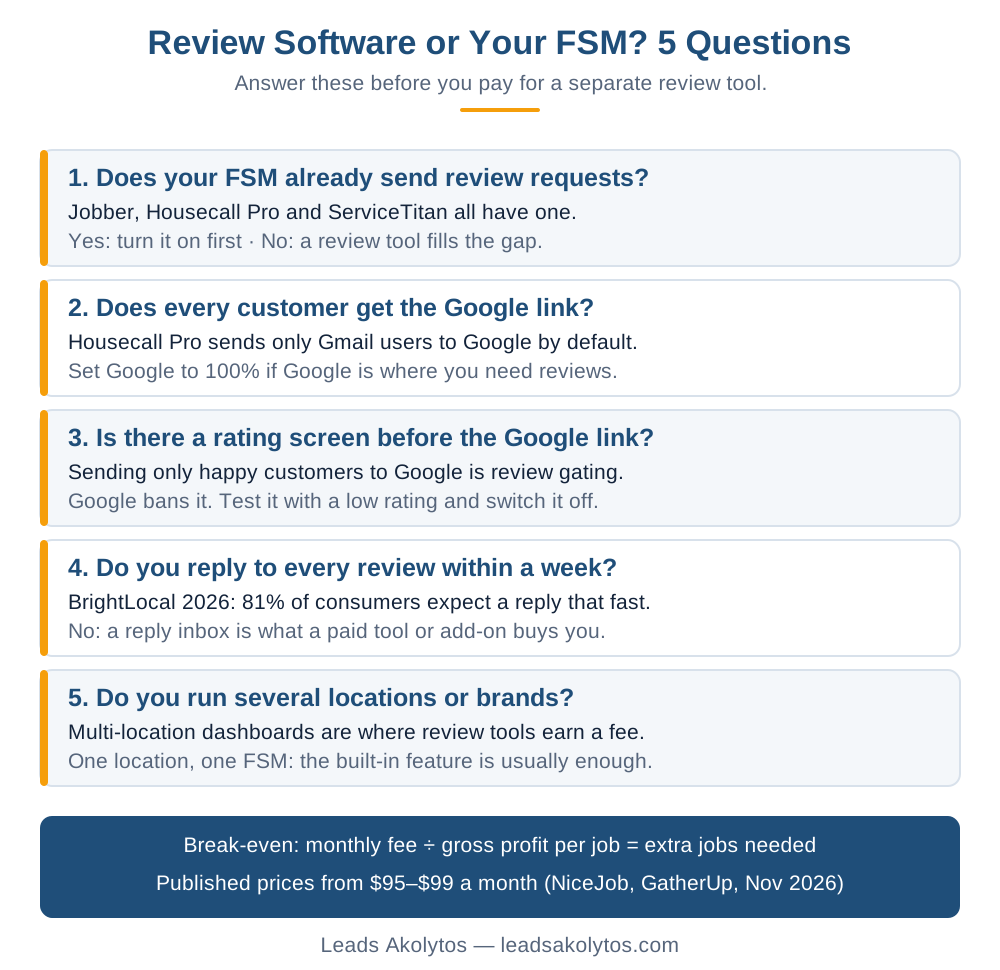
Probably not at first. Jobber, Housecall Pro and ServiceTitan all have a review request feature that texts or emails the customer when a job closes. Turn that on, point it at Google, and check two settings: who gets the Google link and whether anything filters unhappy customers out. A dedicated review tool earns its fee when you run several locations, need one inbox for replies across sites, or your FSM software has no review feature at all. Published prices for those tools start around $95 to $99 a month (NiceJob and GatherUp, checked November 4, 2026).
Why the Ask Matters More Than the Tool
Reviews come from asking, and most customers will write one when asked. BrightLocal's 2026 Local Consumer Review Survey (1,002 US consumers, published February 11, 2026) found 78% of consumers were asked for a review in the past year and 65% wrote one after being asked. The same survey found 74% look for reviews from the last three months and 32% want one from the last two weeks.
So the job is simple: ask every customer, every time, without anyone on the truck having to remember. That is an automation problem, and automation is what your FSM software already does for invoices, reminders and follow-ups.
Google also says on its local ranking help page that more reviews and positive ratings can help a business's local ranking. More reviews means more map pack calls for the same ad budget.
What Your FSM Software Already Does
The three biggest FSM platforms in the trades each send review requests automatically. Here is what their own help pages say, checked November 4, 2026.
Jobber Reviews
Jobber's Reviews feature sends a Google review request by text or email when a visit is completed, a job is closed or an invoice is paid, whichever trigger you pick. If the customer does not click, it follows up twice, 3 and 5 days later. It needs a verified Google Business Profile, and Jobber says it is available on all plans in the US, Canada and Great Britain. Jobber's pricing page marks some review features as part of a Reviews add-on without listing its price, so check your own account before assuming it is free.
Housecall Pro Reviews
Housecall Pro sends a request automatically when a tech taps Finish on a job, or after payment if you change the trigger. Its pricing page lists review management in the Basic plan ($59 a month billed annually, $79 monthly). Replying to reviews from inside the app needs Premium Reviews.
One default matters. Per Housecall Pro's reviews help article, customers with Gmail addresses go to Google and everyone else is split between your Facebook page and your website reviews. If Google is where you need reviews, turn off "Optimize requests for me" and set Google to 100%.
ServiceTitan Reputation
ServiceTitan's reputation management sends review requests by text and email on job completion or manually. It is part of Marketing Pro, a paid package with no public price. Its reputation FAQ describes an Internal Feedback option where the customer leaves a smiley-face rating and comment first, and the option to post on Google appears after they submit that comment. Read the next section before you switch that on.
The Two Settings That Cost Contractors Reviews
Most review leaks are configuration, not software. Check these two before spending a dollar.
Setting 1: Who gets sent to Google
If your tool splits customers between Google, Facebook and your website, Google gets only a slice of your happy customers. Map pack rankings and the stars homeowners see in search come from Google reviews.
- Open the review settings in your FSM software.
- Find the destination split or "review sites" list.
- Send 100% to Google unless you have a real reason to build Facebook reviews.
Setting 2: Any rating screen before the Google link
Google's fake engagement policy bans businesses from selectively soliciting positive reviews. A "rate us first" screen that sends 4- and 5-star customers to Google and keeps the rest private is exactly that, often called review gating. Google can block new reviews on the profile for a set time, unpublish existing ones, and show a public warning that fake reviews were removed (Business Profile restrictions).
- Send yourself a test request from your FSM software.
- Click through it as a customer would and give a low rating.
- If the Google link disappears or gets harder to reach, change the setting so every customer sees it the same way.
Private feedback is fine on its own. The problem is using it to decide who gets asked for a public review. The FTC's review rule does not ban gating by name, but its questions and answers page warns it could still violate the FTC Act. Google is the stricter of the two. Our guide to asking customers for Google reviews without breaking the rules covers the full list.
What a Paid Review Tool Adds
A dedicated review tool adds reach and reporting, not a better ask. The request itself is the same text with a link. Here is what two vendors with public prices include, checked November 4, 2026:
- NiceJob (pricing): Starter $95 a month, Pro $135 a month, no contract, automated text and email requests with follow-ups.
- GatherUp (pricing): $99 a month billed annually for one location, $60 per location for multiple locations, with review monitoring on 100+ sites, replies inside the app and surveys. Annual plans are a full-year commitment.
- Podium and Birdeye publish no prices; you get a quote from sales.
Where those features pay off:
- Several locations or brands that need one dashboard.
- Reviews spread across Google, Yelp, Angi and Facebook that you want in one reply inbox.
- FSM software with no review feature, or one locked behind a costly tier.
- Website widgets that pull reviews onto your service pages.
Before you buy, run the same rating-screen test on the vendor's demo. Some tools still offer a feedback-first flow as an option, and turning it on is your responsibility, not theirs.
The Break-Even Check
A review tool only pays if it brings in reviews your FSM software would not. Work it on your own numbers:
- Monthly fee divided by gross profit per job = jobs the tool must add each month.
- For example, at $99 a month and $300 gross profit per job, that is one extra booked job every three months.
- Compare against a free option: your FSM feature plus Google's own review link.
The math often works for a busy plumbing or HVAC shop. It rarely works for a one-truck operation that can get the same result from a setting.
The Free Option: Google's Own Review Link
Google gives every Business Profile a review link and QR code at no cost. Per Google's review link help page, open business.google.com, choose Read Reviews, then Get more reviews, and copy the link. The QR code can only be generated on a computer browser, not a phone.
- Paste the link into your FSM software's job-complete text template.
- Print the QR code on invoices and leave-behinds.
- Ask out loud at the end of the job, the same way for every customer.
Replies Are the Part Most Contractors Skip
Getting reviews is half the work. BrightLocal's 2026 survey found 89% of consumers expect owners to respond to reviews and 81% expect a reply within a week. Google's ranking page says replying shows you value the feedback. If nobody in the office answers reviews weekly, that is the strongest argument for a tool or add-on with a reply inbox. For bad reviews, see how to respond to negative Google reviews.
Frequently Asked Questions
Can my FSM software ask for Google reviews automatically?
Yes, in most cases. Jobber, Housecall Pro and ServiceTitan all send review requests by text or email when a job is completed or paid. Check that the feature is switched on, that it points to Google and that your plan includes it.
Is review gating against Google's rules?
Yes. Google's fake engagement policy bans selectively soliciting positive reviews. A screen that asks for a rating and only shows happy customers the Google link breaks that rule, and Google can block new reviews on the profile as a penalty.
How much does review software cost for a contractor?
Published prices start around $95 to $99 a month for one location: NiceJob Starter at $95 and GatherUp at $99 billed annually, checked November 4, 2026. Podium and Birdeye quote through sales. Your FSM software's built-in feature may cost nothing extra.
How many review requests should I send?
One request to every customer after every completed job, plus one or two reminders. Jobber sends two reminders by default, 3 and 5 days after the first request. More than that starts to annoy customers.
Do review replies help my Google ranking?
Google does not say replies are a ranking factor. Its help page says more reviews and positive ratings can help local ranking, and that replies show customers you value their feedback. Replies help win the call, which is the point.
Want a Second Look?
You can set all of this up yourself in an afternoon, and our contractor reviews scorecard and the piece on why fewer, fresher reviews can book more jobs show what to aim for. If you would rather walk through your review setup with someone, Leads Akolytos offers a free 30-minute strategy call. We work only with home service contractors across 14 trades, with no setup fees and no long-term contracts. See our local SEO and map pack page, the plumbing and HVAC pages, or book a time here.
Want this handled for you?
We do this work for home service contractors every day, month-to-month, with no contracts. Book a free 30-minute call and we'll show you where you stand on Google.
Book my free call