Someone at a trade show, a vendor or a website developer told you to block AI bots from your site, and now you wonder whether that protects you or costs you jobs. For a contractor the answer depends on which bot you block, because one of them decides whether ChatGPT can name your company.
Should a Contractor Block AI Crawlers? The Short Answer
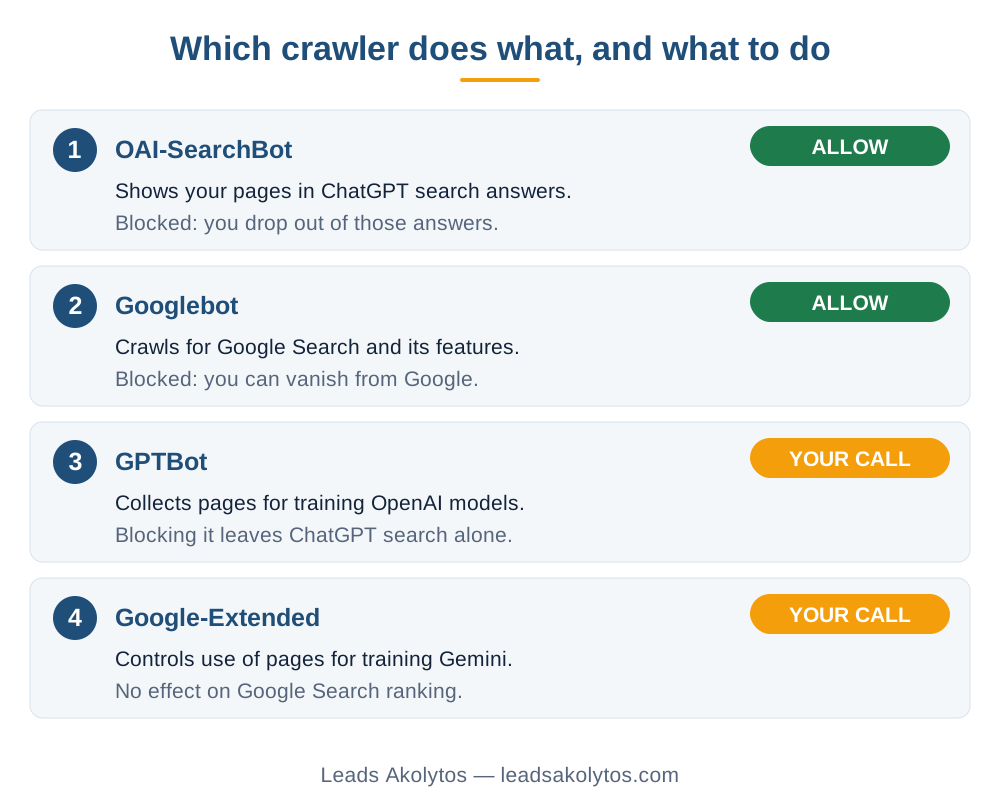
Do not block the search crawlers. Allow OAI-SearchBot, which OpenAI uses to show sites in ChatGPT search, and keep Googlebot allowed. The training crawlers, GPTBot and Google-Extended, are a separate decision, and for most contractors blocking them has no effect on calls. Blocking GPTBot does not remove you from ChatGPT search, and Google says Google-Extended does not affect inclusion or ranking in Google Search. Decide on training by how you feel about your pages feeding AI models. Decide on search by what it does for your phone.
What Each Crawler Does
These are the names you will see in a robots.txt file or in a server log. Each one has one job.
- OAI-SearchBot. OpenAI says it is used to surface websites in ChatGPT's search features. A site that opts out will not be shown in ChatGPT search answers, though it can still appear as a navigational link.
- GPTBot. OpenAI says it is used to make its generative AI foundation models more useful and safe. Disallowing it tells OpenAI that your content should not be used in training those models.
- ChatGPT-User. It fetches a page when a person using ChatGPT asks for it. OpenAI says it is not used to crawl the web automatically, and that because a user starts the action, robots.txt rules may not apply.
- Googlebot. Google's crawler for Search, including Discover and all Search features.
- Google-Extended. A robots.txt token that controls whether content Google crawls may be used for training future Gemini models. Google states it does not impact a site's inclusion in Google Search and is not a ranking signal.
OpenAI documents each of its settings as independent of the others. Its own example is a site that allows OAI-SearchBot so it appears in search, while disallowing GPTBot.
What Blocking Costs You, Bot by Bot
Blocking OAI-SearchBot
You give up appearing in ChatGPT search answers. A homeowner who asks ChatGPT for a roofer or a water heater installer in your town will see other companies. How many of your jobs come from that today is probably small and hard to measure, and our post on how AI search sends contractors leads shows how to check your own numbers. But there is nothing to gain on your side from blocking it, and allowing it takes one line of text.
Blocking Googlebot
This one can end your Google traffic. It is the mistake that shows up most often after a redesign, usually left over from a staging site. If your phone went quiet after a launch, start with how to tell if your website is blocking Google.
Blocking GPTBot or Google-Extended
These two opt your pages out of AI model training. Neither is documented to touch your search visibility. The honest trade-off is about principle, not leads: if you do not want your service pages used to train models, block them and lose nothing you can measure. If you do not care, leaving them allowed is fine too. Either is a legitimate choice.
How to Set It Up in robots.txt
Your robots.txt file lives at yourdomain.com/robots.txt. If a website platform or a developer manages it, send them the rule you want. A setup that stays visible in search and opts out of training looks like this:
User-agent: OAI-SearchBot
Allow: /

User-agent: Googlebot
Allow: /

User-agent: GPTBot
Disallow: /

User-agent: Google-Extended
Disallow: /
Use the exact tokens above. Keep each crawler in its own group so a rule for one does not catch another. OpenAI says it can take about 24 hours after a robots.txt update for its search systems to adjust.
- Open your live robots.txt and read it line by line.
- Confirm "Disallow: /" does not sit under "User-agent: *".
- Add or remove the GPTBot and Google-Extended groups to match your choice.
- Check again the next day.
Blocks That Hide Outside robots.txt
A clean robots.txt does not guarantee crawlers can reach you. Security plugins, CDNs and web application firewalls often have their own bot settings, and a rule written to turn away unknown bots can catch a search crawler along with the scrapers. If you added bot protection to your site, check its allow list for OAI-SearchBot and Googlebot. A website developer can read your server log or firewall rules in a few minutes.
Also know the limit of robots.txt itself. Google's documentation says the instructions in robots.txt cannot enforce crawler behavior: it is up to the crawler to obey them. It is a polite request, not a lock. If a page holds anything private, such as a customer portal or an unpublished price list, put it behind a password instead.
Is It Worth Doing Anything at All?
For most small contractors, the time is better spent elsewhere. Spend ten minutes on robots.txt, confirm the search crawlers are allowed, make your training choice and move on. Then put the hours into what brings calls from both Google and AI answers: a complete Google Business Profile (our checklist is here), service pages that open with their answer, and steady reviews. If a vendor sells you a monthly "AI protection" or "AI visibility" package built on robots.txt alone, our guide on auditing a contractor SEO company lists what to ask first. Our earlier post on whether you need an llms.txt file covers the sister question.
A free website lead audit will check your site in a few minutes and show what may be turning visitors away.
If you are curious how AI tools act on a person's behalf, such as ChatGPT-User fetching a page for a user, Fleurant AI's article on AI agents for small business explains it in plain terms (in English).
Frequently Asked Questions
Will blocking GPTBot make ChatGPT stop recommending my company?
OpenAI documents GPTBot as the crawler for training its models and OAI-SearchBot as the one for ChatGPT search, with each setting independent. Blocking GPTBot alone does not take you out of search. Blocking OAI-SearchBot does.
Does Google-Extended affect my Google rankings?
No. Google says Google-Extended does not impact a site's inclusion in Google Search and is not used as a ranking signal. It only controls use of your content for training Gemini models and for grounding in some Gemini products.
Can a bot ignore my robots.txt?
Yes. Google's documentation says robots.txt cannot enforce crawler behavior, and OpenAI notes that robots.txt rules may not apply to ChatGPT-User because a person starts that request. Do not use robots.txt to protect private information.
How long does a robots.txt change take to work?
OpenAI says its search systems can take about 24 hours to adjust after a robots.txt update. Google's recrawl timing varies by site.
Where do I find my robots.txt?
Type your domain followed by /robots.txt into a browser. If you see "Disallow: /" under "User-agent: *", crawlers are being turned away and you should fix it.
Facts in this article were checked on their sources on November 22, 2026: OpenAI's crawler documentation, Google's common crawlers documentation and Google's robots.txt introduction.
Want a Second Look?
This is a ten-minute job you can do yourself. If you would rather go through it with someone, Leads Akolytos offers a free 30-minute strategy call; we work only with home service contractors, with no setup fees and no long-term contracts. You can book a time here.
If you'd like one practical idea like this in your inbox each month, get The Leads Akolytos Monthly: one email a month, unsubscribe any time.
Want this handled for you?
We do this work for home service contractors every day, month-to-month, with no contracts. Book a free 30-minute call and we'll show you where you stand on Google.
Book my free call