A website costing you leads is easy to spot once you know what to check: it takes longer than 3 seconds to load, the phone number and quote request button are not visible without scrolling, it is not usable on a phone, or a visitor cannot tell what you do and how to reach you within 5 seconds of landing on the page. Any one of these is enough to send a ready-to-buy homeowner straight to the next search result. This guide walks through the 7 warning signs that separate a website quietly bleeding leads from one that is actually working for you, plus what a fix typically costs.
If you are unsure whether your website is costing you leads right now, the 7 checks below are the fastest way to find out. None of these fixes require guesswork about your specific trade or market — they are the same 7 mechanical checks whether you run a two-truck plumbing outfit or a 40-person roofing company, because they are about how any visitor, regardless of trade, decides in the first few seconds whether to stay or leave.
How to Check Whether Your Website Is Costing You Leads This Week
You do not need special tools for most of this. Open your own site on your phone, on mobile data (not wifi), and time how long it takes to see the phone number. Then have someone unfamiliar with your business look at the homepage for 5 seconds and ask what you do and how to contact you — if they cannot answer both, that is a website costing you leads regardless of how it looks on a desktop monitor in your office.
Google’s own research on mobile page speed found that as page load time goes from 1 to 5 seconds, the probability of a visitor bouncing increases significantly — this is precisely the mechanism behind a website costing you leads before a visitor ever reaches your contact form. Pair that check with a look at your contact form: every extra required field measurably lowers completion rate, another common cause of a website costing you leads that never shows up as a “the site is down” problem, only as fewer calls.

Why “Is My Website Costing Me Leads” Is the Wrong First Question to Dismiss
Most contractors only ask whether they have a website costing you leads after a slow season, not before one. But the data on this is not subtle: Google’s own research found that as page load time goes from 1 second to 3 seconds, the probability of a visitor bouncing increases sharply, and separate testing by web-performance researchers has measured conversion rates dropping from roughly 3.05% at a 1-second load time to well under 1% by 5 seconds. If your site is slow, unclear, or hard to use on a phone, you are not losing a few leads at the margin — you are losing the majority of the visitors who were ready to call.
The 2026 median website conversion rate across industries sits around 2.35%, but small-business service sites in a specific, focused funnel (a clear quote-request page, not a generic homepage) should realistically be landing 5-10%+ conversion on that page specifically. If you are converting well under 2%, something on the list below is very likely the reason, not bad luck or a weak market.
Fixing the technical side is only half of it — see how contractors use website messaging to filter price shoppers for the copy side of the same problem.
Warning Sign #1: Your Site Takes Longer Than 3 Seconds to Load
53% of mobile visits are abandoned if a page takes longer than 3 seconds to load. That statistic alone should worry any contractor whose site was built years ago on an old theme or a heavy page builder with no image compression. Run your homepage and your main service page through Google PageSpeed Insights (free) and look specifically at the mobile score, not desktop — most of your traffic and nearly all of your emergency-call traffic is on a phone.
Google’s Core Web Vitals standard defines “fast enough” as largest content visible within 2.5 seconds, page responding to taps within 200 milliseconds, and minimal layout jumping while it loads. As of 2026, only about 42% of mobile sites actually pass all three — meaning most of your competitors are also failing this, which is exactly why fixing it is a real competitive advantage, not just a checklist item. We cover the full diagnostic process in Is Your Contractor Website Too Slow? Core Web Vitals Explained.
Warning Sign #2: The Phone Number and CTA Are Not Visible Without Scrolling
A visitor who has to scroll or hunt to find your phone number, “Get a Free Quote” button, or service area is a visitor you are actively working to lose. On mobile specifically, your phone number should be a tap-to-call link in the very top bar of the page, not buried in a footer. If your top button says something generic like “Learn More” instead of a specific action like “Get a Free Quote” or “Call Now,” that is a conversion-clarity problem, not just a design preference.
Warning Sign #3: The Site Is Hard to Use on a Phone
Test this yourself, right now, on your own phone, on your own cell signal, not office WiFi: can you tap the phone number with your thumb without zooming in? Does the contact form actually submit without the keyboard covering the submit button? Do photos load, or do you see broken image icons on a slower connection? Most contractor website traffic is mobile, and a homeowner who hits a broken mobile experience does not file a complaint — they just leave and call the next name on the search results page.
Warning Sign #4: A Stranger Can’t Tell What You Do and Where in 5 Seconds
Cover the logo and the menu and look only at the first screen a visitor sees. Does it say, in plain language, what trade you’re in, what area you serve, and how to reach you — without requiring a scroll? “Quality Service You Can Trust” tells a visitor nothing. “Licensed Roofers Serving [City] — Free Estimates in 24 Hours” tells them everything they need to decide whether to stay on the page.
Warning Sign #5: There’s No Real Proof Above the Fold
Reviews, star ratings, years in business, licensing/insurance badges, or a handful of real job photos need to be visible early, not buried three scrolls down. A skeptical homeowner comparing three contractors in open tabs decides which tabs to close first, and a page with zero visible proof is usually one of the first closed.
Warning Sign #6: Your Contact Form Asks for Too Much, Too Soon
Every extra required field on a quote-request form is a small tax on your conversion rate. A first-touch form should ask for name, phone, and a one-line description of the job — not a 12-field intake form better suited to after you’ve already got them on the phone. If you’re not sure how much this is costing you, an A/B test that simply removes optional fields is one of the cheapest experiments a contractor site can run.
Warning Sign #7: You Genuinely Don’t Know Your Own Conversion Rate
This is the most common warning sign of all, and the hardest to see from the inside: most contractor site owners cannot tell you, right now, what percentage of visitors to their quote page actually submit the form or call. If you cannot answer that question with an actual number pulled from Google Analytics or your call-tracking software, you cannot know whether your site is underperforming — you’re guessing. Fixing that blind spot costs nothing but an afternoon of setup.
Now that you have seen the mechanics, a website costing you leads usually fails more than one of these checks at once, which compounds the damage.
Build Your Own Lead-Leak Scorecard (5 Minutes, No Tools Required)
Instead of a vague gut feeling, score your own site against each of the 7 signs below. Give yourself 1 point for every sign you can honestly say your site passes. This is not a scientific instrument, but it is a more honest starting point than assuming your site is fine because nobody has complained about it.
| Warning Sign | Pass Condition | Your Score (0 or 1) |
|---|---|---|
| Load speed | Mobile PageSpeed score is “Good” (green) on your quote page | ? |
| CTA visibility | Phone number and quote button visible with zero scrolling on mobile | ? |
| Mobile usability | You personally tested tap-to-call and form submit on your own phone this month | ? |
| 5-second clarity | Trade, service area, and next step are readable without scrolling | ? |
| Above-the-fold proof | Reviews, rating, or credentials visible without scrolling | ? |
| Form friction | Quote form asks for 4 fields or fewer | ? |
| Conversion visibility | You know your actual quote-page conversion rate right now | ? |
A score of 6-7 means your website is very likely not your bottleneck — the leak, if there is one, is probably upstream (not enough traffic) or downstream (follow-up speed). A score of 4-5 means real, fixable revenue is being left on the table. A score of 3 or below means your website is very likely costing you leads every single day it stays as-is, and fixing even the cheapest 2-3 items on this list (headline clarity, form fields, visible phone number) often pays for itself within the first month.
A Worked Example: What This Actually Looks Like on a Real Contractor Site
Picture a mid-sized HVAC company getting 800 monthly visitors to its quote page. At the 2026 small-business-service benchmark of 5% for a focused quote page, that traffic should produce roughly 40 qualified leads a month. If that same site scores a 3 out of 7 on the scorecard above — slow mobile load, a buried phone number, and a 9-field contact form — a realistic real-world conversion rate closer to 1.5-2% is common — another sign of a website costing you leads, which is 12-16 leads from the exact same 800 visitors.
That gap, 24-28 leads a month, is a website costing you leads, not a traffic problem — no amount of additional ad spend or SEO work fixes it, because the same leak keeps consuming whatever new traffic arrives. This is why site-conversion issues are worth diagnosing before increasing marketing spend, not after.
The inverse is also true and worth stating plainly: if your website already scores 6-7 on the scorecard and you’re still not getting enough calls, the honest next question is not “what’s wrong with my website” but “is enough of the right traffic reaching it in the first place” — a different diagnosis with a different fix, covered in Why Aren’t You Getting Calls From Google Even Though You Rank Well?.
Call tracking and heatmap tools (many with free tiers) can answer the “conversion visibility” question directly, but even a rough manual check works: pull last month’s visitor count from Analytics and divide it by the number of quote requests or calls you actually logged. If you don’t have that number available in under two minutes, that itself is the finding.
Should You Fix This Yourself, or Hire a Website Company to Do It?
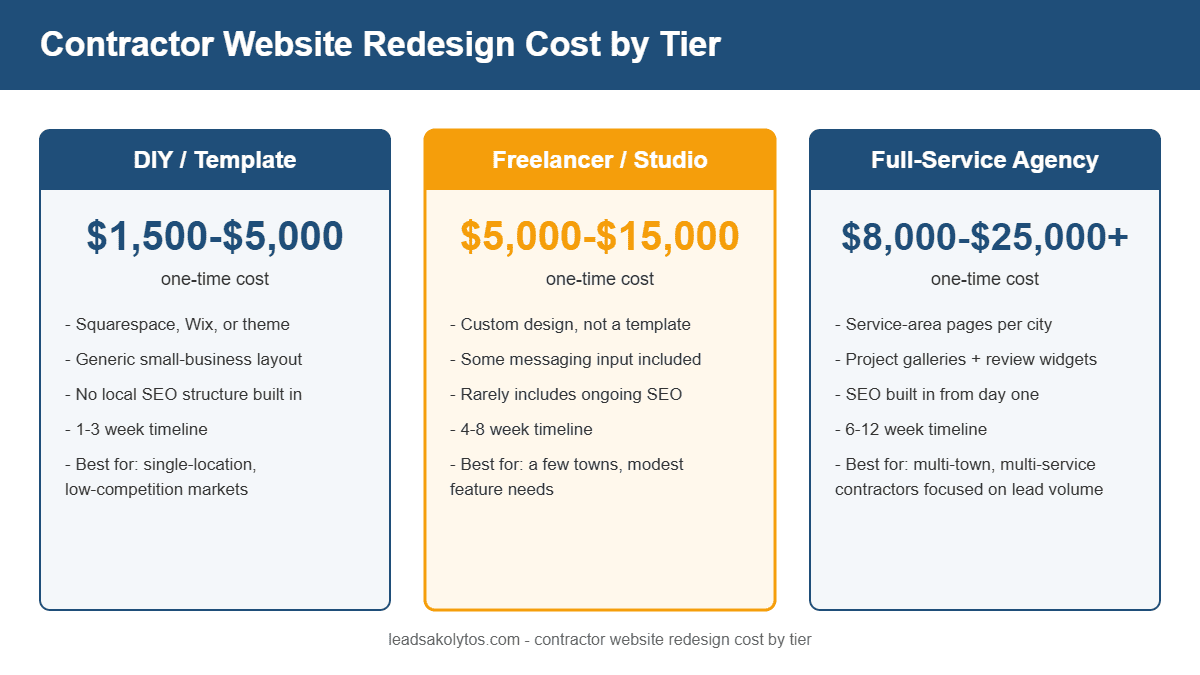
Several of the 7 signs above — rewriting your headline, adding proof above the fold, trimming a form — are things a reasonably comfortable business owner can fix in an afternoon with page-builder access. Site speed and Core Web Vitals work is different: it usually requires image pipeline changes, script auditing, and hosting-level fixes that take real technical time to do correctly, commonly 1-3 days of focused work depending on how the site was originally built. A full redesign, if the underlying template is the real problem, is a bigger decision — see How Much Should a Contractor Website Redesign Cost? for realistic 2026 numbers before you commit to that path.
A quick gut check: if you can name your own site’s mobile PageSpeed score and your quote-page conversion rate off the top of your head right now, you’re already ahead of most contractors and can likely fix the smaller items yourself. If you can’t, that gap in visibility is itself a reason to have someone run a proper audit rather than guessing at fixes.
The Bottom Line: Is Your Website Costing You Leads Right Now?
If you recognize two or more of the 7 warning signs above, the honest answer is yes — you have a website costing you leads today, not hypothetically. The good news is that every one of these is fixable, usually without a full rebuild: a website costing you leads because of slow mobile load is a different (and often cheaper) fix than a website costing you leads because the phone number is buried three clicks deep.
Run the 7-point check this week. If you find a website costing you leads on your own site, prioritize the cheapest fix first (usually the phone number visibility and the contact form field count), then move to the more involved fixes like mobile load speed. A website costing you leads quietly, month after month, costs more over a year than most of these fixes do to implement.
Frequently Asked Questions
How do I know if my website is costing me leads?
Check the 7 signs above directly: mobile load time over 3 seconds, a phone number or CTA that requires scrolling to find, a broken or awkward mobile experience, unclear messaging in the first 5 seconds, no visible proof (reviews/credentials), a contact form with too many required fields, and not knowing your own conversion rate. Any one of these measurably reduces the leads a working site would otherwise generate — which is exactly how a website costing you leads shows up in the numbers, month after month, without ever announcing itself.
How much does it cost to have a lead-leak audit done professionally?
A dedicated website/landing-page audit is typically a smaller, faster engagement than a full redesign — often bundled into an initial strategy call at no cost, with paid fixes scoped afterward based on what’s actually found. Full redesign pricing, if that turns out to be necessary, is covered in our website redesign cost guide.
What’s a good conversion rate for a contractor quote page?
The 2026 median across all industries is around 2.35%, but a focused contractor quote or estimate-request page should realistically aim for 5-10%+, since that traffic is typically higher-intent than a general homepage visitor.
If you’ve read through all 7 signs and recognize your own site in more than two of them, that’s worth a conversation, not a guess. Book a free, no-pressure 30-minute strategy call and we’ll tell you honestly whether the fix is a quick DIY afternoon or something worth hiring out.
Want this handled for you?
We do this work for home service contractors every day, month-to-month, with no contracts. Book a free 30-minute call and we'll show you where you stand on Google.
Book my free call